
Full and Limited Photo Library Access
Unlike previously, where full access meant being able to read everything in the user’s photo library, with the limited access, you’ll only have access to selected number of photos chosen by the user
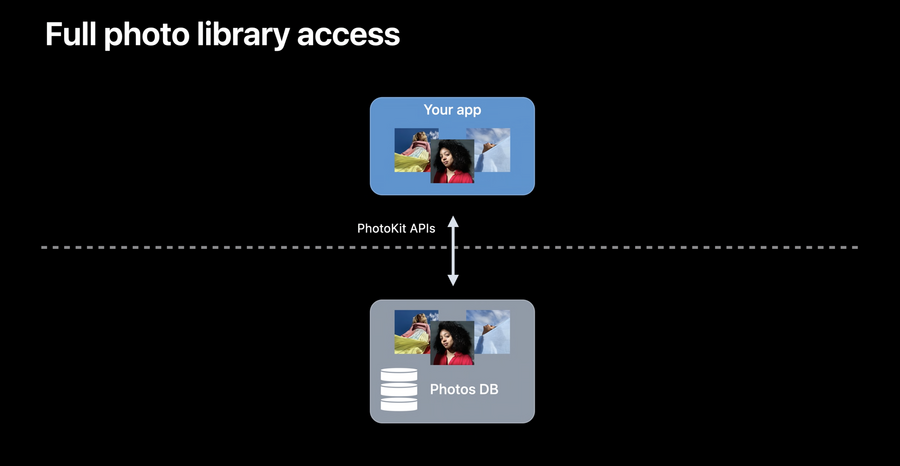 | 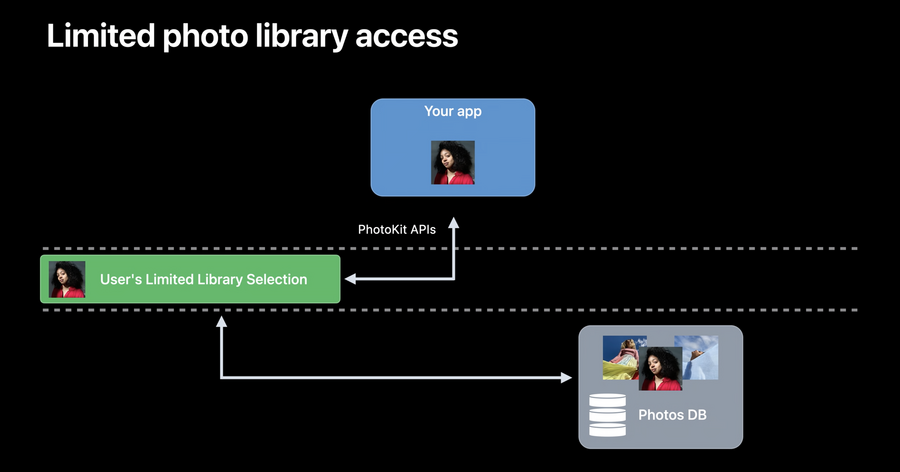 |
|---|---|
| Full access | Limited access |
For apps that haven’t adopted the new API, when asking for permission, the user will be prompted to either grant a full access or only select a limited number of photos to grant access permission to, once a limited access is granted, app won’t be able to receive any updated authorization or extra photos until it asks for the permission again in the next app lifecycle
Another way the user can update photos access is by visiting the Settings app on their iPhone and updating the given access
PHPicker
UIImagePickerControllerreplacementIt has improvements such as search and multi-select
Doesn’t require the user to grant photo library access
Querying for authorization status
There is a new authorization status value:
.limitedAlso, a new enumeration is introduced:
PHAccessLevel, this can be either.addOnlyor.readWriteNow you can will need to use one of those two access levels values to query or update the current authorization status granted, here is how you can query the current status:
import Photos

let accessLevel: PHAccessLevel = .readWrite
let authorizationStatus = PHPhotoLibrary.authorizationStatus(for: accessLevel)

switch authorizationStatus {
case .limited:
	print("limited authorization granted")
default:
	//FIXME: Implement handling for all authorizationStatus values
	print("Not implemented")
}
Requesting an access manually will only prompt the user if the current status is undetermined, here is how you can manually request an authorization for a specific access level:
import Photos

let requiredAccessLevel: PHAccessLevel = .readWrite // or .addOnly
PHPhotoLibrary.requestAuthorization(for: requiredAccessLevel) { authorizationStatus in
	switch authorizationStatus {
	case .limited:
    	print("limited authorization granted")
	default:
    	//FIXME: Implement handling for all authorizationStatus
    	print("Unimplemented")

	}
}
The old query and request authorization status APIs aren’t aware of the new access level and they will always return
.authorizedeven if the access was.limited, hence they are marked for future deprecation
In limited access, PHPicker will behave differently in these notable scenarios:
When the app creates a
PHAsset, they’re automatically included in the available photos to access for your applicationUser albums cannot be fetched nor created
No access to cloud shared assets or albums
Control photo library management UI
To present a limited library management UI:
import PhotosUI

let library = PHPhotoLibrary.shared()
let viewController = self

library.presentLimitedLibraryPicker(from: viewController)
Changes to access can be monitored through
PHPhotoLibraryChangeObserverupdates
Preventing the automatic prompt on first access
Set
PHPhotoLibraryPreventAutomaticLimitedAccessAlerttoYESin app’sinfo.plist
