
What are Universal Links?
http or https urls that represent your content both in your app and in your website
they allow users to open content directly in your app instead on in a browser
created by adding the Associated Domains entitlement in your app and the
apple-app-site-associationJSON file to your web server.the app entitlement mentions your web server’s domain name, and the web server mentions your app’s application identifier.
New Platform Support: WatchOS
In order to support this, add the Associated Domains entitlement to the WatchKit extension, not the containing WatchKit app.
Since with WatchOS we use WatchKit instead of UIKit, this is how you handle universal links:
// Handling universal links
// WKExtensionDelegate
func handle(_ userActivity: NSUserActivity) -> Void

// Opening universal links in other applications
let url = /* ... */
WKExtension.shared().openSystemURL(url)
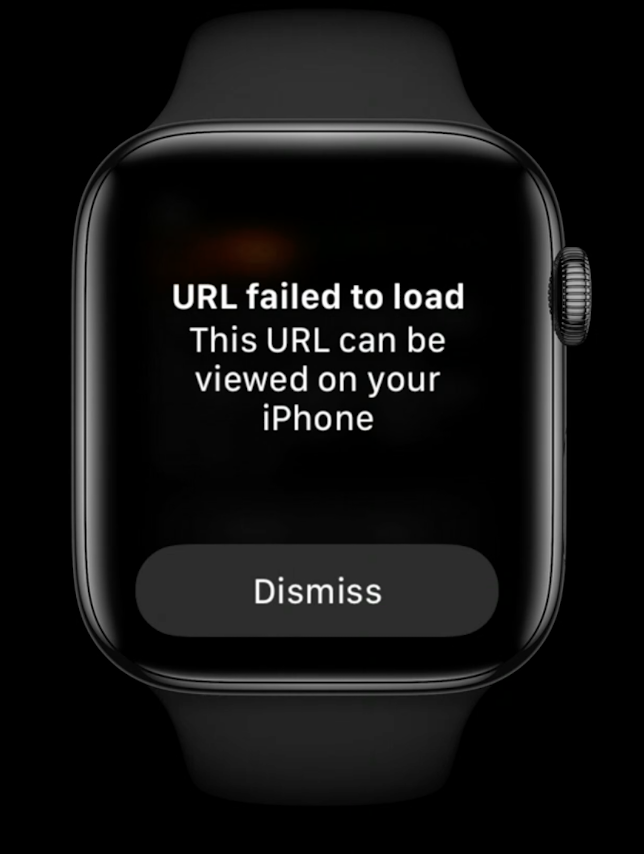
Unlike UIKit, WatchKit’s openSystemURL(:) does not have a callback indicating success or failure: instead, it either succeeds or a pop up error is displayed (shown below).
SwiftUI
Regardless of the platform, you can use handle Universal Links in SwiftUI as well:
// Handling universal links
onOpenURL { url in /* ... */ }

// Opening universal links in other applications
@Environment (\.openURL) var openURL

let url = /* ... */
openURL(url)
Pattern matching
How pattern matching works with Universal Links
You can use the * and ? in your pattern strings to specify wildcards:
*matches 0 or more characters and does so greedily: it will match as many characters as possible.?matches exactly one character.?*matches at least one character.
New Features
Case insensitive patterns
Available since macOS 10.15.5 and iOS 13.5
"components": [{ "/": "/sourdough/?*", "caseSensitive": false }] Unicode patterns
URLs are always ASCII: Unicode characters are turned into ASCII before being part of an URL.
The ASCII representation of Unicode characters completely loses the visual clue of what those characters are, making it completely unreadable.
Thanks to the new percentEncoded key, we can now define a Unicode pattern that is still readable, the conversion to ASCII will automatically be done later.
Defaults
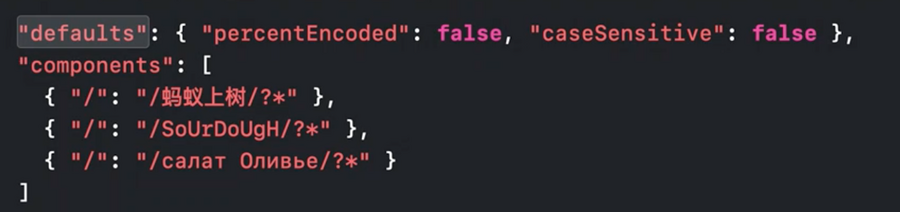
Instead of defining Unicode and case insensitive components for each component, we can define defaults that will be applied to all:
Substitution variables
Available since macOS 10.15.6 and iOS 13.5
Named list of possible substrings to match against.
All characters beside
$()are allowedValues can contain
?and*case-sensitive by default but can be overridden with the
caseSensitivekey as seen above
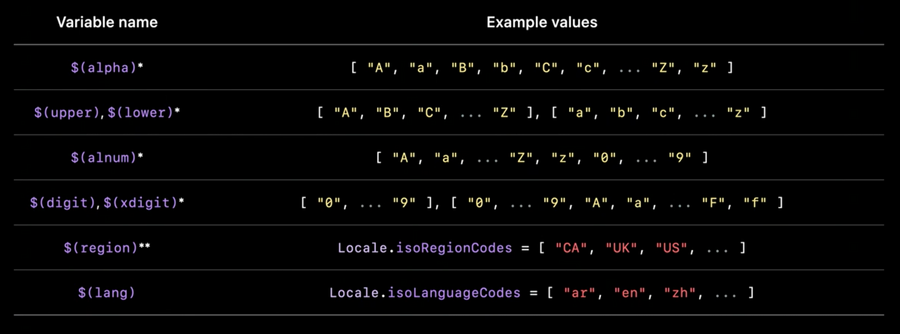
Predefined substitution variables:
Usage example:
{
	"applinks": {
    "substitutionVariables": {
    	"food": [ "burrito", "shawarma", "sushi", "curry-pad-thai" ]
  	},
    "details": [{
      "appIDs": [ "ABCDE12345.com.example.restaurant" ],
      "components": [{ "/"; "/$(lang)_$(region)/$(food)/" }]
    }]
  }
}
We can still exclude individual combinations of variable values:
{
	"applinks": {
    "substitutionVariables": {
    	"food": [ "burrito", "shawarma", "sushi", "curry-pad-thai" ]
  	},
    "details": [{
      "appIDs": [ "ABCDE12345.com.example.restaurant" ],
      "components": [
	      { "/": "/$(lang)_CA/$(food)/", "exclude": true },
	      { "/"; "/$(lang)_$(region)/$(food)/" }
      ]
    }]
  }
}
Apple CDN
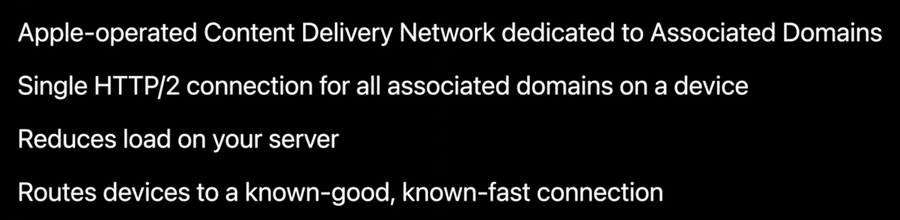
Starting with macOS 11 and iOS 14, apps no longer send requests for apple-app-site-association files directly to your web server. Instead, they send these requests to an Apple-managed content delivery network (CDN) dedicated to associated domains.
This way Apple’s CDN can cache those files and make a better experience to the user when their device download your app.
Benefits
Alternate Modes
In case your app/server are not intended to be used publicly, cannot be reached by Apple’s CDN, etc, Apple offers alternate modes:
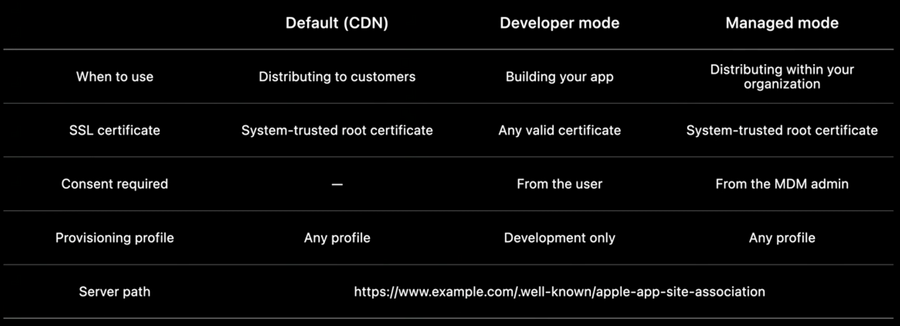
In the app Associated Domains entitlement we will need to define a url for each mode we would like to operate in, the only requirement (for the non public url) is to have a query item with the name mode and a value specifying the alternate mode to use (developer, managed, or developer+managed)
