
Sample Code
Download the sample code to learn more about Modern Collection Views.
Modern Collection View APIs Overview
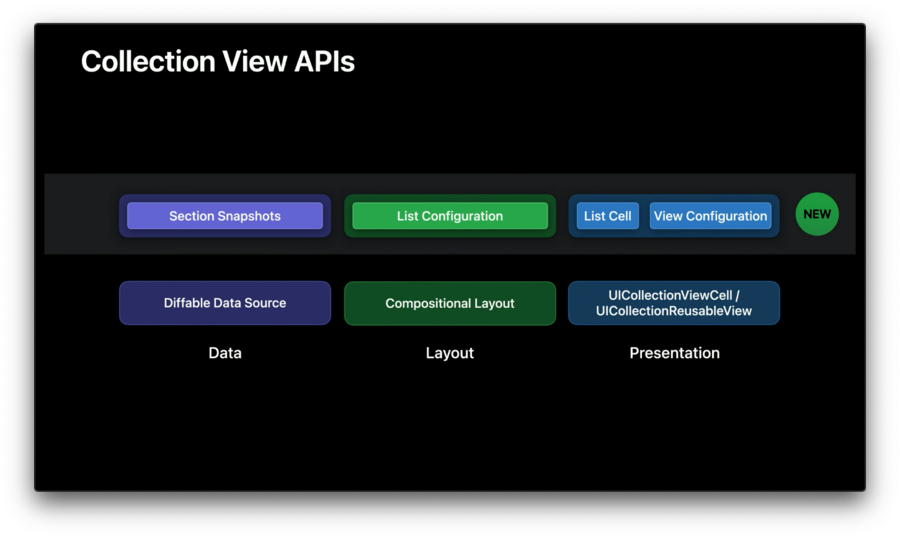
Diffable Data Source
Recap
Introduced in iOS 13.
Simplifies UI State.
Automatic animations.
More to watch session 220 from WWDC 19: Advances in UI Data Sources.
New in iOS 14
Section Snapshots
Encapsulates the data for a single section in a UICollectionView.
Allow data sources to be more composable into section-sized chunks of data.
Can present the same data with different layout in different sections.
Allow modeling of hierarchical data, which is needed to support rendering outline-style UIs.
Examples
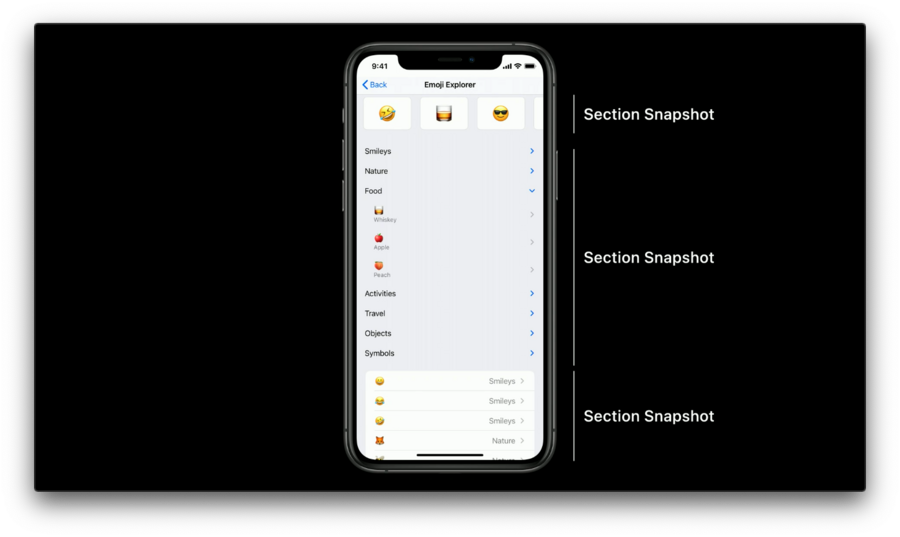
Top: Horizontally scrolling section.
Middle: Outline style section.
Bottom: List section.
For more refer to the Advances in diffable data sources session.
Compositional Layout
Recap
Introduced in iOS 13.
Allows us to build rich, complex layouts by composing smaller, easy-to-reason bits of layout together.
Describes what we want the layout to look like instead of how the layout ought to work.
Provides section-specific layouts.
For more refer to the
Advances in Collection View Layoutsession.
New in iOS 14
Lists
UITableView-like appearance.Rich with features like swipe actions and many common cell layouts.
Built on top of Compositional Layout.
New concrete UICollectionViewListCell.
Header and footer support.
Sidebar appearance.
Examples
Creating a UICollectionViewLayout where every section in the collection view is a list with an inset grouped appearance.
let configuration = UICollectionLayoutListConfiguration(appearance: .insetGrouped)
let layout = UICollectionViewCompositionalLayout.list(using: configuration)
More to watch session 10026: Lists in UICollectionView.
Modern Cells
Cell Registrations
Brand new way to configure cells.
Simple, re-usable way to set up a cell from a view model.
Eliminates the extra step of registering a cell class or nib to associate it with a re-use identifier.
Uses a generic registration type, which incorporates a configuration closure for setting up a new cell from a view model.
let reg = UICollectionView.CellRegistration<MyCell, ViewModel> { cell, indexPath, model in
   // configure cell content
}

let dataSource = UICollectionViewDiffableDataSource<S,I>(collectionView: collectionView) {
   collectionView, indexPath, item -> UICollectionViewCell in
   return collectionView.dequeueConfiguredReusableCell(using: reg, for: indexPath, item: item)
}
Cell Content Configurations
Similar to
UITableViewCell.To be used as any cell or even a generic UI view.
Flexible.
Lightweight.
var contentConfiguration = UIListContentConfiguration.cell()
contentConfiguration.image = UIImage(systemNamed:"hammer")
contentConfiguration.text = "Ready. Set. Code"
cell.contentConfiguration = contentConfiguration
Background Configurations
Similar to content configurations, but applied to any cell’s background with the ability to adjust properties such as color, border styles, and more.
cell.backgroundConfiguration = UIBackgroundConfiguration.clear()More to watch session 10027: Modern cell configuration.
