
New fatures
Rich-selection experience:
Double-tap to select a word
Double-tap again to select a line
Grab selection handles to expand your selection
Enhanced tap-and-pan gesture: you can make noncontiguous selections by brushing over specific strokes
Add space between scribbles/notes:
Tap on the space between two lines
Tap
Insert Spacefrom the callout barUse the grab handle to adjust the amount of space
New color picker:
Saved colors
Eye dropper
Catalyst support
Pencil vs hand drawing
New (iOS 14 only) system settings for users to choose if they would like to draw only with the pencil or with fingers as well.
All apps need to respect that, if you have your own drawing engine, check
UIPencilInteraction.prefersPencilOnlyDrawingThis can also be toggled directly on the tool picker:
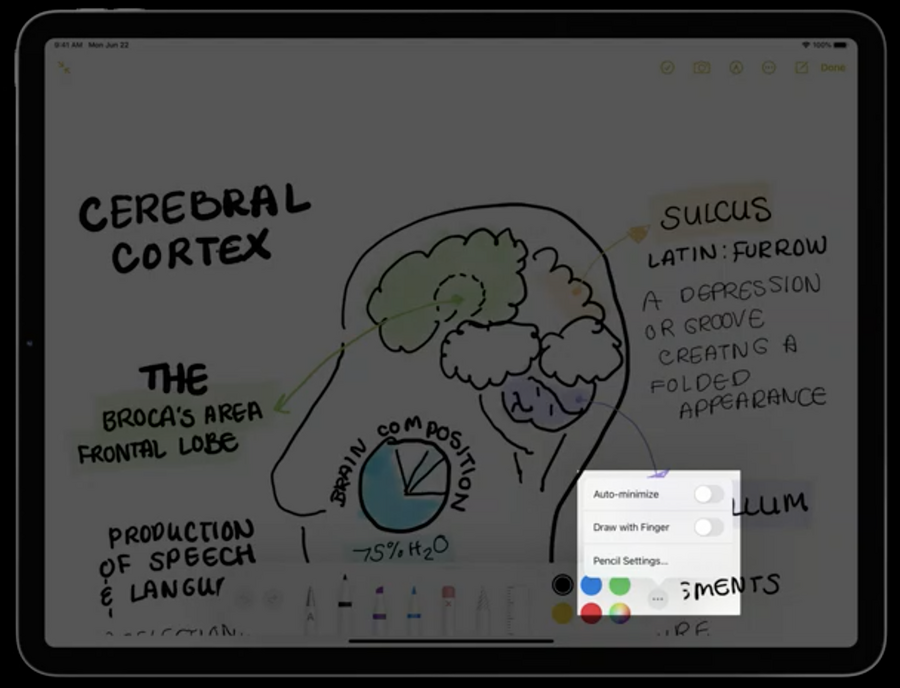
PKCanvasViewhas been updated to reflect this preference with the newdrawingPolicy, these are the possible values/behaviors:anyInput: allows drawing on the canvas from any input sourcepencilOnly: pencil touches are the only input that draw on the canvasdefault:if the tool picker is displayed, it follows
UIPencilInteraction.prefersPencilOnlyDrawingif the tool picker is hidden, it’s the same as
pencilOnly
If you’d like to hide the
Draw with Fingeroption in the tool picker (for example when your app is a pencil-only app) set thePKToolPicker.showsDrawingPolicyControlstofalse.You can also create your own
PKToolPickerinstances:Need to be retained by your app
Each toolpicker can be used with different states with different canvases
Strokes Access
PencilKit in iOS 14 provides access to strokes, for more, check session
Inspect, modify, and construct PencilKit drawings
