
Siri Event Suggestions are now also on macOS Big Sur and on the simulator
What is Siri Event Suggestions?
Makes it easy to get your event from your app into Calendar
The system uses on-device intelligence to streamline everyday interactions with your events:
on the lock screen, Siri can notify you when it’s time to leave for a restaurant reservation, based on local traffic conditions.
on Maps, you get a Siri Suggestion, making getting directions to the airport to catch a flight is as easy as just one tap.
Siri can also proactively suggest turning on Do Not Disturb, so you can stay focused on what matters, like the movie you’re about to watch.
Siri can even provide a suggestion to check-in for your flight right on your lock screen.
New categories and platforms
Previously:
Restaurants booking
Car rentals
Train
Movies
Lodging
Ticketed Events
Flights
New:
Bus
Boat
New ways to donate events
Beside apps you can now donate events with Mail.app and Safari.app:
to do you need to embed the event web markup within the HTML of your website or emails.
leverages a web standard called schema.org
supports both JSON-LD and Microdata
JSON-LD example:
<script type="application/ld+json">
{
  "@context": "http://schema.org",
  "@type": "FoodEstablishmentReservation",
  "reservationStatus": "http://schema.org/ReservationConfirmed",
  "reservationId": "IWDSCA",
  "partySize": "2",
  "reservationFor": {
    "@type": "FoodEstablishment",
    "name": "EPIC Steak",
    "startDate": "2020-06-26T19:30:00-07:00",
    "telephone": "(415)369-9955"
    "address": {
      "@type": "http://schema.org/PostalAddress",
      "streetAddress": "369 The Embarcadero",
      "addressLocality": "San Francisco"
      "addressRegion": "CA",
      "postalCode": "95105",
      "addressCountry": "USA"
    }
  }
}
</script>
Microdata example:
<div itemscope itemtype="FoodEstablishmentReservation">
  <link itemprop="reservationStatus" href="http://schema.org/ReservationConfirmed"/>
  <meta itemprop="reservationId" content="IWDSCA"/>
  <meta itemprop="partySize" content="2"/>
  <div itemprop="reservationFor" itemscope itemtype="FoodEstablishment">
    <meta itemprop="name" content="EPIC Steak"/>
    <meta itemprop="startDate" content="2020-06-26T19:30:00-07:00"/>
    <meta itemprop="telephone" content="(415)369-9955"/>
    <div itemprop="address" itemscope itemtype="PostalAddress">
      <meta itemprop="streetAddress" content="369 The Embarcadero"/>
      <meta itemprop="addressLocality" content="San Francisco"/>
      <meta itemprop="addressRegion" content="CA"/>
      <meta itemprop="postalCode" content="95105"/>
      <meta itemprop="addressCountry" content="USA"/>
    </div>
  </div>
</div>
As long as the reservation identifier stays the same, we can use the same markup format to update the event as well.
If the event gets canceled, update the
reservationStatustohttp://schema.org/ReservationCancelled
Requirements
you must register your domain at developer.apple.com where you can submit your domain and samples of your markup.
your website must use HTTPS, and that your emails have a valid DKIM signature.
Testing
To enable your domain for testing, either:
open the Developer Settings and enable
Allow Any Domain on iOSuse the command below on the Mac:
defaults write com.apple.suggestions SuggestionsAllowAnyDomainForMarkup -bool trueTo enable local testing, either:
open the Developer Settings and enable
Allow Unverified Sourcesuse the command below on the Mac:
defaults write com.apple.suggestions SuggestionsAllowUnverifiedSourceForMarkup -bool trueGuidelines
Use appropriate
reservationStatusUse
ISO8601format for dates and timeKeep
reservationIdconsistent for updates and canceled reservations
Donations overview
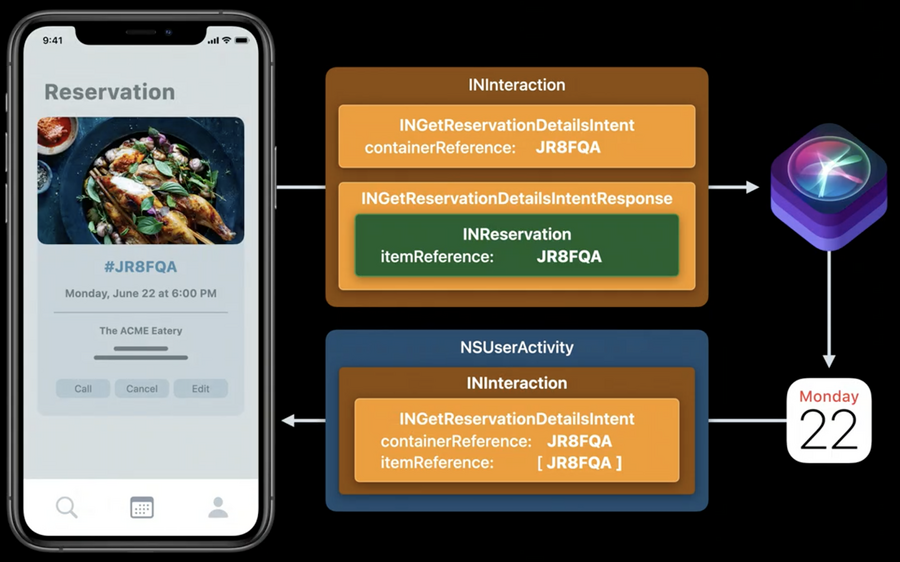
To donate to Siri, the app first maps its reservation details into
INReservationobjects.INReservationcontains the details about the reservation shown in the app.The
INReservationobjects are added to an intent response that, together with the intent, forms the interaction,INInteraction, that the app donates to Siri.Once donated, Siri may create one or more Calendar events and notify the user that the reservations were added to their Siri Event Suggestions Calendar.
To get more details, or to manage the reservation, we want people to easily get back into your app, so we put a “Show in App” button right in Calendar to make this easy.
When the “Show in App” button is pressed, the system will construct an
INGetReservationDetailsIntentcontaining information about the reservation the user wants to view.This
INGetReservationDetailsIntentuses the container and item reference from the donation that was used to create the event.A reservation may consist of one or more parts. For example, in a flight reservation with multiple legs, each leg is one part of the reservation and must be represented as an individual
INReservationobject with a uniqueitem reference.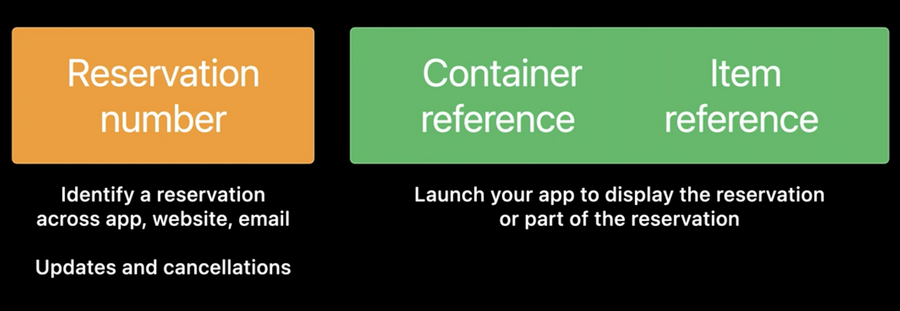
You can choose any identifier you’d like, as long as it’s unique and it enables you to find a specific part of the reservation to show when being launched
if the booking consists of one part only, like a dinner, you can use the reservation number as item reference
if the booking consists of multiple parts, like a round-trip flight, each flight/leg needs to have its own unique item reference (for example the ticket number)
if the app is not installed on a device, instead of the “Show in App” button there will be a “Show in Safari” button: pressing this will open the URL you set in Safari, so the user can view their reservation details on your website.
Make sure you adopt this new URL property, since calendar events will be synced to all the users’ devices, some of which may not have your app installed.
Debugging Donations
When your app/website/email donates reservation details, they may be processed asynchronously by different parts of the system: it’s not always possible to let your app know if something went wrong.
To help you debug issues during development, you can view donation logs in the Console.app (needs Big Sur):
select the device you’re debuggin
filter by
siri-event-suggestionscategorydonate again
