
Your main focus while writing Tests is to fail
The test template follows this pattern
Set up
Test: actions
Test: assertions
Tear down
Set Up
This is where you explicitly state the required assumptions and set the right environment for your app to run in
You can use
setUpWithError() throwsthat allows you to throw an error during your set up, you may need this in a case for example where your previous tests have modifier the state of your app, example:
class RecipesTests: XCTestCase {
	let app = FrutaApp()

	override func setUpWithError() throws {
    	continueAfterFailure = false
    	app.launchArguments.append("-recipes-tests")
    	app.launch()
	}
}
continueAfterFailure = falsecauses your testing process to stop immediately instead of test failing for no obvious reasonslaunchArgumentscan be used to pass flags to bypass certain parts of your app, for example, here we’re bypassing the first tap.menuand jumping to the last one.recipes:
@State private var selection: Tab = CommandLine.arguments.contains("-recipes-tests") ? .recipes : .menuTest: actions
Tests names should reflect what the test is doing
Minimize the number of actions a test is doing as much as possible
Use enum cases to extract typed
Strings from your tests, this makes it easier to update them later, and reduces the not-so-obvious errors coming from misspelling stringsFactor out common code into separate functions to reduce repetitive bits and allow for more time to focus on hardening these paths to reduce errors
Try to model your app domain and design a test language around those models, for example, here we’re creating a
FrutaAppobject that can retrieve an array ofSmoothieList:
public class FrutaApp : XCUIApplication {
  public func smoothieList() throws -> SmoothieList {  }
}

public class SmoothieList : FrutaUIElement {
  public func selectRecipe(smoothie: SmoothieType) throws -> Recipe {  }
}
This helps in increasing the readability of your code and organizes the hierarchy of objects
Consider creating shared frameworks or shared Swift Packages when your test codebase becomes large, and especially when sharing code between multiple applications
Test: assertions
Try to make use of optional descriptions in different
XCTAssert*functions as much as possible, this gives more context for failure messages when viewed from the test results bundle
XCTAssertEqual(
	count,
	expectedCount,
	"\(SmoothieType.berryBlue.rawValue) smoothie is expected to have \(expectedCount) ingredients: \(expectedIngredients), however, there were \(count) found."
)
Leave out too specific details such as date, timestamps and file paths from your assertion messages
When testing asynchronous logic, avoid using
sleep(), you should otherwise use built inwaitfunctions such aswaitForExistence, this allows you to thrown a custom error and lets you view the time async operations took to finish in the tests resultsUnwrap your optionals gracefully, force unwrapping causes crashes and halts your tests, examples of techniques that can be used to unwrap optionals:
if let favs = favorites {  }
guard let favs = favorites else { /* throw an error */ }
let favs = favorites ?? []
let favs = try XCTUnwrap(favorites, "favorites is nil, so there is nothing to count”)
Unlike crashing, failing a test gracefully on unwrap allows your teardown method to be called
User
throwin your shared code functions this allows sharing basic testing logic between different test cases, you can also throw custom errors to give more clear error messages:
public func verify(ingredients: [String]) throws {
	...
	throw RecipeError.ingredientDoesNotExist(ingredient)
}

public enum RecipeError : Error, CustomStringConvertible {
	case ingredientDoesNotExist(String)

	public var description : String {
    	switch self {
    	case .ingredientDoesNotExist(let ingredient):
        	return "\(ingredient) does not exist in the Ingredients View.)"
    	}
	}
}![][image-1]
> New in Xcode 12, you can see the back trace for thrown errors, which allows you to see directly from which inner/shared code an error was thrown Use
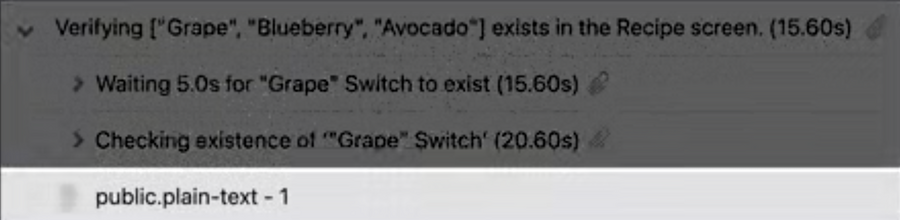
XCTContext.runActivity()to provide custom entries in your results bundle that helps identifying the current context, you can addXCTAttachmentas well and it will show along the given context:
public func verify(ingredients: [String]) throws {
	try XCTContext.runActivity(named: "Verifying \(ingredients) exists in the Recipe screen.")
	{ verifyingRecipe in
    	for ingredient in ingredients {
        	if !element.switches[ingredient].waitForExistence(timeout: 5) {
            	let attachment = XCTAttachment(string: element.debugDescription)
            	verifyingRecipe.add(attachment)
            	 throw RecipeError.ingredientDoesNotExist(ingredient)
        	}
    	}
	}
}
Use
XCTSkip(),XCTSkipIf()andXCTSkipUnless()when you want to skip certain test cases when it’s not a suitable time for them to run, or they’re not relevant to a certain platformThis is particularly useful for when a test is failing due to flawed code that is due fixing in the near future, or for when the test is written before the code itself
Skipping the test will still make it appear in the results bundle, reminding you that you still have to go back and fill that missing code or fix it at sometime
Tear Down
Use
tearDownWithError() throwsand take advantage of the provided error managementCollect additional logging that’s relevant to your tests, including some analysis of the failures
Remember to reset the environment from the changes that were done during the set up
