
Can set default mail and browser client
3rd party accessories can join Apple’s Find My network. More info such as how to apply and draft specifications are available at developer.apple.com/find-my
Apple Silicon
All Apple systems apps, including professional ones such as Xcode have already been ported to Apple Silicon
Adobe Creative Cloud apps, Microsoft Office app suite, and Unity have already been ported to Apple Silicon and work great
Apple is designing new SoCs for the Mac
Coming to all lineup in ~2 years top
Booting from external drives, kernel drivers, booting linux
Why Transitioning to ARM?
better performance per watt
More secure
Same tech stack as Apple mobile devices
Apple owns it
Longer battery
High performance GPU architecture
dedicated neural engine
Getting Started
Developer Transition Kit: to start working on bringing support to ARM mac, Apple is offering a development kit, which is a mac mini running on A12Z Soc, 16GB memory, 512GB SSD.
Universal App Quick Start Program: developers can apply for the Developer Transition Kit and more resources via developer.apple.com/programs/universal
Universal Apps
Universal apps work the same way as 32bit/64bit apps worked previously: when installing to a specific device the correct app slice will be downloaded/installed.
To build an universal app (supporting both Intel and Apple Silicon), Xcode has a new target called
Any Max (Apple Silicon, Intel)which will build the app for both platformsApple expects a few weeks of engineering effort to adapt apps to Universal Apps Apple Silicon
Rosetta 2
Run Intel optimized apps in Arm macs
Most apps will be translated at installation, some during the first launch
Apps that dynamically load code will be translated on the fly
Developers can run an app via Rosetta by selecting the associated target, all Xcode capabilities still work fine
Extensions and DriveKit can also be build as Universal Binaries and Universal Drivers: Rosetta 2 cover those that are not yet build this way
Virtual Machine
Parallels Desktop already supports Apple Silicon
Apple is working with Docker to Support Apple Silicon as well
Running iOS and iPad OS Apps on Apple Silicon
While Catalyst helped running iOS/iPadOS apps on a Intel Mac, iOS and iPadOS apps are binary compatible with Apple Silicon, meaning that they work without any change to the binary.
iOS and iPad apps do not get all the customizations that catalyst apps have (think Touch Bar, custom menus, ..)
All iOS and iPad apps will be available on the Mac App Store (only for Apple Silicon Macs), as long as the app developer has opted-in into this (no further purchase required).
macOS Big Sur
New look closer to iOS and iPadOS (as written above, Apple Silicon macs will be able to run iOS/iPadOS apps, which make this design direction understandable)
Control and Notification Centers are built in SwiftUI
Notification content can be customized the same way as iOS and iPadOS
New Sidebar and update toolbar make the UI bigger and more…touch friendly?
Apps can define their own accent color via NSAccentColorName
New photo permission (allow access to only a few selected photos or all photos)
Mac Catalyst has new improvements and more customization to make UIKit apps more native
iPadOS
Sidebar: two-column layout, with a swipe it becomes a three column layout, even on portrait mode. It uses current components like
NavigationViewandListPicker Updates:
DatePickerandUIDatePicker: we can now choose a day from a calendar (no more scroll wheel), this component comes also in a compact size (depending on the screen available)EmojiPicker: shows up with the same shortcut as macOS (
⌃⌘space)ColorPicker: similar to Xcode color picker
ContextMenu have gotten lighter and more fluid
PencilKit has gotten some enhancements such as stroke information via the new apis: we can now read angle, pressure attributes and more for all user strokes.
iOS
Widgets
need to be written in SwiftUI
as they’re on the home screen, they need to be very performant, no live update possible, they’re Archived SwiftUI views (we can think of them as a displayed JSON file that we can update, but it’s user interactive).
All of this work thanks to a new WidgetKit framework, structured around timeline entries, each containing a SwiftUI archive with time of the entry and relevance score.
When the widget is displayed, no code is run, just our most relevant entry will be shown.
Apps can control which entry to use at what time
User can create stacks of widgets (to flip through), and iOS offers a Smart stack widget, which will display the most relevant widgets based on the current widget relevance
Widgets can provide customizations/settings (without having to go throughout the main app), the settings will be displayed by long pressing on the widget, we need to tell widgetKit what are the possible configurations of our widget.
App Clips
light and fast mini apps
The card shown in the home screen before opening our app clip contains metadata of our app submitted to the App Store.
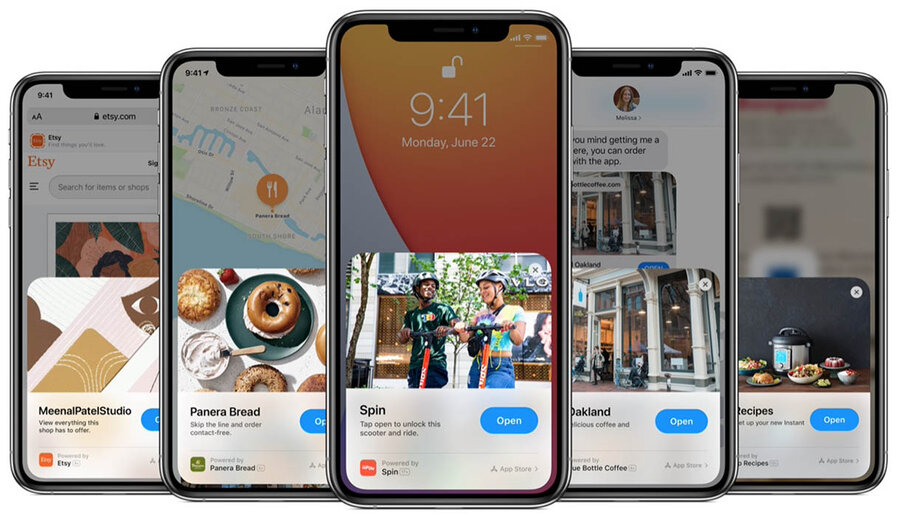
While displaying the card, behind the scenes iOS is downloading the App Clip
App Clips don’t show up in the home screen, but do show up in the App Library
App clips can be launched via link, app clip code
must be less than 10MB
Part of the apps
App Clips can show notifications within 8hours of opening one
Apple offers an API to make sure the location of where the app clip has been launched is where we expect
App clips are new targets in our main app
App Clips can be run/tested on Xcode (like other app extensions)
watchOS
SwiftUI can be used for build complication
Each app can show multiple complications in each Watch Face
Like for other SwiftUI views, we can now have complication previews
Xcode
Refreshed design with the new macOS 11 components like the new Sidebar and toolbar
Document tabs
Xcode tabs can now contain anything, files, test result etc.
We can drag a folder in the tab bar and all the files of that folder will open
Testing
UI Tests can now read velocity of animations, hitches, and more
New StoreKitTest framework, and Store Transaction Manager to use when debugging StoreKit-related events
SwiftUI Tools
Previews have new toolbar on top of each preview to make changes as if the preview was a view itself
code completion up to 12x faster
projects views and modifiers can now appear in the Xcode library via a LibraryContentProvider protocol
Swift Packages
supports assets, localization, and binaries
SwiftUI
completely additive only changes
no migration required for “SwiftUI 1.0” apps
The new color picker is build in SwiftUI
faster launch and layout
smaller code size and memory usage
Stacks behave more like a List by prepending them with with Lazy (e.g.
LazyVStack)MapKit and AVKit support
