
For an in-depth overview of everything Apple Silicon, check the official Apple Silicon documentation.
What the transition to Apple Silicon means
| Apple Silicon Mac | Intel-based Mac | |
|---|---|---|
| Native architecture | arm 64 | x86_64 |
| Supported architectures | arm64 (native), x86_64 (translated via Rosetta) | x86_64 |
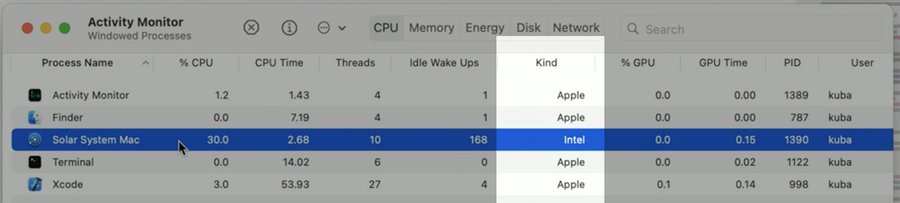
In macOS 11, when running on Apple silicon, the CPU tab of the Activity Monitor.app has a new Kind column showing which architecture each process runs on (”Apple” means it’s running natively in Apple Silicon, Intel when the process is being translated via Rosetta):
Universal Mach-O binaries
Your apps and most executable code in macOS, are stored in a file format called Mach-O.
These files can either be targeting a single CPU architecture or they can be universal (a.k.a. support multiple CPU architectures).
To examine a file on disk, you can use the lipo command.
Rosetta translation
the entire process is either native or translated (cannot mix).
Kernel extensions, AVX vector instructions, and virtualization are not supported.
Building Universal Binaries
endianness of arm64 is the same as x86
if your (macOS) app shares code with an iOS app, that code is guarantee to work in Apple Silicon
Xcode 12 supports building Universal Binaries on all mac architectures (both on Intel and Apple Silicon macs)
Determining CPU page size
Native page size on Intel is
4 kB, on Apple Silicon it’s16 kB: therefore thePAGE_SIZEmacro is no longer a constant. Use:PAGE_MAX_SIZEfor a compile-time upper boundvm_page_sizeto read the actual value at runtime
Rosetta provides 4 KB pages when translating Intel processes
#if for platforms and CPU architectures
macOS:
#if os(macOS)intel:
#if arch(x86_64)ARM64:
#if arch(arm64)Simulator:
#if targetEnvironment(simulator)iOS device:
#if os(iOS) && !targetEnvironment(simulator)
Precompiled binaries
When building for Apple Silicon you might encounter linker warnings (that later translate in some cryptic errors) similar to: ignoring file when building for macOS-arm64, but attempting to link with file built for macOS-x86_64..
This happens when we have a binary dependency that hasn’t been built as universal yet, the only way to fix this is to:
remove such dependency (even just temporarily)
wait for the dependency to provide an universal binary
What you can do now: search for precompiled binaries in your project (.a, .dylib, .framework, .xcframework) and reach out their vendors if the binary is not universal (use lipo --info path/to/binary to inspect them)
Building Universal Binaries steps
Build your app as an Intel app in Xcode 12 first (make sure it builds fine with no warnings)
Build your app natively for Apple Silicon
fix non-portable code issues (see #if chapter above)
fix link-time issues (see
Precompiled binarieschapter above)
Running, Testing, Debugging
When running tests, they will run only in the selected architecture
The default architecture is the one the mac machine is running on
Always run your tests on both architectures
Asymmetric CPU cores on Apple Silicon
Apple Silicon Macs have two types of cores:
High-performance (P Cores)
Energy-efficient (E Cores)
All can be active at the same time for highly-parallel workloads
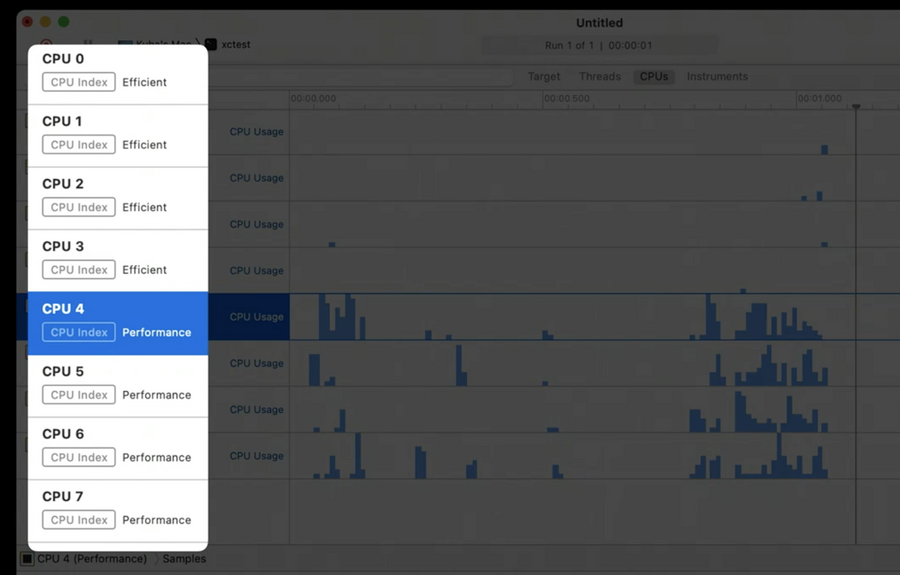
In Instruments you can see which core is which by the associated label:
Plug-ins
Plug-ins are a way to dynamically load and execute code.
Both native and translated plug-ins are supported.
If your app is a plug-in host, and if it’s using a custom plug-in loading mechanism, you will need to consider how plug-ins work on Apple Silicon Macs.
If your app supports plug-ins, it will typically discover them at runtime and then load them when needed.
That’s called an in-process plug-in model, and typically the app uses a call to dlopen() or Bundle.load() for this.
Alternatively, the plug-ins can be spawned as new processes, and we call those out-of-process plug-ins. The app and the plug-in process then use some interprocess communication mechanism like XPC. Loading another plug-in typically spawns another process.
| 1st party (build from source code shipped inside your app) | 3rd party (precompiled binaries, shipped inside the app or separately) | |
|---|---|---|
| Out-of-process | Supported | Supported, even when the binary is intel only (Rosetta will take care of that process) |
| In-process | Supported only if the running architecture matches the one in the precompiled binary) | not supported |
