
What an UI interruption?
An element that:
appears unexpectedly
blocks access to another element (which an UI test is trying to interact with)
Common interruptions:
banner notifications
alerts/dialogs
What are UI interruptions handlers?
closures
XCTest maintains a stack of handlers
XCTest uses LIFO: the last handler registered is the first to be invoked
the stack resets between tests
If an interruption handler successfully handled an interruption, it returns true and the UI test continues. If it was not able to handle the interruption, it returns false and the next handler is invoked.
iOS has built-in interruption handlers for alerts:
taps cancel button if any, falls back to the default button otherwise
(New in Xcode 12) iOS has built-in interruption handlers for banners:
swipe to dismiss persistent banners
wait for temporary banners to auto-dismiss
macOS has built-in interruption handlers for:
permission dialogs: chooses
Don't AllowBluetooth Setup Assistant: closes window
When UI interruptions handlers are not triggered
Not all alerts will trigger UI interruptions handlers:
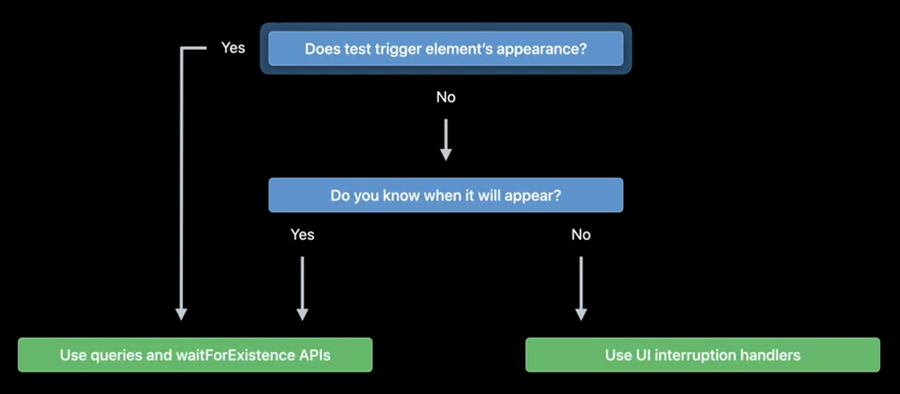
How to interact with expected alerts
Use addUIInterruptionMonitor(withDescription:handler:) to add a new interruption monitor. The system will automatically invoke the interruption handler stack when the UI test tries to interact with something that is blocked by an interruption.
The following example tries to tap the Retry button on an alert (if interrupted by it):
addUIInterruptionMonitor(withDescription: "Handle recipe update failures") { element -> Bool in
    let retryButton = element.buttons["Retry"].firstMatch
    if element.elementType == .alert && retryButton.exists {
        retryButton.tap()
        return true
    } else {
        return false
    }
}
Protected resources
From Xcode 11.4, iOS and tvOS 13.4, and macOS 10.15.4, we have a new resetAuthorizationStatus(for:) API to reset the authorization status for a protected resource (it will be like it was never asked before).
Note that the app will be killed when this api is called, therefore a way to use this API is the following:
func testAddingPhotosFirstTime() throws {
    let app = XCUIApplication()
    app.resetAuthorizationStatus(for: .photos)

    app.launch()

    // Test code…
}