
Sample Code
Download the sample code to learn more about Modern Collection Views.
Diffable Data Source
Recap
Introduced in iOS 13.
Simplifies UI State.
Automatic animations.
No more batch updates.
For more, refer to the
Advances in UI Data Sourcessession.
Section Snapshots
Encapsulate the data for a single section in a
UICollectionView.Allow data sources to be more composable into section-sized chunks of data.
Can present the same data with different layout in different sections.
Allow modeling of hierarchical data, which is needed to support rendering outline-style UIs.
Examples
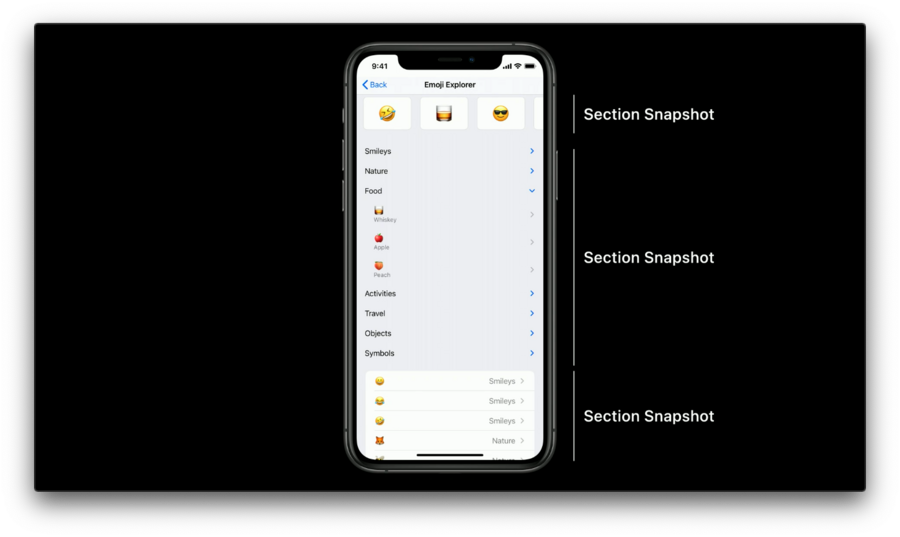
Top: Horizontally scrolling section.
Middle: Outline style section.
Bottom: List section.
It composes Diffable Data Source from three distinct section snapshots, each representing a single section’s content.
APIs
Use
append(:parent:)API to add content into a section snapshot.The optional
parentparameter allows us to create parent-child relationships in the section snapshot.
// UICollectionViewDiffableDataSource additions for iOS 14

extension UICollectionViewDiffableDataSource<Item, Section> {

    func apply(_ snapshot: NSDiffableDataSourceSectionSnapshot<Item>,
               to section: Section,
               animatingDifferences: Bool = true,
               completion: (() -> Void)? = nil)

    func snapshot(for section: Section) ->
                  NSDiffableDataSourceSectionSnapshot<Item>
}
Code example:
// Example of using snapshots and section snapshots together

func update(animated: Bool=true) {

   // Add our sections in a specific order
   let sections: [Section] = [.recent, .top, .suggested]
   var snapshot = NSDiffableDataSourceSnapshot<Section, Item>()
   snapshot.appendSections(sections)
   dataSource.apply(snapshot, animatingDifferences: animated)

   // update each section's data via section snapshots in the existing position
   for section in sections {
      let sectionItems = items(for: section)
      var sectionSnapshot = NSDiffableDataSourceSectionSnapshot<Item>()
      sectionSnapshot.append(sectionItems)
      dataSource.apply(sectionSnapshot, to: section, animatingDifferences:animated)
   }
}
Child snapshots
let childSnapshot = sectionSnapshot.snapshot(for: parent, includingParent: false)Expanding and Collapsing Items
Expansion state is persisted.
Expansion state is managed as part of a section snapshot’s state.
Call
apply(_:to)to commit changes.Automatic animations.
struct NSDiffableDataSourceSectionSnapshot<Item: Hashable> {
   func expand(_ items: [Item])
   func collapse(_ items: [Item])
   func isExpanded(_ item: Item) -> Bool
}
Section snapshot handlers
To be notified about expansion state changes caused by these user interactions.
// Section Snapshot Handlers: handling user interactions for expand / collapse state changes

extension UICollectionViewDiffableDataSource {

  struct SectionSnapshotHandlers<Item> {
    var shouldExpandItem: ((Item) -> Bool)?
    var willExpandItem: ((Item) -> Void)?

    var shouldCollapseItem: ((Item) -> Bool)?
    var willCollapseItem: ((Item) -> Void)?

    var snapshotForExpandingParent: ((Item, NSDiffableDataSourceSectionSnapshot<Item>) -> NSDiffableDataSourceSectionSnapshot<Item>)?
  }

  var sectionSnapshotHandlers: SectionSnapshotHandlers<Item>

}SectionSnapshotHandlersis a generic struct which contains five optional closures.snapshotForExpandingParentis used for lazy loading when the content is expensive.
Reordering Support
Automatic snapshot updates.
Transactions.
Reordering Handlers
Used to be notified when a user-initiated reordering interaction took place.
Once notified, it can persist the new visual order to the application’s backing store, which is its final source of truth.
// Diffable Data Source Reordering Handlers

extension UICollectionViewDiffableDataSource {

  struct ReorderingHandlers {
    var canReorderItem: ((Item) -> Bool)?
    var willReorder: ((NSDiffableDataSourceTransaction<Section, Item>) -> Void)?
    var didReorder: ((NSDiffableDataSourceTransaction<Section, Item>) -> Void)?
  }

  var reorderingHandlers: ReorderingHandlers
}
Automatic reordering.
When the user is done with the reordering interaction, the
didReorderclosure is called.Must provide both the
canReorderItemanddidReorderclosure to enable the reordering feature.
Reordering Transactions
A transaction that describes the changes after reordering the items in the view.
struct NSDiffableDataSourceTransaction<Section, Item> {
   var initialSnapshot: NSDiffableDataSourceSnapshot<Section, Item> { get }
   var finalSnapshot: NSDiffableDataSourceSnapshot<Section, Item> { get }
   var difference: CollectionDifference<Item> { get }
   var sectionTransactions: [NSDiffableDataSourceSectionTransaction<Section, Item>] { get }
}initialSnapshotis the state of the Diffable Data Source before the update is applied.finalSnapshotis the state of the Diffable Data Source after the update is applied.Apply the data directly to
difference, if use a data type such asArrayfor the source of truth.sectionTransactionsprovides per-section details about all the sections involved in this reordering update.
Section Transactions
struct NSDiffableDataSourceSectionTransaction<Section, Item> {
   var sectionIdentifier: Section { get }
   var initialSnapshot: NSDiffableDataSourceSectionSnapshot<Item> { get }
   var finalSnapshot: NSDiffableDataSourceSectionSnapshot<Item> { get }
   var difference: CollectionDifference<Item> { get }
}sectionIdentifierfor inspecting which section thissectionTransactionhas been applied to.
Example
dataSource.reorderingHandlers.didReorder = { [weak self] transaction in
   guard let self = self else { return }

   if let updateBackingStore = self.backingStore.applying(transaction.difference) {
      self.backingStore = updatedBackingStore
   }
}