Demo app here.
Foreground opportunities
When the app is in the foreground, we can tell the CLKComplicationServer that we would like to reload our complications timelines:
let complicationServer = CLKComplicationServer.sharedInstance()

if let activeComplications = complicationServer.activeComplications {
  for complication in activeComplications {
      // Be selective on what you actually need to reload
    complicationServer.reloadTimeline(for: complication)
  }
}
This tells the server when we would like to refresh our complication(s).
Later on our CLKComplicationDataSource’s getCurrentTimelineEntry(for:withHandler:) will be called:
func getCurrentTimelineEntry(
  for complication: CLKComplication,
  withHandler handler: @escaping (CLKComplicationTimelineEntry?) -> Void
  ) {
  // ..
  handler(entry)
}
Background App Refresh
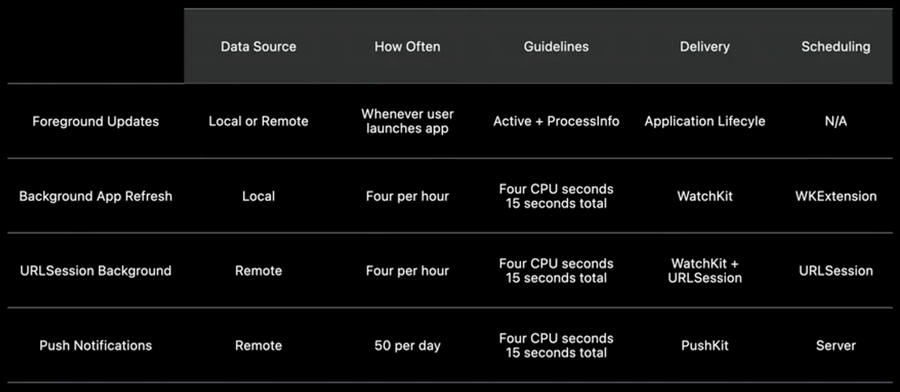
Background refresh allows us to schedule periodic updates to keep that complication up-to-date even when the app isn’t in use.
Up to four times per hour (regardless of how many complications are present in the current watch face)
Make a scheduleBackgroundRefresh(withPreferredDate:userInfo:scheduledCompletion:) request on WKExtension
private func scheduleBAR(_ first: Bool) {
  let now = Date()
  let scheduledDate = now.addingTimeInterval(first ? 60 : 15*60)

  // use the info dictionary to supply your own data to the refresh
  let info: NSDictionary = [“submissionDate”: now]

  let wkExt = WKExtension.shared()
  wkExt.scheduleBackgroundRefresh(
      withPreferredDate: scheduledDate,
      userInfo:info
  ) { (error: Error?) in
    if (error != nil) {
      print("background refresh could not be scheduled \(error.debugDescription)")
    }
  }
}
Later on the WKExtension will trigger the refresh in our WKExtensionDelegate via the handle(:) method.
class ExtensionDelegate: NSObject, WKExtensionDelegate {
  func handle(_ backgroundTasks: Set<WKRefreshBackgroundTask>) {
    for task in backgroundTasks {

      switch task {
        case let backgroundTask as WKApplicationRefreshBackgroundTask:

          if let userInfo: NSDictionary = backgroundTask.userInfo as? NSDictionary {
             if let then:Date = userInfo["submissionDate"] as! Date {
                let interval = Date.init().timeIntervalSince(then)
                print("interval since request was made \(interval)")
             }
          }

          // once we're done updating the data, we ask the complication server to reload our active complications
          self.updateActiveComplications()

          // we then schedule the next background refresh
          self.scheduleBAR(first: false)

          // then we complete the current task, we pass `false` to indicate that no snapshot is needed.
          // Each complication update results in a snapshot request, so we don't have to request one separately.
          backgroundTask.setTaskCompletedWithSnapshot(false)
         case ...
      }
    }
  }
}
Guidelines:
Only one request is outstanding at a time: if you need periodic updates, schedule the next update before marking the current one complete
No networking: URLSession will fail with an error
Background updates are limited to a maximum of four seconds of active CPU time
Background updates have a maximum of 15 seconds of total time to complete the task
Background URLSession
Allow your app to schedule and receive data even when the app isn’t running
Can be used in addition to background app refresh
Up to four times per hour
Multiple outstanding tasks are allowed
Creating a request is composed by multiple steps:
define a
backgroundURLSession:
class WeatherDataProvider: NSObject, URLSessionDownloadDelegate {

  private lazy var backgroundURLSession: URLSession = {
    let config = URLSessionConfiguration.background(withIdentifier: “BackgroundWeather")
    config.isDiscretionary = false
    config.sessionSendsLaunchEvents = true

    return URLSession(configuration: config, delegate: self, delegateQueue: nil)
  }()
}
create and resume a background task:
func schedule(_ first: Bool) {
  if let url = self.currentWeatherURLForLocation(delegate.currentLocationCoordinate) {
    let bgTask = backgroundURLSession.downloadTask(with: url)

    bgTask.earliestBeginDate = Date().addingTimeInterval(first ? 60 : 15*60)
    bgTask.countOfBytesClientExpectsToSend = 200
    bgTask.countOfBytesClientExpectsToReceive = 1024
    bgTask.resume()
    backgroundTask = bgTask
  }
}
When the download is complete, our WKExtensionDelegate’s handle(:) method will be called.
class ExtensionDelegate: NSObject, WKExtensionDelegate {
   var weatherDataProvider:WeatherDataProvider

  func handle(_ backgroundTasks: Set<WKRefreshBackgroundTask>) {
    for task in backgroundTasks {
       switch task {
         case let urlSessionTask as WKURLSessionRefreshBackgroundTask:
           weatherDataProvider.refresh() { (update: Bool) -> Void in
           	 // schedule the next retrieval (if needed)
             weatherDataProvider.schedule(first: false)

             // update complications if needed
             if update {
               self.updateActiveComplications()
             }

             // call task completion
             urlSessionTask.setTaskCompletedWithSnapshot(false)
           }
       }
      }
    }
  }
}
Our URLSessionDownloadDelegate’s urlSession(:downloadTask:didFinishDownloadingTo:) will be called with information on the downloaded data:
class WeatherDataProvider : NSObject, URLSessionDownloadDelegate {
  func urlSession(
  	_ session: URLSession, downloadTask: URLSessionDownloadTask,
    didFinishDownloadingTo location: URL
    ) {
      if location.isFileURL {
        do {
          let jsonData = try Data(contentsOf: location)
          if let kiteFlyingWeather = KiteFlyingWeather(jsonData) {
          // Process weather data here.
        }
      } catch let error as NSError {
        print("could not read data from \(location)")
      }
    }
  }
}
After we process the data URLSessionDownloadDelegate’s urlSession(:task:didCompleteWithError:) will be called: call the completion handler on the main queue so we dispatch to the main queue and call the completion handler.
func urlSession(
  _ session: URLSession, task: URLSessionTask,
  didCompleteWithError error: Error?
  ) {
  	print("session didCompleteWithError \(error.debugDescription)”)
  	DispatchQueue.main.async {
  	  self.completionHandler?(error == nil)
  	  // set the completion handler to nil to make sure it's not called more than once.
  	  self.completionHandler = nil
    }
  }
}
Guidelines:
Background updates are limited to a maximum of four seconds of active CPU time
Background updates have a maximum of 15 seconds of total time to complete the task
Complication Pushes
Servers can send up to fifty complication pushes per day to each individual watch (no limitations on how frequent they are, aka they can be 50 pushes in one hour)
The server needs to have a valid push certificate:
crate a new app (complication) identifier with id
{{bundle ID}}.watchkitapp.complicationcreate a push notification certificate with this new app identifier
your app needs to enable
Remote NotificationsBackground modes (in the app project)your watchkit extension need the push notifications capabilities enabled
Register the complication for push notifications
class PushNotificationProvider : NSObject, PKPushRegistryDelegate {

  func startPushKit() -> Void {
    let pushRegistry = PKPushRegistry(queue: .main)
    pushRegistry.delegate = self
    pushRegistry.desiredPushTypes = [.complication]
  }

  func pushRegistry(
  	_ registry: PKPushRegistry,
    didUpdate pushCredentials: PKPushCredentials, for type: PKPushType
  ) {
    // Send credentials to server
  }
}
Receiving Push notifications
The app will resumed or launched when receiving a push notification
Our
PKPushRegistryDelegate’spushRegistry(_:didReceiveIncomingPushWith:for:completion:)will be calledThis function is called in the queue we specified when registering with PushKit
Remember to call the completion after processing the notification
class PushNotificationProvider : NSObject, PKPushRegistryDelegate {
  ...

  func pushRegistry(
  	_ registry: PKPushRegistry,
    didReceiveIncomingPushWith payload: PKPushPayload,
    for type: PKPushType,
    completion: @escaping () -> Void
  ) {
    // Process payload
    delegate.updateActiveComplications()
    completion()
  }
}
Guidelines:
Background updates are limited to a maximum of four seconds of active CPU time
Background updates have a maximum of 15 seconds of total time to complete the task
Recap