
Key Takeaways
🔐 Passive quantum attacks are already relevant
⚡ Sensitive data needs quantum-secure encryption immediately
🛡️ iOS 26 provides automatic defence mechanisms
🆕 New CryptoKit APIs: Post-quantum HPKE (X-Wing), ML-KEM, ML-DSA
Understanding Quantum Attacks
Quantum attacks compromise the security of fundamental cryptographic mechanisms, including encryption and signatures.
Types:
Passive - does not require a quantum computer at the time of attack
Active - requires the attacker to have access to a quantum computer
Passive Attack - Harvest now, decrypt later
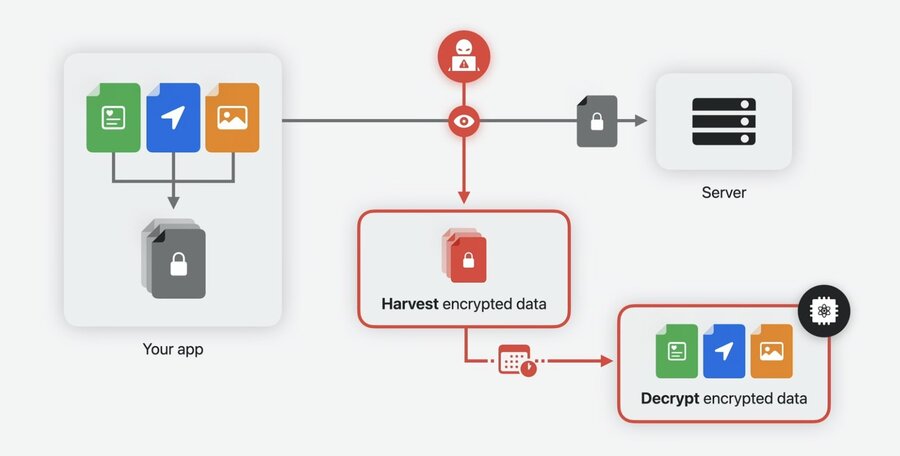
Affects encryption
Breaks confidentiality
Since this is a passive attack, it is already relevant today.
How it works:
Attacker harvests encrypted data by observing the network
Attacker waits until sufficiently powerful quantum computers become available
Attacker decrypts harvested data using quantum computers
Active Attack
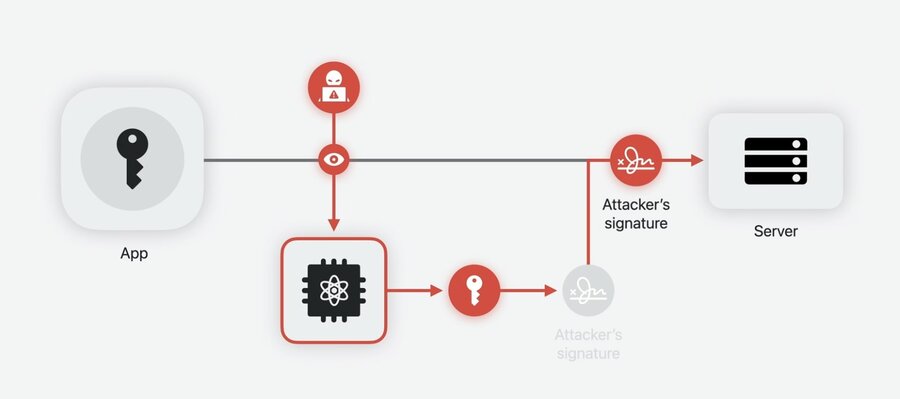
Affects signatures
Breaks authenticity
Since we don’t have sufficiently powerful quantum computers yet, this is a future threat.
How it works:
Attacker intercepts a signature by observing network traffic
Attacker steals the signing key from the signature using a quantum computer
Attacker uses the stolen key to impersonate the user
Quantum-secure cryptography
New quantum-secure cryptographic algorithms can be adopted today on traditional (non-quantum) devices.
Public-key cryptography
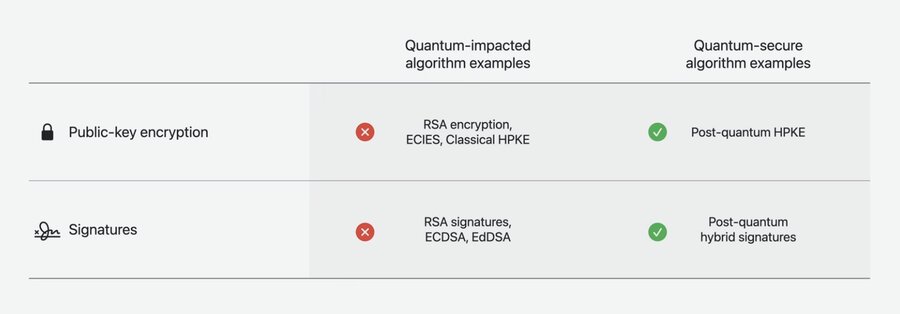
Current algorithms are based on computationally-intensive mathematical problems, which can be solved by quantum computers. Solutions:
For encryption: Post-quantum Hybrid Public Key Encryption (HPKE)
Fore signatures: Post-quantum Hybrid Signatures
Both of the aforementioned solutions use a hybrid approach, integrating post-quantum and traditional algorithms. Attacking them demands breaking both layers.
Symmetric-key cryptography
While these algorithms also rely on complex computational problems, quantum computers reduce their security only by a small constant factor.
Solution: Double the key size
Upgrade 128-bit ciphers to 256-bit
Protecting network data
Protecting against Harvest Now, Decrypt Later attacks is the top priority now. To do so, quantum-secure encryption should be applied for data in transit.
Apple is already using quantum-secure encryption in iMessage since iOS 17.4
TLS 1.3
Includes a quantum-safe encryption enhancement, using a secure key exchange resistant to quantum attacks
Most providers already support it
Client-side quantum-secure TLS
Starting from iOS 26, quantum-secure encryption in TLS is enabled by default for:
URLSession
Network.framework
It is recommended to migrate away from legacy APIs like Secure Transport, as they won’t support quantum-secure TLS
Server-side quantum-secure TLS
Quantum-secure TLS should also be enabled on the server side.
Most content/website hosting providers already support and enable it by default
For your own servers, you need to upgrade TLS explicitly
iOS 26 introduces support for quantum-secure TLS across various built-in services such as CloudKit, Apple Push Notifications, iCloud Private Relay, Safari, Weather, Maps, and other built-in apps
Protecting custom protocols
In most cases, quantum-secure TLS provides sufficient protection against Harvest Now, Decrypt Later attacks. However, direct usages of cryptographic APIs in your app also require upgrading to their quantum-secure counterparts using new CryptoKit APIs.
Quantum-secure encryption with CryptoKit
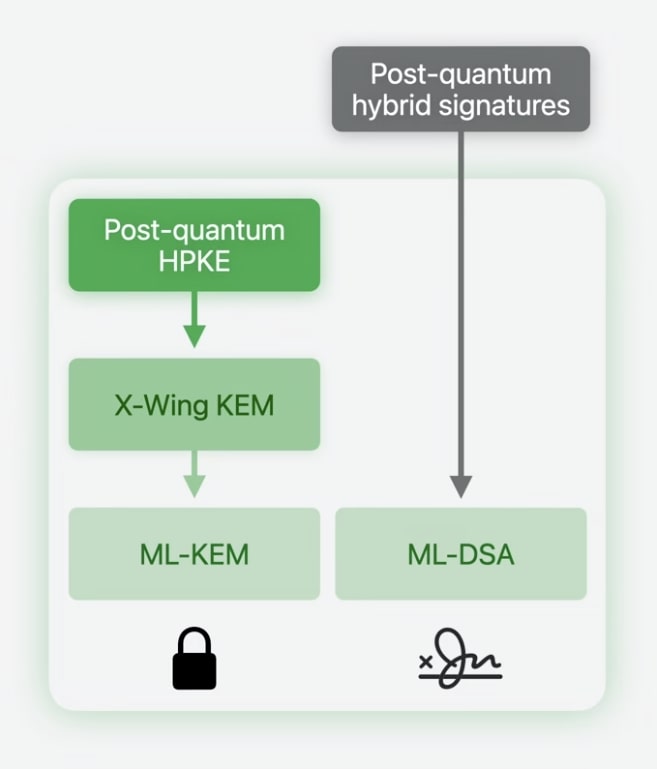
Based on Post-quantum HPKE
Uses X-Wing Key Encapsulation Mechanism (KEM)
Uses ML-KEM as its post-quantum building block
Large encryption size overhead
Comparable or even better performance in comparison to traditional methods
Hardware-isolated execution via Secure Enclave
Formally verified
Sample Post-quantum HPKE usage:
let ciphersuite = HPKE.Ciphersuite.XWingMLKEM768X25519_SHA256_AES_GCM_256

// Recipient
let privateKey = try XWingMLKEM768X25519.PrivateKey.generate()
let publicKey = privateKey.publicKey

// Sender
var sender = try HPKE.Sender(recipientKey: publicKey, ciphersuite: ciphersuite, info: info)
let encapsulatedKey = sender.encapsulatedKey

// Recipient
var recipient = try HPKE.Recipient(privateKey: privateKey, ciphersuite: ciphersuite, info: info, encapsulatedKey: encapsulatedKey)

// Sender encrypts data
let ciphertext = try sender.seal(userData, authenticating: metadata)

// Recipient decrypts message
let decryptedData = try recipient.open(ciphertext, authenticating: metadata)
#expect(userData == decryptedData)
While post-quantum HPKE provides a simplified abstraction, CryptoKit gives developers the option to use lower-level APIs as well.
Quantum-secure signatures with CryptoKit
Post-quantum hybrid signatures can be made using ML-DSA
Also offers hardware-isolated execution via Secure Enclave
CryptoKit’s adherence to standard protocols means it can interoperate with any compliant server library, but Apple’s preferred choice is Swift Crypto.
Migration checklist
-
Enable quantum-secure TLS on your servers
-
Use URLSession or Network.framework for networking
-
Update server configuration to support quantum-secure TLS
-
Replace custom encryption with Post-quantum HPKE
