
Prerequisites
Watch Explore video experiences for visionOS first.
Fundamentals
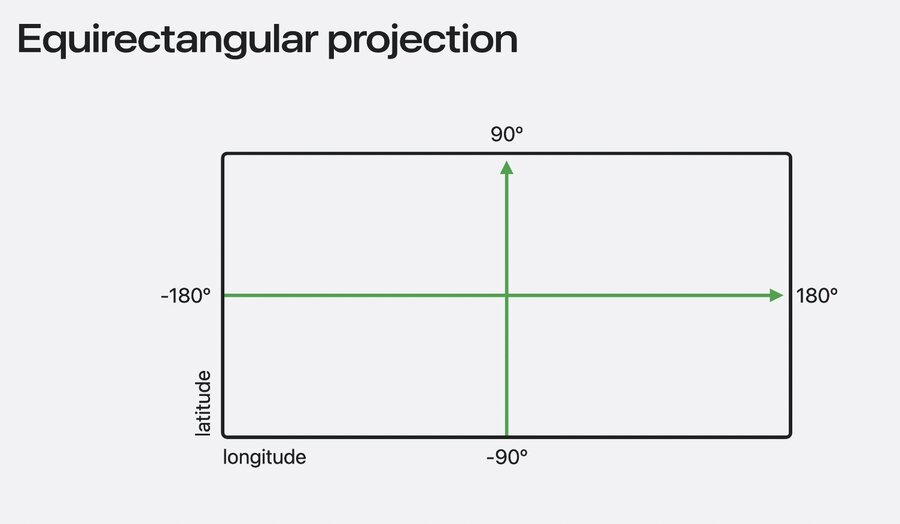
Equirectangular projection supported by many tools including Final Cut Pro
Pixel coordinates expressed as angles of lat/long, projected into rows & columns
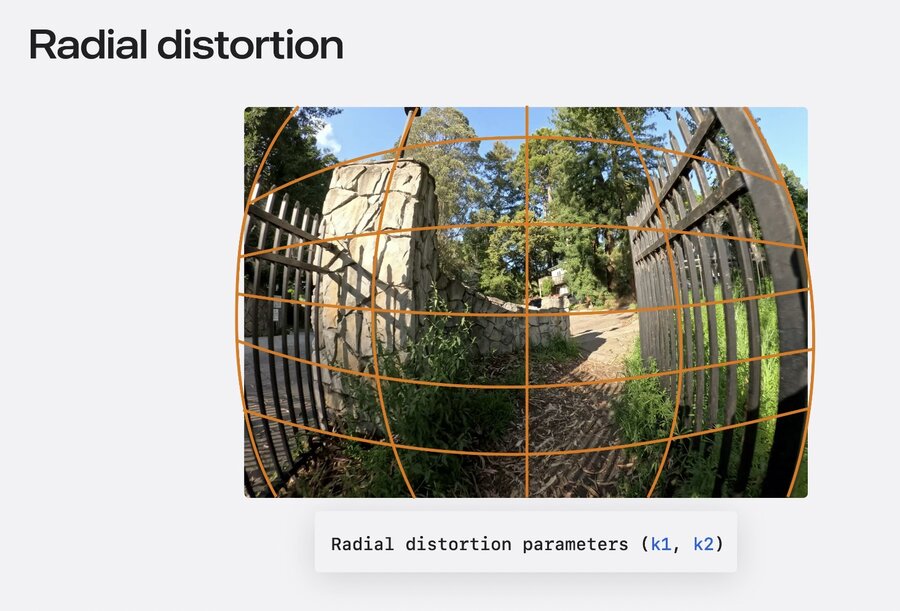
ParametricImmersive projection for fisheye with focal length, offset, and skew
Additional radial distortion parameters may be needed (for wide angle lenses), also:
Tangential distortion, projection offset, radial angle limit, lens frame adjustment
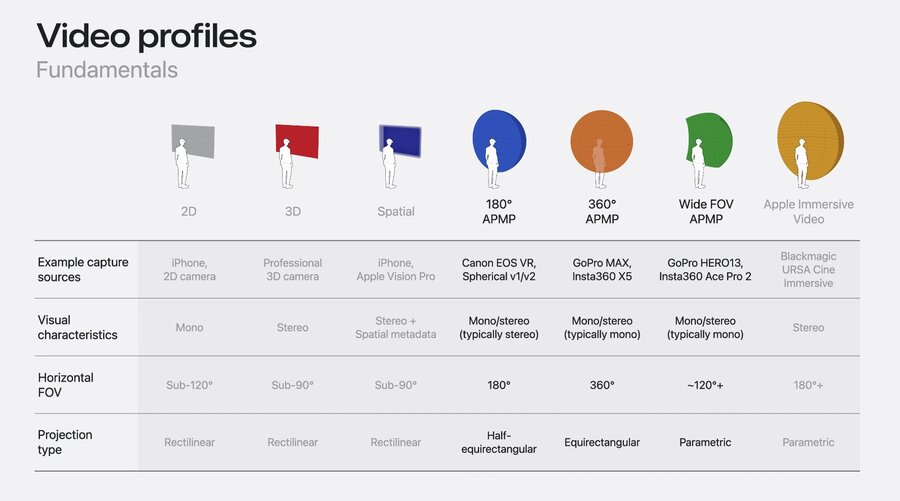
Apple Projected Media Profile
Specification
APMP allows signaling 180, 360, and Wide FOV content in MOV/MP4 files
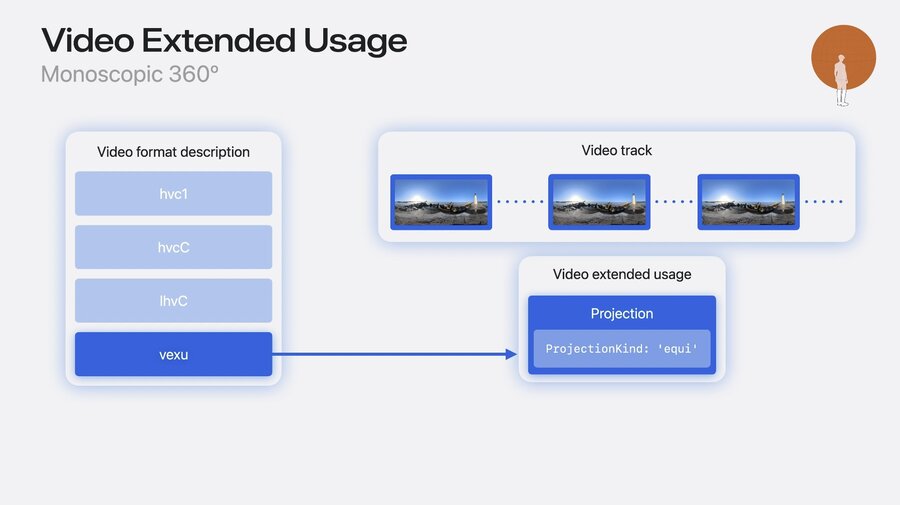
VisionOS 1 had introduced “Video Extended Usage” box to MP4 (vexu)
VisionOS 26 adds projection signaling information to the vexu box
New lens collection box for intrinsics, extrinsics, and distortions (for parametric)
New view packing box defines eye frame packing (side-by-side, over-under)
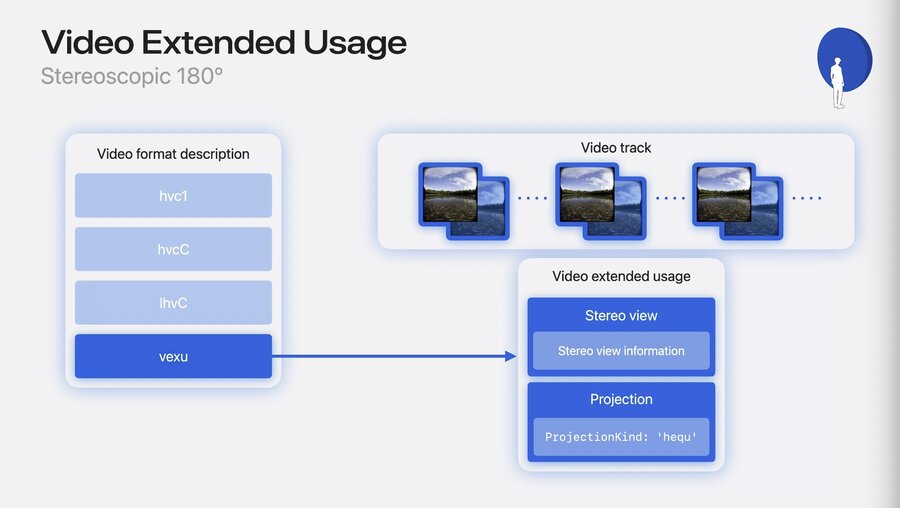
Learn more in this spatial and immersive format specification document.
Workflow
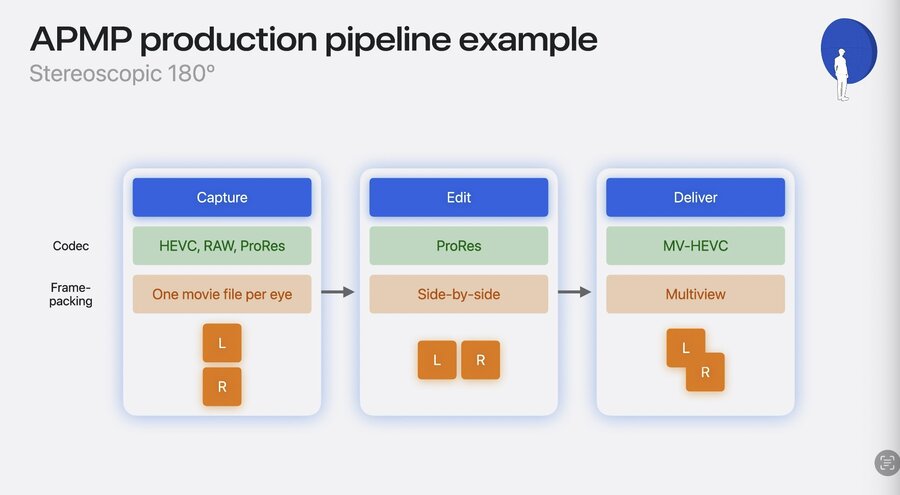
Variety of cameras can capture APMP content, e.g. Canon, GoPro, and Insta 360 cameras
Their editing software will receive updates later this year to export in APMP
Use camera software for stitching, stabilization, etc. - export with spherical metadata
Then use
avconvertCLI tool / Finder action to convert from spherical video to APMP
Convert
Make a compatible VR video asset treated like an APMP file until video software has adopted it like this:
import AVFoundation

func wasConvertedFromSpherical(url: URL) -> Bool {
   let assetOptions = [AVURLAssetShouldParseExternalSphericalTagsKey: true]
   let urlAsset = AVURLAsset(url: url, options: assetOptions)

   // simplified for sample, assume first video track
   let track = try await urlAsset.loadTracks(withMediaType: .video).first!

   // Retrieve formatDescription from video track, simplified for sample assume first format description
   let formatDescription = try await videoTrack.load(.formatDescriptions).first

   // Detect if formatDescription includes extensions synthesized from spherical
   let wasConvertedFromSpherical = formatDescription.extensions[.convertedFromExternalSphericalTags]

   return wasConvertedFromSpherical
}
For a compatible Wide FOV video, convert like this:
// Convert wide-FOV content from recognized camera models
import ImmersiveMediaSupport

func upliftIntoParametricImmersiveIfPossible(url: URL) -> AVMutableMovie {
   let movie = AVMutableMovie(url: url)

   let assetInfo = try await ParametricImmersiveAssetInfo(asset: movie)
   if (assetInfo.isConvertible) {
       guard let newDescription = assetInfo.requiredFormatDescription else {
               fatalError("no format description for convertible asset")
       }
       let videoTracks = try await movie.loadTracks(withMediaType: .video)
       guard let videoTrack = videoTracks.first,
                 let currentDescription = try await videoTrack.load(.formatDescriptions).first
       else {
         fatalError("missing format description for video track")
       }
       // presumes that format already compatible for intended use case (delivery or production)
       // for delivery then if not already HEVC should transcode for example
       videoTrack.replaceFormatDescription(currentDescription, with: newDescription)
   }
   return movie
}
With these conversions, system-wide APIs will recognize video as APMP content.
Learn more in this sample application.
Read
CoreMediaandAVFoundationnow support projected mediaTo identify if an asset conforms to APMP profile, check options like this:
// Determine if an asset contains any tracks with nonRectilinearVideo and if so, whether any are AIV
import AVFoundation

func classifyProjectedMedia(movieURL: URL) async -> (containsNonRectilinearVideo: Bool, containsAppleImmersiveVideo: Bool) {
   let asset = AVMovie(url: movieURL)
   let assistant = AVAssetPlaybackAssistant(asset: asset)
   let options = await assistant.playbackConfigurationOptions

   // Note contains(.nonRectilinearProjection) is true for both APMP & AIV, while contains(.appleImmersiveVideo) is true only for AIV
   return (options.contains(.nonRectilinearProjection), options.contains(.appleImmersiveVideo))
}
Learn more: Support immersive video playback in visionOS apps
Edit
Use
AVVideoCompositionfromAVFoundationandCMTaggedDynamicBufferThese buffers are used to handle steoscopic content across different APIs
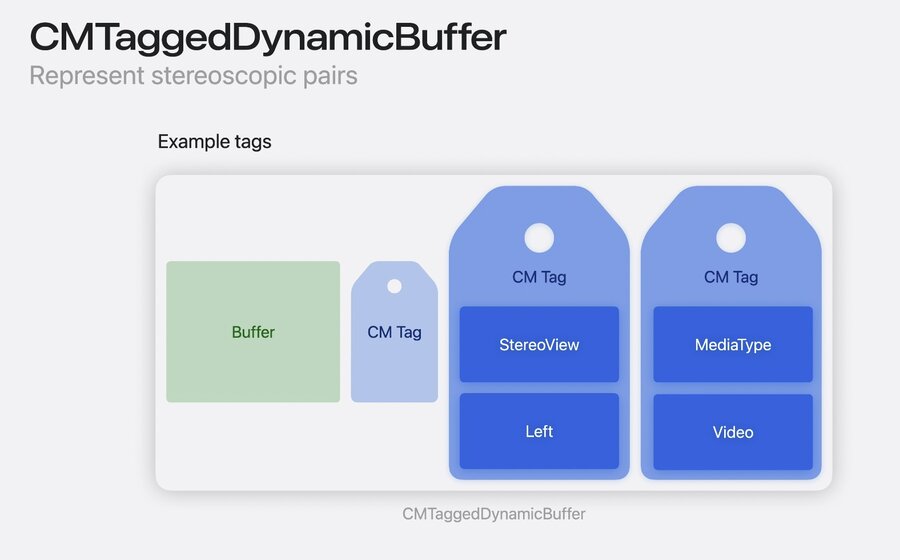
Author note: More code provided for new buffer-related APIs (watch video to learn more).
Write
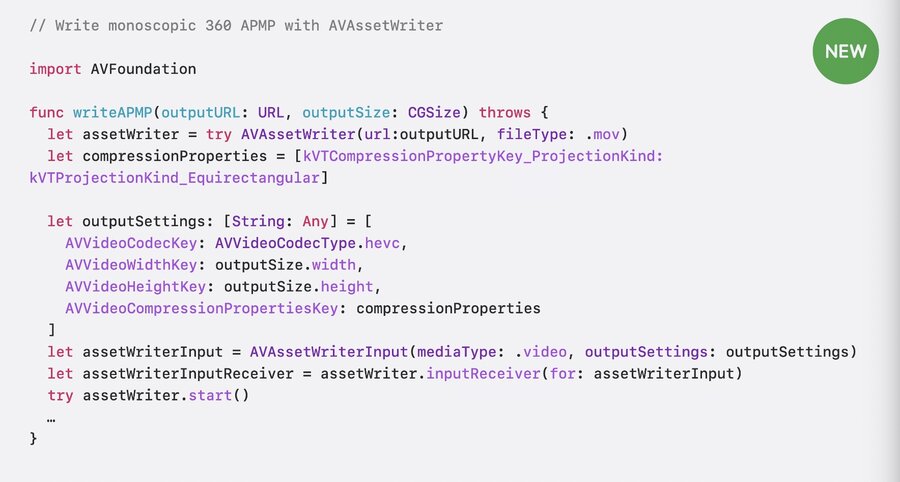
Use AVAssetWriterInput to pass compression properties, full example:
Publish
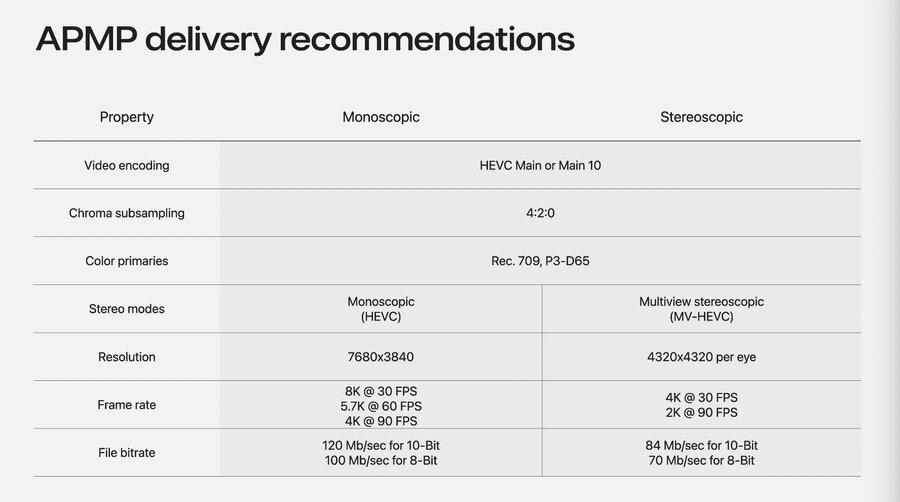
APMP delivery should be HEVC Main/Main10 with color sampling 4:2:0 in Rec. 709 or P3-D65
Monoscopic: 8K@30FPS / 5.7K@60FPS / 4K@90FPS, 10-bit: 120 Mbit, 8-bit: 100 Mbit
Stereoscopic: 4320x4320 per eye, 4K@30FPS / 2K@90FPS, 10-bit: 84 Mbit, 8-bit: 70 Mbit
Bitrate depends on content, but recommended to stay under 150 Mbit/sec peak
Learn more about MV-HEVC profile in this document
AVQT (Advanced Video Quality Tool) was updated to support spatial/VR content
Use for assessing quality of content and fine-tuning video encoding parameters
New features include quality assessment considering (half-)requirectangular projection
Learn more in Evaluate videos with the Advanced Video Quality Tool and Whats new in AVQT.
HTTP Live Streaming documentation updated for streaming APMP content
HLS Tools have also been updated to publish APMP media
Use
#EXT-X-STREAM-INFin HLS manifest withREQ-VIDEO-LAYOUT="CH-STEREO/PROJ-HEQU"Refer to this document for the latest information and guidelines
Apple Positional Audio Codec
APAC can encode ambisonic audio – technique for record/mix/play spatial audio
Not tied to a specific speaker layout, encoded mathematically
Array of microphones needed, signals transformed to spherical harmonic components
1st-order ambisonics uses 3 components: Front/Back, Left/Right, Up/Down
2nd-order ambisonics uses 9, 3rd-order ambisonics use 16 for more more spatial resolution
APAC is recommended for APMP media files, plays on all platforms (except watchOS)
System encoder supports 1st, 2nd, and 3rd-order ambisonics, minimal code sample:
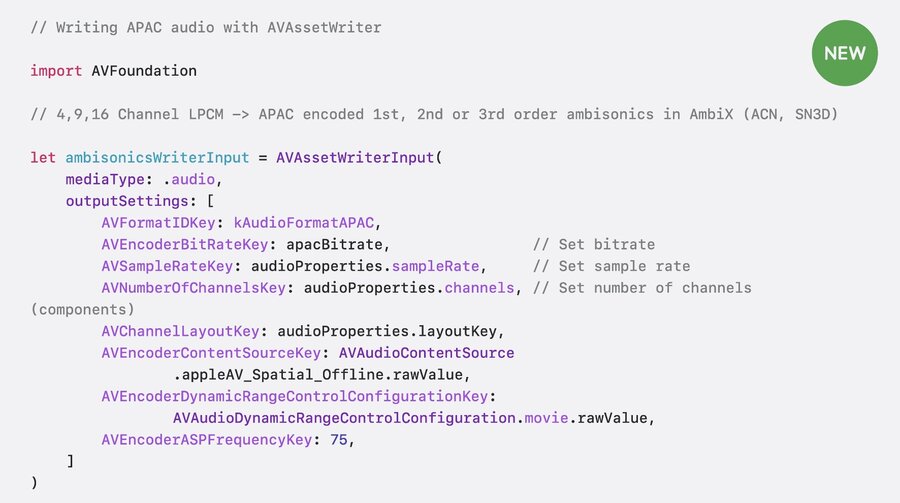
Recommended bitrates range for 384 Mbit for 1st order, to 768 Mbit for 3rd order
APAC can be segmented and streamed via HLS
