
Key Takeaways
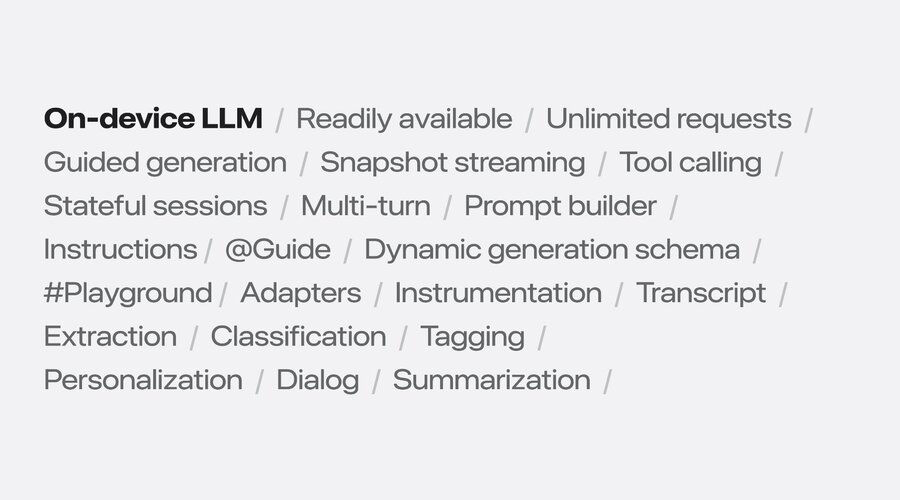
🧠 Built-in small on-device LLM model for general use
⚡ Great for summarization, classification, tagging etc.
🎯 “Guided generation” can use data provided by your app
🌊 Partial results streamed as full (generated) Swift type
🏷️ Specialized “content tagging” adapter available (more later)
The model
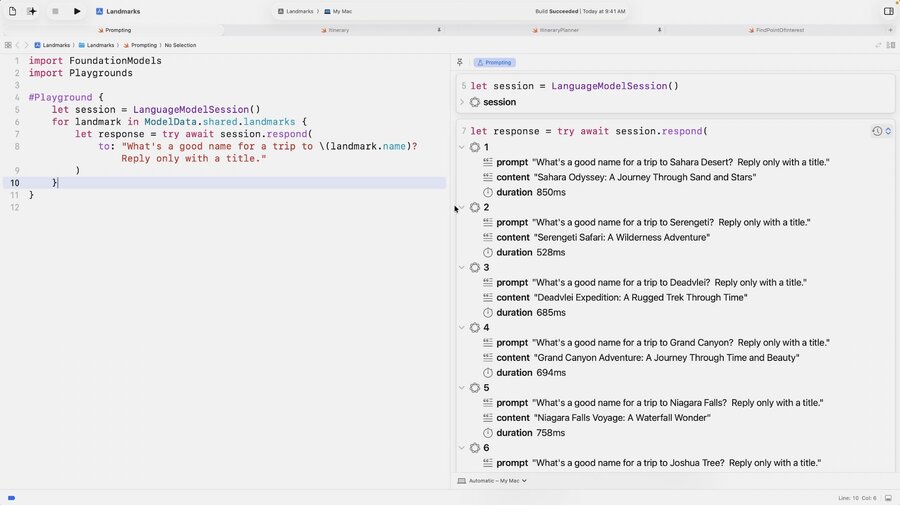
Optimize your prompt within Xcode using the
#PlaygroundmacroModel is an LLM with 3 billion parameters each quantized to 2 bits
(Author note: According to Claude this would be a small model about 750 MB in size)
It’s not designed for world knowledge or advanced reasoning
Built for: Summarization, Extraction, Classification, Tagging, Composition, Revision
For special uses such as content tagging, specialized adapters should be used
Continuous improvement over time based on developer feedback
Guided generation
By default, the output is unstructured natural language text
Do not specify your desired output (like JSON) in the prompt
Use the
@Generablemacro to mark types you want to generateUse the
@Guide(description:)macro to describe & programmatically define possible values
For example specify an output type like so:
// Creating a Generable struct
@Generable
struct SearchSuggestions {
   @Guide (description: "A list of suggested search terms", .count(4))
   var searchTerms: [String]
}
Then specify it as the generating type:
// Responding with a Generable type
let prompt = "Generate a list of suggested search terms for an app about visiting famous landmarks."
let response = try await session.respond(to: prompt, generating: SearchSuggestions.self)

print(response.content)
// SearchSuggestions(searchTerms: ["Hot springs", "Watery wonders", ...])
Supported property types to be @Generable:
String
Int
Float
Double
Bool
[String]
any type that is also
@Generable(for relationships)arrays of any type that is also
@Generablerecursive types also supported
Example of a @Generable type showcasing all supported types:
@Generable
struct Itinerary {
   var destination: String
   var days: Int
   var budget: Float
   var rating: Double
   var requiresVisa: Bool
   var activities: [String]
   var emergencyContact: Person
   var relatedItineraries: [Itinerary]
}
You’re guaranteed to get structural correctness (“constrained coding”)
Helps the model to provide more accurate and faster results
Learn more: Deep dive into the Foundation Models framework
Snapshot streaming
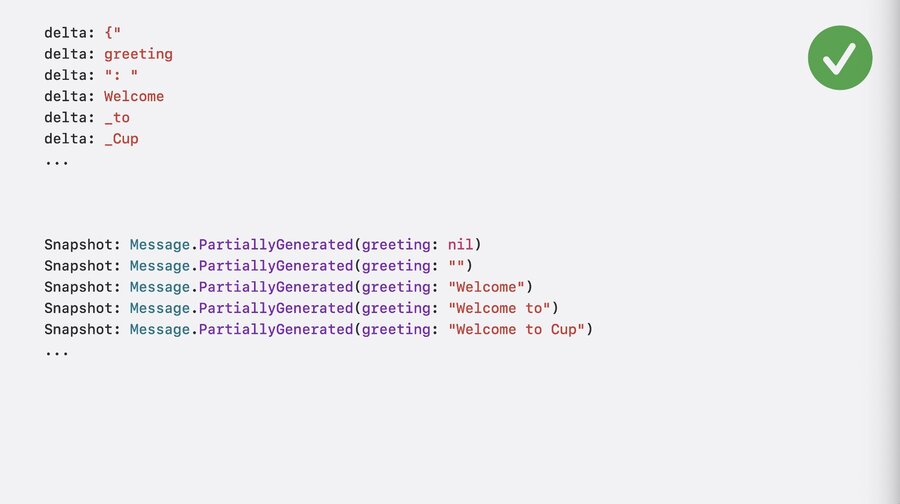
Rather than providing tokens (= partial words) during generation (like other LLMs), the Foundation models provide partial snapshots of the requested output type:
Possible because
@Generablemacro produces a subtypePartiallyGeneratedwith all Optional fieldsMore robust and convenient representation of “streaming output” than string tokens
The
PartiallyGeneratedis what you get upon callingstreamResponse(to:)(instead ofrespond(to:))Returns an
AsyncSequenceyou can easily iterate over usingfor await
let stream = session.streamResponse(to: "Your prompt", generating: Itinerary.self)
for try await partial in stream {
   print(partial)
   // => Itinerary.PartiallyGenerated(name: nil, days: nil)
   // => Itinerary.PartiallyGenerated(name: "Mt.", days: nil)
   // => Itinerary.PartiallyGenerated(name: "Mt. Fuji", days: nil)
   // => Itinerary.PartiallyGenerated(name: "Mt. Fuji", days: [])
   // => Itinerary.PartiallyGenerated(name: "Mt. Fuji", days: [Day.PartiallyGenerated(...)])
}
Best Practices for Streaming
Use SwiftUI animations & transitions to hide latency (turn waiting into delight)
Think carefully about view identity (especially when working with arrays)
Property order matters for both the straming UI and model output quality
Put more contextual fields that need data from other fields towards the end (e.g.
summary)
Learn more: Codealong Bring ondevice AI to your app using the Foundation Models framework
Tool calling
Why you want to use it
Can do more, like identifying when more info/action needed or deciding on tool usage
Provide model with world knowledge, recent events, or personal data
Gives model ability to cite sources to prevent hallucination by fact-checking
Allows model to take actions in your app, the system, or the real world
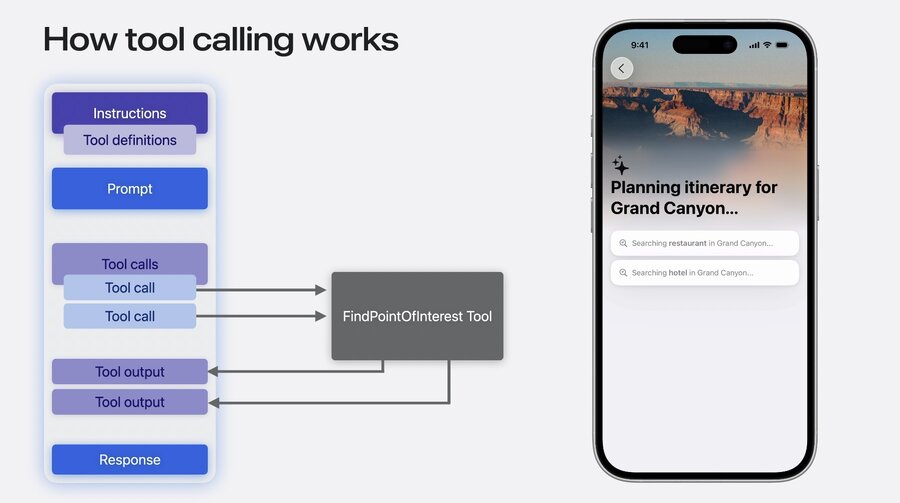
How it works
You define tools with instructions, then pass a prompt
The model checks if any tool calls are needed and executes them
Your tools produce output that is feeded back to the model
Model combines tool output along with everything else for final response
Defining a tool
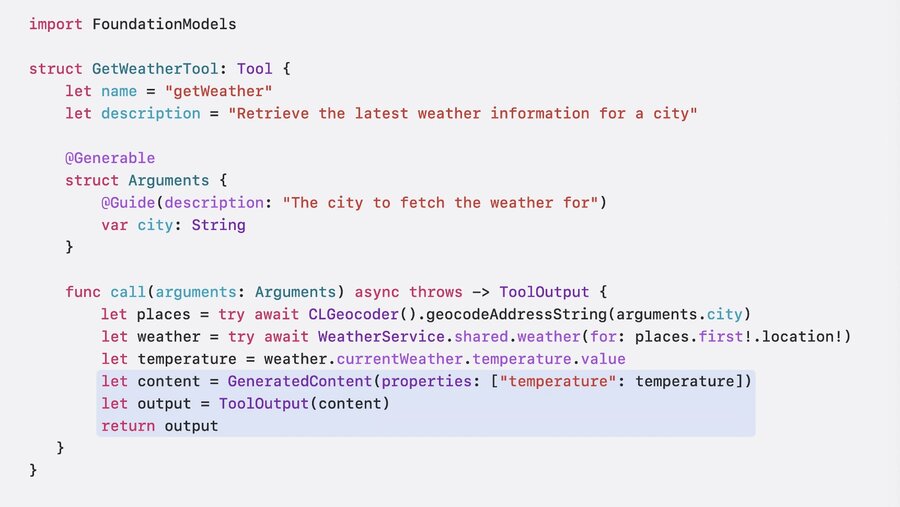
Define a type conforming to the
Toolprotocol, which requiresnameanddescriptionImplement the function
call(arguments:) async throws -> ToolOutputThe
argumentsparameter can be any@Generabletype of your choiceInitialize & return a
ToolOutputwhich accepts either aStringorGeneratedContent(dictionary)
Tools must be passed upon initializing a
LanguageModelSessionThe session will autonomously use tools where needed, just use
session.respond(to:)like normal
Dynamic tools
Use these for runtime-defined behaviors, with dynamic schema & parameterized names/descriptions
Learn more: Deep dive into the Foundation Models framework
Stateful sessions
By default new sessions prompt the general purpose model
You can pass
instructionsupon session initialization to provide the model its roleE.g. you could pass a response style or length restrictions as instructions
Instructions should always come from the developer, not from the user (instructions get priority)
For security reasons, dont’t allow untrusted content in instructions
Learn more: Explore prompt design and safety for ondevice foundation models
Past interactions are considered as part of the “transcript” within a single session
You can access the
transcriptproperty on a session (e.g. to show in UI)Use the
isRespondingproperty to prevent users from sending a new message while in progressAdditional built-in specialized use-cases available as alternative models
Pass to sessions’
modelparameter, e.g.:SystemLanguageModel(useCase: .contentTagging)
More use cases may get added over time, check the docs: https://developer.apple.com/documentation/foundationmodels/systemlanguagemodel/usecase
Content tagging adapter
First-class support for: Tag generation, entity extraction, and topic detection
By default trained to output topic tags, integrates with guided generation out-of-the-box:
@Generable
struct Result {
   let topics: [String]
}

let session = LanguageModelSession(model: SystemLanguageModel(useCase: .contentTagging))
let response = try await session.respond(to: ..., generating: Result.self)
But you can specify custom
@Generabletypes and custom instructions for detecting other things:
@Generable
struct Top3ActionEmotionResult {
    @Guide(.maximumCount(3))
    let actions: [String]
    @Guide(.maximumCount(3))
    let emotions: [String]
}

let session = LanguageModelSession(
    model: SystemLanguageModel(useCase: .contentTagging),
    instructions: "Tag the 3 most important actions and emotions in the given input text."
)
let response = try await session.respond(to: ..., generating: Top3ActionEmotionResult.self)
Make sure to check for availability as only supported by Apple Intelligence enabled devices:
struct AvailabilityExample: View {
    private let model = SystemLanguageModel.default

    var body: some View {
        switch model.availability {
        case .available:
            Text("Model is available").foregroundStyle(.green)
        case .unavailable(let reason):
            Text("Model is unavailable").foregroundStyle(.red)
            Text("Reason: \(reason)")
        }
    }
}
Possible errors for requests: Guardrail violation, unsupported lanugage, context window exceeded
Developer experience
Keep in mind that LLMs are slower than traditional ML models
You can quantify delays in instruments to optimize your prompts
Provide unexpected responses using Feedback assistant (choose “Foundation Models Framework”)
Use the
LanguageModelFeedbackAttachmenttype that conforms toEncodableto attach a JSON fileYou can train your own adapter (but have to retrain with every Apple model update)
Learn more about training your adapters in this developer article.
