
Key Takeaways
SwiftUI adopts the new look and feel of the OS out of the box, but provides a variety of tools to customize the behavior.
Better interoperability with other frameworks across the board (like AppKit, RealityKit, and WebKit) provides additional flexibility and optionality for advanced use cases and incremental adoption.
New views and functionality open SwiftUI to new use cases that previously required bridging, like rich text editing and web views.
Adopt the new design
Toolbars
New
ToolbarSpacerAPI to separate buttons.borderedProminentappearance for toolbar items supports tinting via thetintmodifier.
Bottom aligned search fields on iOS
Use
searchableon the outside of theNavigationSplitViewto get the bottom aligned search automatically.On iPad, the new search appearance is on the top trailing corner.
For tab based apps, you can get the morphing search tab by using the
roleinitializer on yourTab:Tab(role: .search) { … }
Custom views
Custom views can adopt the new look too.
glassEffectmodifier can be applied to reflect the content behind your custom view.
Menu bar on iPadOS
Using the
commandsmodifier now yields the same result across iPad and Mac.
Adopt fluid resizing
On iPadOS, migrate off APIs that fix the screen to full size.
Remove
UIRequiresFullScreen. It is now deprecated.Watch Elevate the design of your iPad app to learn more.
On macOS, for window resizes caused by content size changes, SwiftUI now synchronizes the animation between content and window sizes.
Use the new
windowResizeAnchorAPI to customize where the animation originates.Great for animating tab switching in the settings window on macOS.
To learn more about adopting the new design, watch Build a SwiftUI app with the new design.
SwiftUI performance
Key performance improvement areas:
Lists
Improvements to large lists and incremental updates.
Scrolling
Improved scheduling for updates on iOS and macOS.
Debugging and profiling
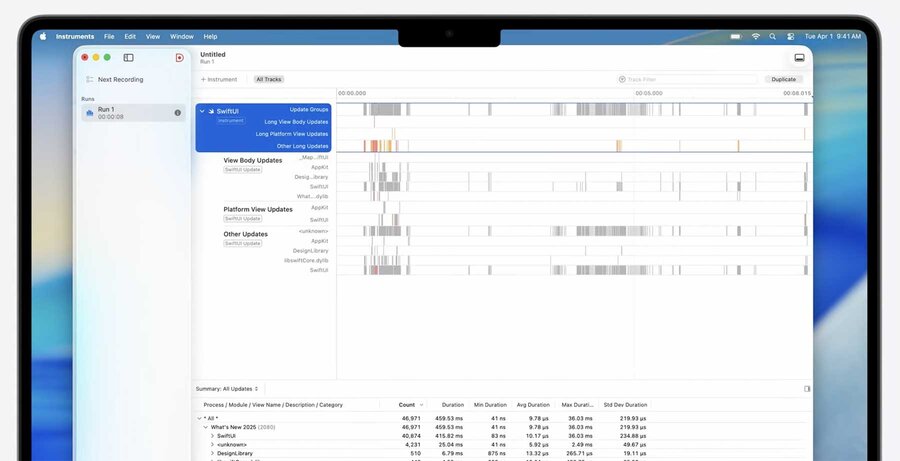
New SwiftUI Performance instrument in Xcode
Animatable macro
New @Animatable macro allows you to delete manual custom animatableData property declarations.
You can exclude properties that shouldn’t be animatable as @AnimatableIgnored within your @Animatable annotated type.
@Animatable
struct LoadingArc: Shape {
    var center: CGPoint
    var radius: CGFloat
    var startAngle: Angle
    var endAngle: Angle
    @AnimatableIgnored var drawPathClockwise: Bool
}
SwiftUI on visionOS
More volumetric and spatial layout options.
To learn more about new layout techniques like the
spatialOverlaymodifier, watch Meet SwiftUI spatial layout.New
manipulablemodifier allows users to pick up objects.To learn more about volumes and scenes, watch Set the scene with SwiftUI in visionOS.
SwiftUI across the system
Scene bridging
Allows you to request scenes from AppKit and UIKit contexts.
Mac apps can now render remote immersive spaces using a new scene.
Uses
CompositorServicesunder the hood.To learn more, watch Whats new in Metal rendering for immersive apps.
A new
AssistiveAccessscene type allows your app to take advantage of the special mode for users with cognitive disabilities.To learn more, watch Customize your app for Assistive Access.
Enhancements to AppKit interoperability
You can show sheets in
NSWindows with SwiftUIViews in them.AppKit gestures can be bridged to SwiftUI using
NSGestureRecognizerRepresentable.NSHostingViewcan be used in Interface Builder.
Improvements to RealityKit interoperability
RealityKit entities now conform to
Observable.Makes it trivial to observe changes in SwiftUI views.
An improved coordinate conversion API.
Enhanced support for presentations right from RealityKit.
For instance, you can present SwiftUI popovers directly from a RealityKit
Entityusing the newPresentationComponentAPI.To learn more, watch Better together SwiftUI and RealityKit.
Platform adoption
Custom Control Center Controls are coming to macOS and watchOS.
Widgets are coming to visionOS and CarPlay.
To learn about additions to widgets, watch Whats new in widgets.
New & updated SwiftUI views
WebView
New SwiftUI view for showing web content.
Powered by WebKit.
Can show
URLs orWebPages.WebPageis a newObservabletype that enables rich interaction with the web.To learn more about these APIs and the better WebKit interoperability, watch Meet WebKit for SwiftUI.
3D Charts
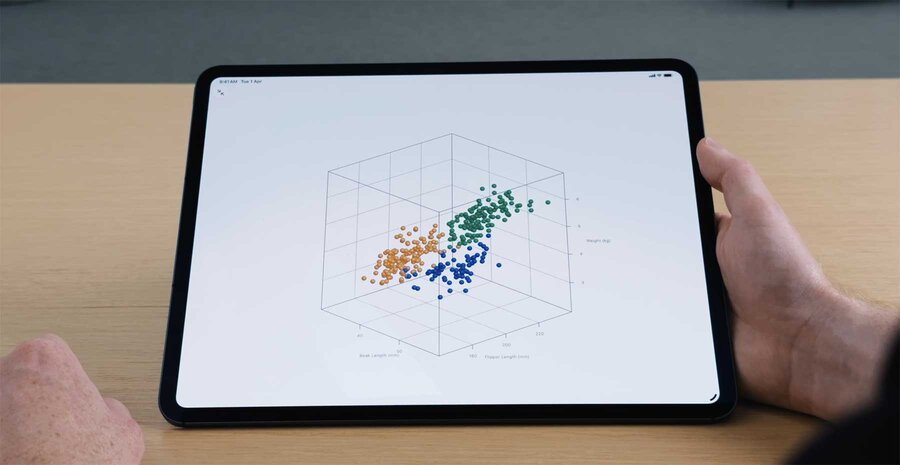
Declared using
Chart3DCould use
zaxis specific modifiers likechartZScaleto specify e.g. scalesTo learn more, watch Bring Swift Charts to the third dimension.
Drag & Drop
New variant of the
draggablemodifier accepts acontainerItemID.dragContainermodifier makes the target view a container for drag items.SwiftUI requests drag items lazily when a drop occurs.
Customize the drag behavior by adopting the new
dragConfigurationmodifier.Observe drag event updates, use the new
onDragSessionUpdatedmodifier.To customize the drag preview for multiple items, you can specify the formation of the items using the
dragPreviewsFormationmodifier.
Rich text editing
TextEditornow accepts anAttributedString.Introduces abilities to add paragraph styles, transform attributes, and constrain text inputs.
Watch Codealong Cook up a rich text experience in SwiftUI with AttributedString and Codealong Explore localization with Xcode.
