Key Takeaways
Introduce only the concurrency you need
Interleaving improves system performance
Profile and optimize first
Swift catches data races at compile time
Apps need to use concurrency sparingly, should only introduce concurrency as you need it.
Presenters
Doug Gregor, Swift team
Step 0. Single-threaded code
Start by running all code on the main thread
Easier to write and maintain (only one thing happens at a time)
Many apps need concurrency only sparingly, some not at all → introduce it only as needed
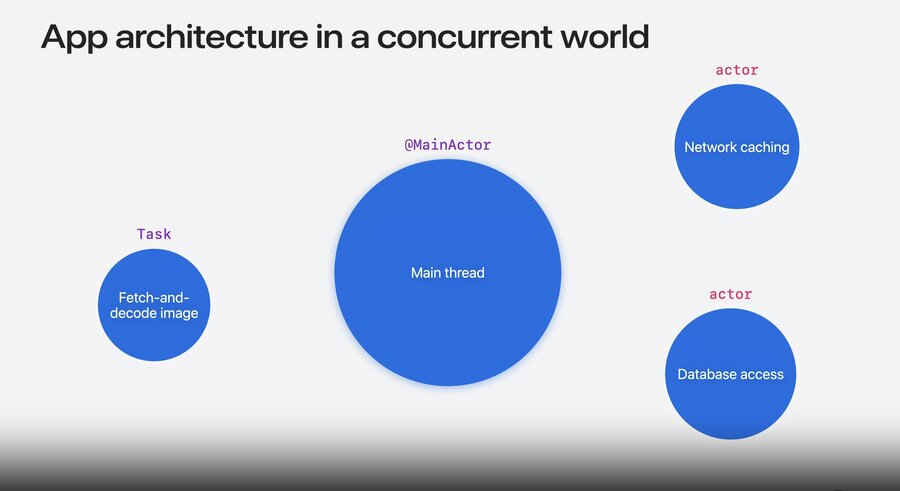
The main thread and its data are represented by the main actor
No concurrency exists on the main actor, since only one main thread can run it
Mark code/data with
@MainActorto isolate it — Swift ensures it only runs on the main thread and its data is only accessed there
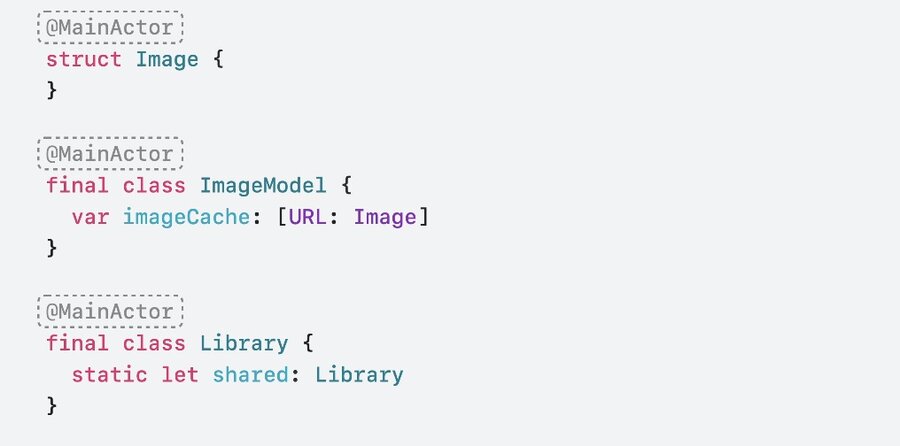
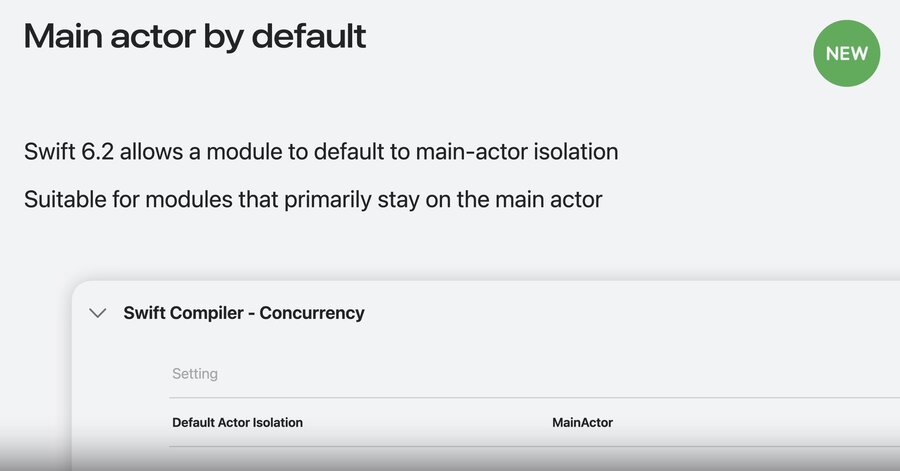
Main actor by default: a build setting that applies
@MainActoracross a whole module for youEnabled by default for new app projects in Xcode 26+; best for the main app module and UI-focused modules
Keep the app responsive — don’t tie up the main thread so long that the UI glitches or hangs
e.g. a synchronous fetch blocks the main thread until the download finishes, freezing the UI

func fetchAndDisplayImage(url: URL) throws {
    let (data, _) = try URLSession.shared.data(from: url)
    let image = decodeImage(data)
    view.displayImage(image)
}
Step 1. Asynchronous tasks
Use asynchronous tasks when waiting on data (e.g. a network request) without tying up the main thread
Mark the function
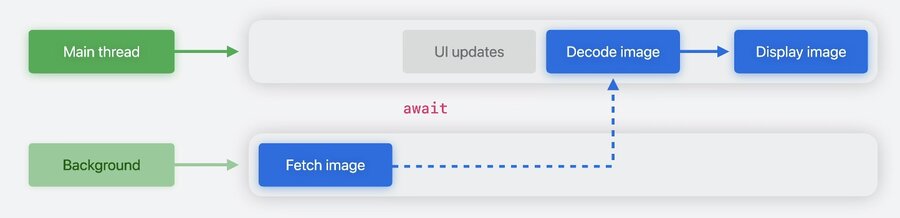
asyncand call the slow API withawaitawaitmarks a suspension point — the function may stop running on the current thread until the awaited event happens, then resumesThink of it as splitting the function in two (before / after the fetch) → other work can run in between, keeping the UI responsive
awaitdoes not block the main thread; APIs likeURLSessionoffload the actual work to the background for you
func fetchAndDisplayImage(url: URL) async throws {
    let (data, _) = try await URLSession.shared.data(from: url)
    let image = decodeImage(data)
    view.displayImage(image)
}
An
asyncfunction runs in a taskA task executes independently of other code and should perform one operation end-to-end
Commonly created in response to an event (e.g. a button press) — start async work from sync code with
Task { }
func onTapEvent() {
    Task {
        do {
            try await fetchAndDisplayImage(url: url)
        } catch let error {
            displayError(error)
        }
    }
}
Each task completes operations in order, start to finish
Fetching runs in the background, but the task’s other operations still run on the main thread — only one runs at a time
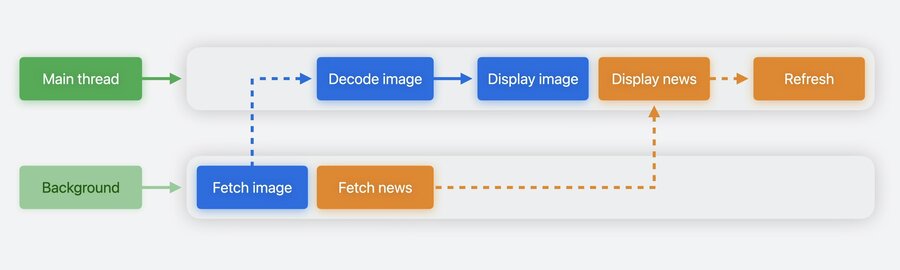
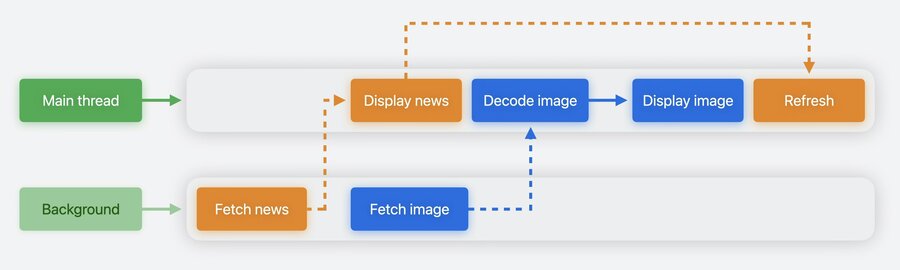
What is “Interleaving”?
a single thread alternating between multiple independent tasks → more efficient use of resources
still no concurrency in your own code — async is not background, it just means non-blocking while staying on the main actor
Asynchronous single-threaded code is often enough.
If the app feels unresponsive, too much is running on the main thread
profile with Instruments, and speed the work up without concurrency first if you can
Step 2. Introduce concurrency to move work to a background thread
Async single-threaded code isn’t always enough — async functions still run on the main actor, so heavy CPU work (e.g. decoding a large image) can still hang the UI
Concurrency runs parts of your code on a background thread, in parallel with the main thread → doesn’t block the UI, and uses more CPU cores
@concurrentruns the function in the background
@MainActor
func fetchAndDisplayImage(url: URL) async throws {
    let (data, _) = try await URLSession.shared.data(from: url)
    let image = await decodeImage(data, at: url)
    view.displayImage(image)
}

@concurrent
func decodeImage(_ data: Data, at url: URL) async -> Image {
    if let image = cachedImage[url] {   // error: main actor-isolated property 'cachedImage'
        return image                    // can't be accessed from outside the main actor
    }

    // decode image
    cachedImage[url] = image
    return image
}
The system schedules offloaded work on the concurrent thread pool (all of the system’s background threads)
Small devices (e.g. a watch) may have only 1–2 threads, systems with more cores have more
When a task suspends, its thread runs other ready tasks, on resume it may continue on any available thread
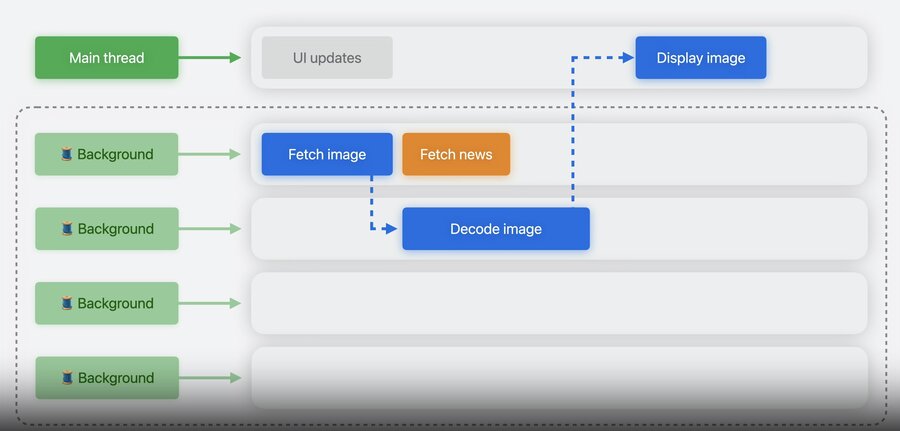
Strategies to break ties to the main actor
Move the main-actor code into a caller that always runs on the main actor
Use
awaitto access the main actor from concurrent code asynchronouslyMark code
nonisolatedwhen it doesn’t need any actor
Strategy 1 — check the cache in the
@MainActorcaller (no isolation error), and offload only the decodeChecking the cache before any async call removes latency: a cache hit completes synchronously without ever suspending
func fetchAndDisplayImage(url: URL) async throws {
    if let image = cachedImage[url] {
        view.displayImage(image)
        return
    }

    let (data, _) = try await URLSession.shared.data(from: url)
    let image = await decodeImage(data)
    cachedImage[url] = image
    view.displayImage(image)
}

@concurrent
func decodeImage(_ data: Data) async -> Image { ... }
Strategy 3 — for a library used by many clients,
@concurrentisn’t always best (small data is fine on the main thread)Provide a
nonisolatedAPI and let the client decide whether to offloadnonisolatedcode is flexible: called from the main actor it stays there, called from a background thread it stays there → a great default for general-purpose libraries
nonisolated
public class JSONDecoder {
    public func decode<T: Decodable>(_ type: T.Type, from data: Data) -> T
}
Step 3. Sharing data without data-races
Each hop between the main actor and the concurrent pool shares data across threads (URL out,
Databack, decoded image back)Sharing mutable state across threads is error-prone → Swift catches these mistakes at compile time, so you can add concurrency with confidence
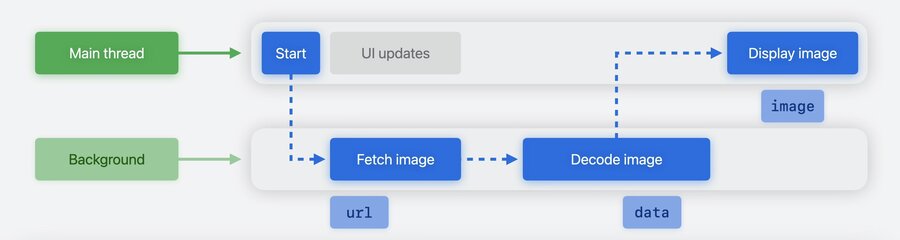
Sendable: a protocol marking types that are always safe to share concurrently; sharing across actors/tasks triggers a Sendable checkValue types are safe because sharing is really copying — each copy is independent, so changes on one thread don’t affect another
Basic types (
Int,String,Date,URL) and collections of them are implicitlySendableStructs/enums are
Sendablewhen all stored properties areSendableMain-actor-isolated types are implicitly
Sendable(the actor serializes access)
// Value types are Sendable
extension URL: Sendable {}

// Collections of Sendable elements
extension Array: Sendable where Element: Sendable {}

// Structs and enums with Sendable storage
struct ImageRequest: Sendable {
    var url: URL
}

// Main-actor types are implicitly Sendable
@MainActor class ImageModel: Sendable { ... }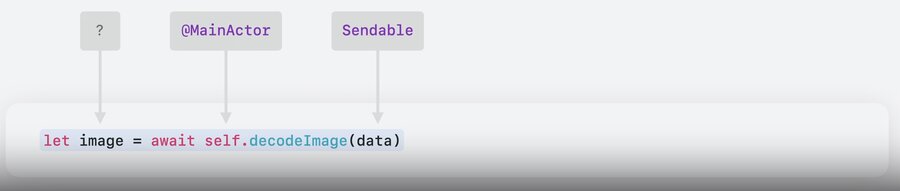
Reference types (classes) are different — many variables point to the same object, so a mutable class is not
SendableA model class usually starts on the main actor; if it needs background work, make it
nonisolatedbut keep it non-Sendable(prevents two threads from mutating it at once)
Sending a non-
Sendableobject (e.g. a mutableimage) into a concurrent task while the main actor still uses it risks a data race → Swift catches it at compile time
// error: sending 'image' to concurrent task risks data races with uses on the main actor
func scaleAndDisplay(imageName: String) {
    let image = loadImage(imageName)
    Task { @concurrent in
        image.scaleImage(by: 0.5)
    }
    view.displayImage(image)
}
Fix: finish all the work before hopping to the main thread, so nothing is shared concurrently
// Option 1 — make the whole function `@concurrent`; only the final UI update hops back with `await`
@concurrent
func scaleAndDisplay(imageName: String) async {
    let image = loadImage(imageName)
    image.scaleImage(by: 0.5)
    await view.displayImage(image)
}

// Option 2 — keep the function on the main actor, wrap the work in `Task { @concurrent in }`, then `await` the UI update
func scaleAndDisplay(imageName: String) {
    Task { @concurrent in
        let image = loadImage(imageName)
        image.scaleImage(by: 0.5)
        await view.displayImage(image)
    }
}
Order matters too — once you hand
imageto the main actor (await view.displayImage), you can’t keep mutating it concurrently
You can still send an object between tasks — just make all mutations before sending it
// error: sending 'image' risks data races — access can happen concurrently
@concurrent
func scaleAndDisplay(imageName: String) async {
    let image = loadImage(imageName)
    image.scaleImage(by: 0.5)
    await view.displayImage(image)   // image handed to the main actor here
    image.applyAnotherEffect()       // ...but still mutated concurrently → error
}

// Fix: finish all mutations before handing the image off to the main actor
@concurrent
func scaleAndDisplay(imageName: String) async {
    let image = loadImage(imageName)
    image.scaleImage(by: 0.5)
    image.applyAnotherEffect()
    await view.displayImage(image)
}
Step 4. Actor: move data off the main thread
As an app grows, more subsystem state piles up on the main actor
Background tasks then keep hopping to the main thread to touch that state → contention
many small hops add up to UI glitches
Define your own
actorto isolate that data onto its own domain, off the main actorAn actor isolates its state so only one task touches it at a time (access is serialized)
call its methods with
awaitfrom outsideActors are reference types but are
Sendable(serialized access → no data race)A program can have many independent actor objects, none tied to a single thread → frees the main thread for the UI
// Before: a main-actor class → every access hops to the main thread
final class NetworkManager {
    var openConnections: [URL: Connection] = [:]
    func openConnection(for url: URL) async -> Connection { ... }
    func closeConnection(_ connection: Connection, for url: URL) async { ... }
}

// After: an actor → manages its own isolation, off the main actor
actor NetworkManager {
    var openConnections: [URL: Connection] = [:]
    func openConnection(for url: URL) async -> Connection { ... }
    func closeConnection(_ connection: Connection, for url: URL) async { ... }
}Reach for an actor only when main-actor data forces too much code onto the main thread — then split out one non-UI subsystem (e.g. networking). Keep UI-facing and model classes on the main actor (or non-Sendable) so you don’t invite lots of concurrent access.
Recommended build settings
Approachable Concurrency: enables upcoming features that make concurrency easier → adopt in all projects
For UI-focused Swift modules (e.g. your main app module), set the default actor isolation to Main Actor
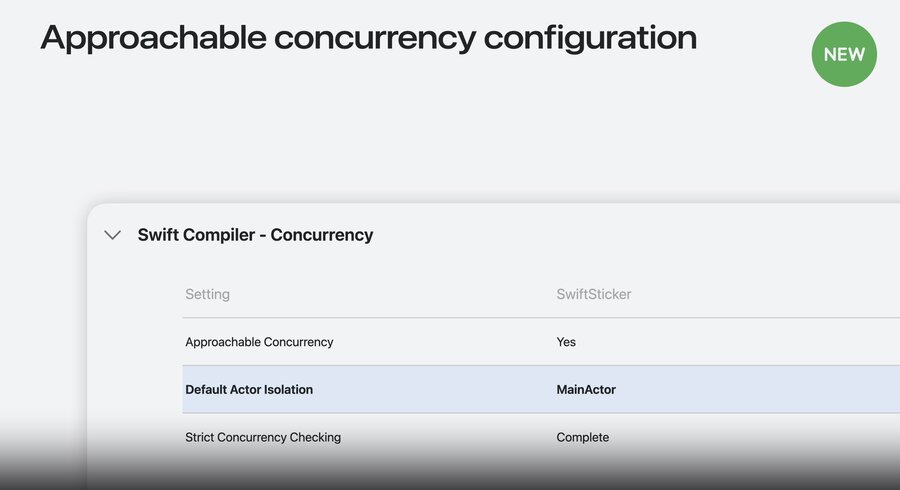
The journey — start single-threaded on the main actor → add async/await to hide latency → @concurrent for heavy work → share data safely with Sendable → introduce actors for shared mutable state. Profile to decide what to move off the main thread.