
Key Takeaways
Bring app functionality out into the system
App Intents perform actions of your app
App Shortcuts expose App Intents to Spotlight, Siri, Action Button or Apple Pencil
App Enums are static values
App Entities are dynamically fetched values
App Intents ecosystem
App Intents (short Intents) allow you to bring your apps functionality out into the system like:
Spotlight search results
New: Spotlight on Mac can invoke actions directly
Configurable and interactive Widgets
Controls in Control Center
Apple Pencil Pro actions
Shortcuts App
Core Concepts
AppIntentsdescribe actions of your app (basically the verb)Intents take parameters and return values as native Swift types or custom types (basically the noun)
AppShortcutsused to surface App Intents to Siri, Spotlight, etc. (basically the sentence)
Basic Structure of App Intents
struct NavigateIntent: AppIntent {
    // Title shown in Shortcuts app
    static let title: LocalizedStringResource = "Navigate to Landmarks"

    // Opens app before running perform() (optional)
    static let supportedModes: IntentModes = .foreground

    // Action of the Intent
    // Running on @MainActor here because example navigates app
    @MainActor
    func perform() async throws -> some IntentResult {
        Navigator.shared.navigate(to: .landmarks)
        return .result()
    }
}
Minimum requirements for App Intent are title and perform method
titleis localized name of Intentperform()method contains logic returningIntentResultIntentResultcan be used for Siri’s response or showing snippetBy default Intents don’t foreground/open app
Use new
supportedModesto open app before intent is run
App Shortcuts
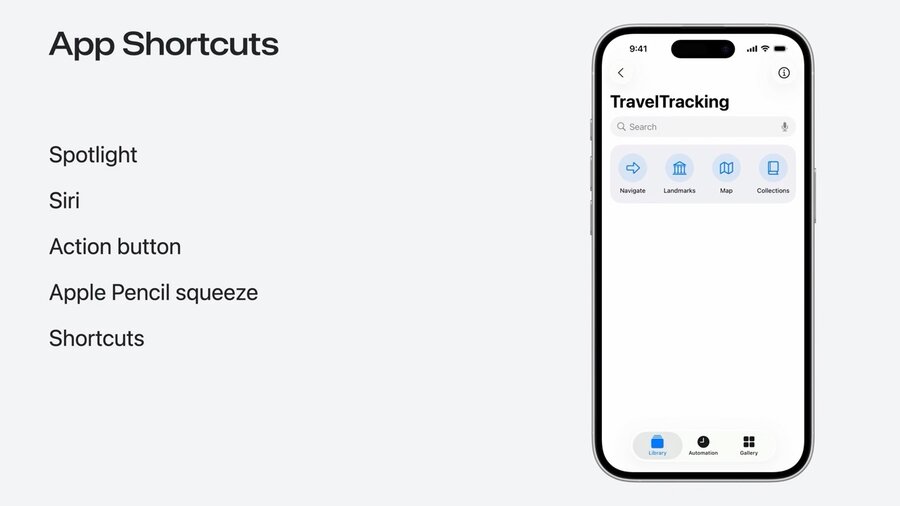
AppShortcutsexpose App Intents to Spotlight, Siri, Action Button or Apple PencilAlso appear in dedicated section in Shortcuts app
Defined via
AppShortcutsProvideronce per app:
struct TravelTrackingAppShortcuts: AppShortcutsProvider {
    static var appShortcuts: [AppShortcut] {
        AppShortcut(
            intent: NavigateIntent(),
            phrases: [
                "Navigate in \(.applicationName)",
                "Navigate to \(\.$navigationOption) in \(.applicationName)"a
            ],
            shortTitle: "Navigate",
            systemImageName: "arrowshape.forward"
        )
    }
}
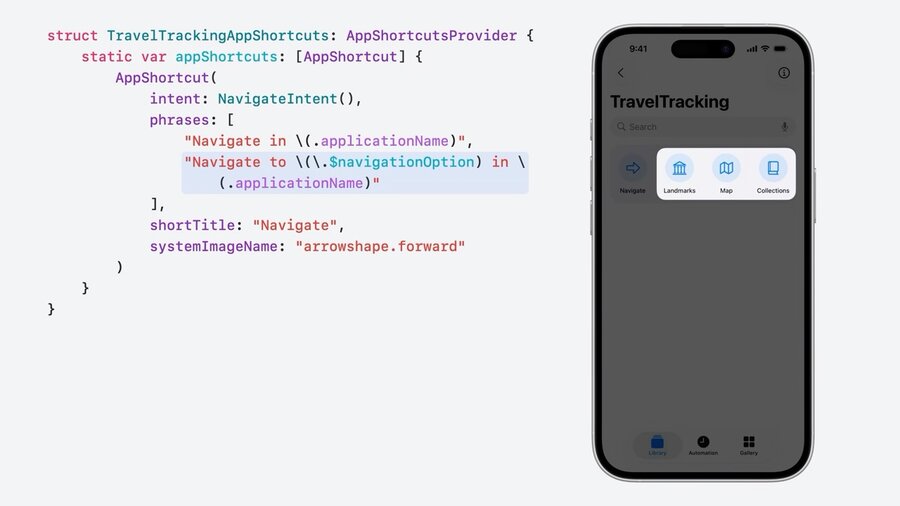
Each phrase must contain app name placeholder
.applicationNameCan include up to one intent parameter
Creates App Shortcut for each value of type
Learn more about App Shortcuts in this talk: Spotlight your app with App Shortcuts
Customize Shortcuts Appearance
struct NavigateIntent: AppIntent {
    // …

    // Sentence like representation in Shortcuts app
    static var parameterSummary: some ParameterSummary {
        Summary("Navigate to \(\.$navigationOption)")
    }

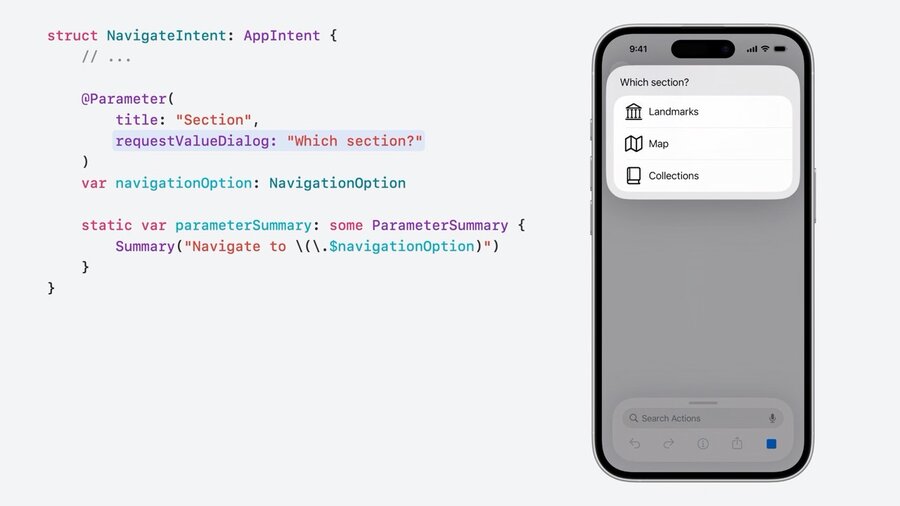
    // Custom label for parameter & title shown when user input is required
    @Parameter(
        title: "Section",
        requestValueDialog: "Which section?"
    )
    var navigationOption: NavigationOption

    @MainActor
    func perform() async throws -> some IntentResult {
        Navigator.shared.navigate(to: navigationOption)
        return .result()
    }
}
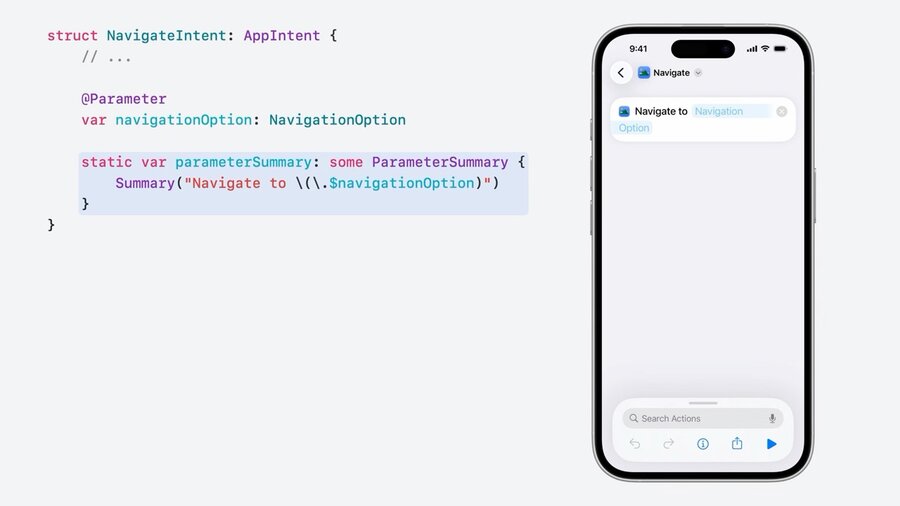
Use
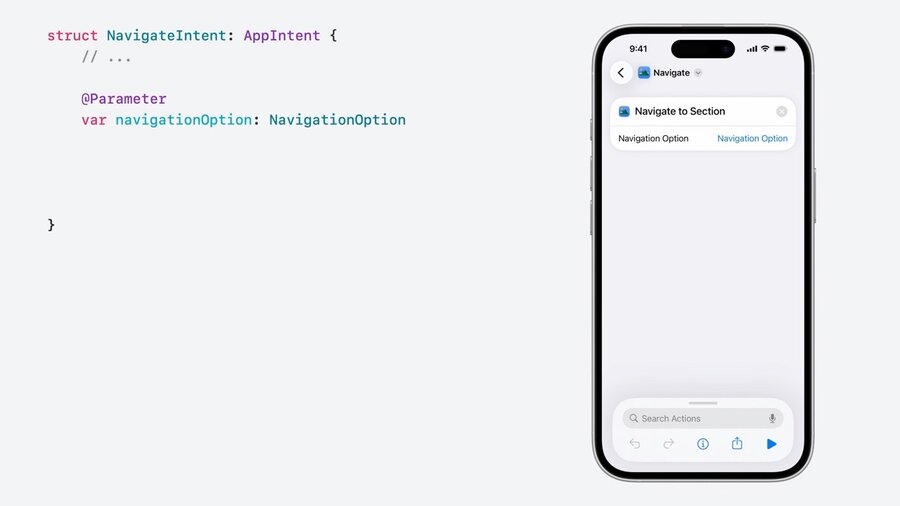
parameterSummaryto add sentence like representation for ShortcutAccepts parameters for inline customization
Use
titleat@Parameterto customize labelUse
requestValueDialogat@Parameterfor custom Siri headline
Static Values via AppEnum
enum NavigationOption: String, AppEnum {
    case landmarks
    case map
    case collections

    // Title of the whole type
    static let typeDisplayRepresentation: TypeDisplayRepresentation = "Navigation Option"

    // Title of each individual case
    static let caseDisplayRepresentations: [NavigationOption: DisplayRepresentation] = [
        .landmarks: "Landmarks",
        .map: "Map",
        .collections: "Collections"
    ]
}

struct NavigateIntent: AppIntent {
    // …

    // Link to AppEnum
    @Parameter var navigationOption: NavigationOption

    @MainActor
    func perform() async throws -> some IntentResult {
        Navigator.shared.navigate(to: navigationOption)
        return .result()
    }
}
Conform enums to
AppEnumto use them in IntentsRequires to also conform to
StringRequires
typeDisplayRepresentationas description of the whole typeRequires
caseDisplayRepresentationsas description of individual casesNeeds to be constant as it is used at compile time!
Use
@Parameterto offer options to IntentsParameters can be optional or required
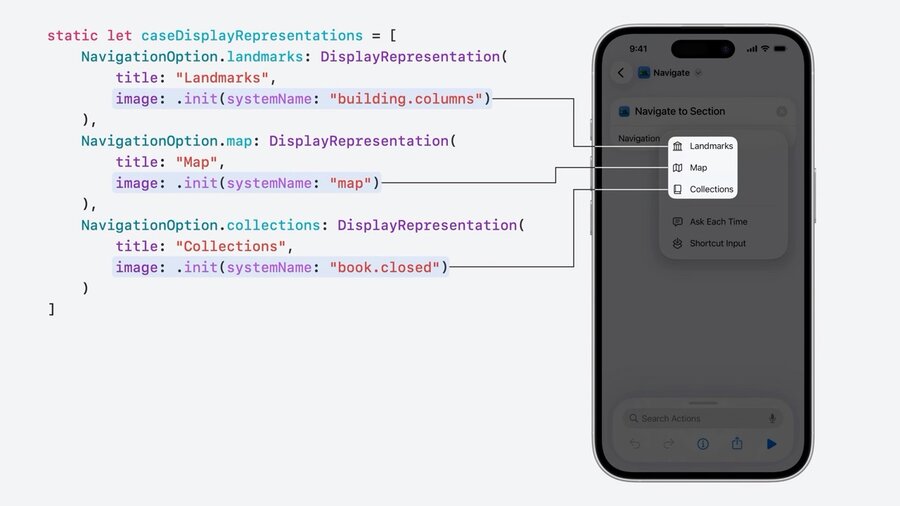
Add icons via
DisplayRepresentation:
static let caseDisplayRepresentations = [
    NavigationOption.landmarks: DisplayRepresentation(
        title: "Landmarks",
        image: .init(systemName: "building.columns")
    ),
    NavigationOption.map: DisplayRepresentation(
        title: "Map",
        image: .init(systemName: "map")
    ),
    NavigationOption.collections: DisplayRepresentation(
        title: "Collections",
        image: .init(systemName: "book.closed")
    )
]
Dynamic Values via AppEntity
Use existing types or create new types as bridge between data model and Intents via
AppEntityAppEntitymust be identifiable with persistent ID for lookupUse
@Propertyto define attributesWill be exposed to user
Also used for Find and Filter actions
Use new getter
@ComputedPropertyto defer to data model directlyRequires representations of type and instances like App Enums
Requires
defaultQueryto get the dynamic data
struct LandmarkEntity: AppEntity {
    // Required persistent identifier
    var id: Int

    // Attributes exposed to users
    @Property
    var name: String

    @Property
    var description: String

    // Title of the whole type
    static let typeDisplayRepresentation = TypeDisplayRepresentation(name: "Landmark")

    // Title of each individual case
    var displayRepresentation: DisplayRepresentation {
        DisplayRepresentation(title: "\(name)")
    }

    // Handling of retrieving the data
    static let defaultQuery = LandmarkEntityQuery()
}
struct LandmarkEntity: AppEntity {
// Required persistent identifier
var id: Int { landmark.id }
// Attributes exposed to users
@ComputedProperty
var name: String { landmark.name }
@ComputedProperty
var description: String { landmark.description }
// The data model
let landmark: Landmark
// Title of the whole type
static let typeDisplayRepresentation = TypeDisplayRepresentation(name: "Landmark")
// Title of each individual case
var displayRepresentation: DisplayRepresentation {
DisplayRepresentation(title: "\(name)")
}
// Handling of retrieving the data
static let defaultQuery = LandmarkEntityQuery()
}Query the Data
EntityQueryis used to get the Entities from appEntityStringQueryasks for Entity matching a stringEntityPropertyQueryused for more complex filteringUse
@Dependencyto access local database or other dependenciesRegister as early as possible in app lifecycle via
AppDependencyManager
struct LandmarkEntityQuery: EntityQuery {
    // Optional link to local database
    @Dependency var modelData: ModelData

    func entities(for identifiers: [LandmarkEntity.ID]) async throws -> [LandmarkEntity] {
        modelData
        .landmarks(for: identifiers)
        .map(LandmarkEntity.init)
    }
}

// Register dependency in App
@main
struct LandmarksApp: App {
    init() {
        AppDependencyManager.shared.add { ModelData() }
    }
}
Show Results after Run
struct ClosestLandmarkIntent: AppIntent {
    static let title: LocalizedStringResource = "Find Closest Landmark"

    @Dependency var modelData: ModelData

    @MainActor
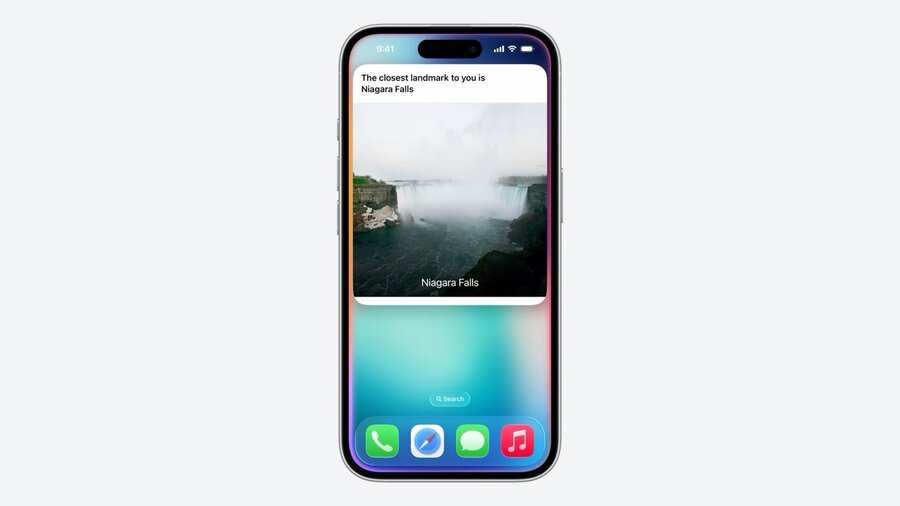
    func perform() async throws -> some ReturnsValue<LandmarkEntity> & ProvidesDialog & ShowsSnippetView {

        let landmark = try await modelData.findClosestLandmark()

        return .result(
            value: landmark,
            dialog: "The closest landmark to you is \(landmark.name)",
            view: ClosestLandmarkView(landmark: landmark)
        )
    }
}@Dependencycan be used in App IntentsReturn all kinds of values for multi step actions via
ReturnsValuePossible to return Entities for your own app actions
Return
ProvidesDialogto read out resultsReturn
ShowsSnippetViewfor custom results view
Customize Representation of App Entities
Uses display representation by default
Use
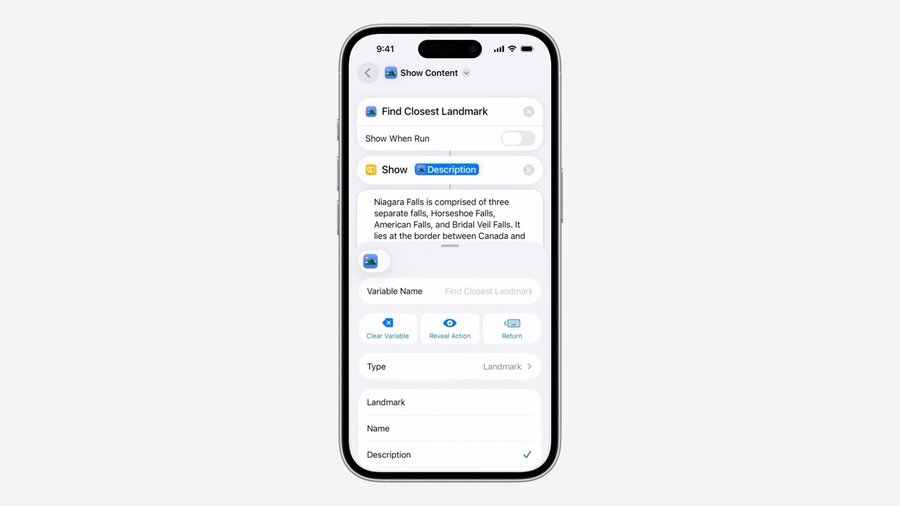
Transferableprotocol to customize representationCan be used to share data between apps and other actions
extension LandmarkEntity: Transferable {
    static var transferRepresentation: some TransferRepresentation {
        DataRepresentation(exportedContentType: .image) {
            return try $0.imageRepresentationData
        }
    }
}
Choose in Shortcuts app between types:
App Entities in Spotlight
struct LandmarkEntity: IndexedEntity {
    // …

    @Property(
        indexingKey: \.displayName
    )
    var name: String

    @Property(
        indexingKey: \.contentDescription
    )
    var description: String
}
Donate to Spotlight by conforming to
IndexedEntityIs an
AppEntitywith Core Spotlight attribute set
Add indexing keys to
@Property
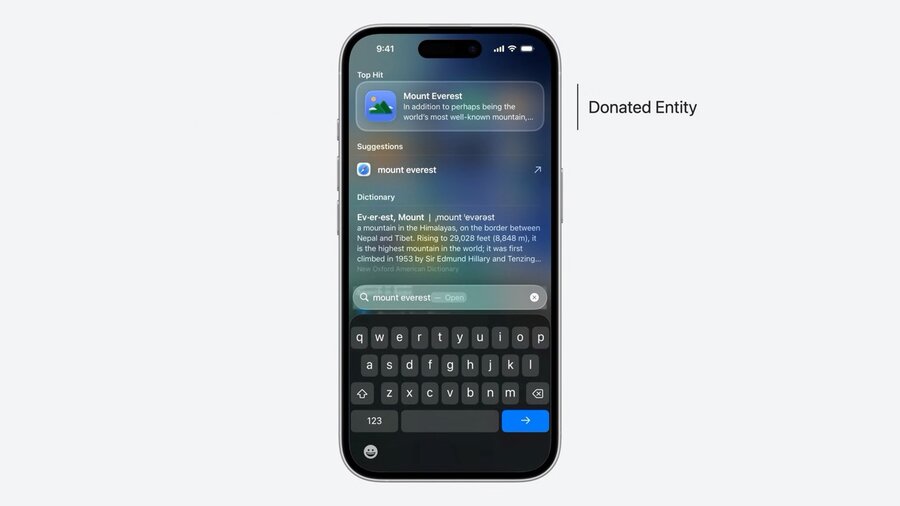
Tapping Spotlight result opens app by default
Open corresponding view via a
OpenIntent:
struct OpenLandmarkIntent: OpenIntent, TargetContentProvidingIntent {
    static let title: LocalizedStringResource = "Open Landmark"

    @Parameter(title: "Landmark", requestValueDialog: "Which landmark?")
    var target: LandmarkEntity
}

// App Handling
struct LandmarksNavigationStack: View {
    @State var path: [Landmark] = []

    var body: some View {
        NavigationStack(path: $path) {}
        .onAppIntentExecution(OpenLandmarkIntent.self) { intent in
            path.append(intent.target.landmark)
        }
    }
}OpenIntentautomatically open app before performing actionRequire
targetparameterUsing
TargetContentProvidingIntentdoesn’t require theperform()actionLinks to view in app via
.onAppIntentExecutionmodifier
More Advanced Queries
Use
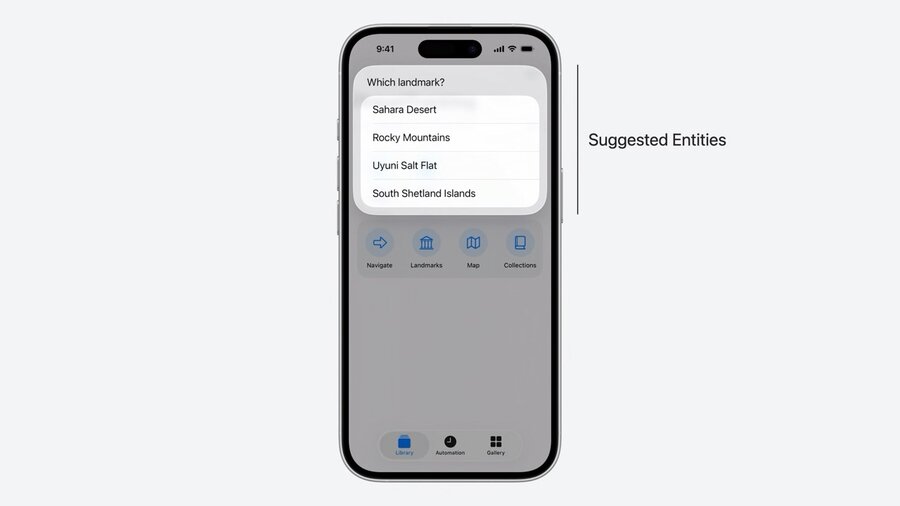
suggestedEntities()to offer selection to user in Siri or App ShortcutsUse
.updateAppShortcutParameters()in app to generate App Shortcut for each entity
struct LandmarkEntityQuery: EntityQuery {
    // …

    func suggestedEntities() async throws -> [LandmarkEntity] {
        modelData
            .favoriteLandmarks()
            .map(LandmarkEntity.init)
    }
}
Use
EnumerableEntityQuerywithallEntities()function if all entities can fit in memoryUse
EntityPropertyQueryfor more complicated queries:
extension LandmarkEntityQuery: EntityPropertyQuery {
    static var properties = QueryProperties {
        // …
    }

    static var sortingOptions = SortingOptions {
        // …
    }

    func entities(
        matching comparators: [Predicate<LandmarkEntity>],
        mode: ComparatorMode,
        sortedBy: [Sort<LandmarkEntity>],
        limit: Int?
    ) async throws -> [LandmarkEntity] {
        // Handle data fetching, filtering and sorting
    }
}
Use
EntityStringQueryfor finding entities via matching string:
extension LandmarkEntityQuery: EntityStringQuery {
    func entities(matching: String) async throws -> [LandmarkEntity] {
        modelData
            .landmarks
            .filter { $0.name.contains(matching) || $0.description.contains(matching) }
            .map(LandmarkEntity.init)
    }
}
How it works
Code is the source of truth
Code is read at compile time
Packaged with your target
Indexed at installation
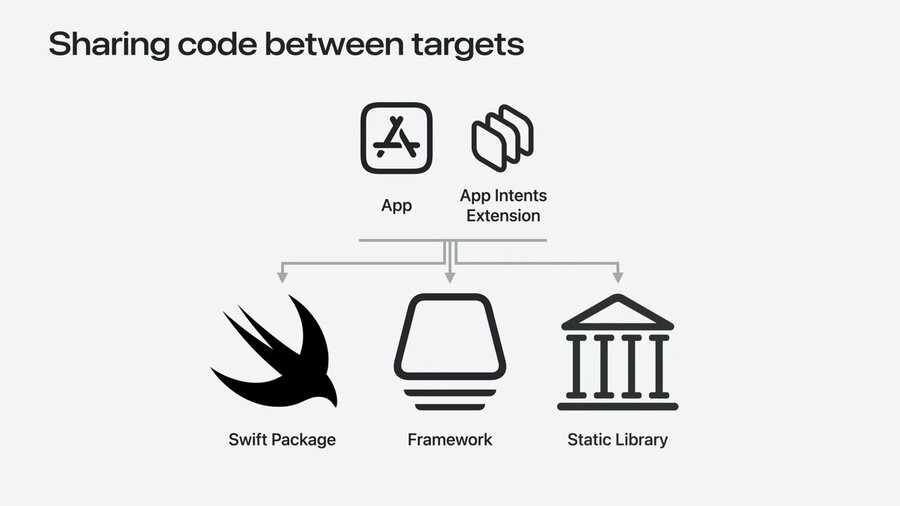
Intents can be shared via multiple targets
Register each target via
AppIntentsPackage
// Swift Package
public struct TravelTrackingKitPackage: AppIntentsPackage {}
public struct LandmarkEntity: AppEntity {
    // …
}

// App
struct TravelTrackingPackage: AppIntentsPackage {
    static var includedPackages: [any AppIntentsPackage.Type] {
        [TravelTrackingKitPackage.self]
    }
}
struct OpenLandmarkIntent: OpenIntent {
    // …
}

// Extension
struct TravelTrackingExtensionPackage: AppIntentsPackage {
    static var includedPackages: [any AppIntentsPackage.Type] {
        [TravelTrackingKitPackage.self]
    }
}
struct FavoriteLandmarkIntent: AppIntent {
    // …
}