
Key Takeaways
MainActor is SwiftUI’s default, so views stay isolated
Heavy work runs off the main thread, with data races flagged
Keep callbacks synchronous, bridging UI and async work with state
Presenters
Daniel Duan, SwiftUI Engineer
Attraction 1. MainActor Meadows
how SwiftUI treats the main actor as the compile-time and runtime default for apps.
SwiftUI’s
Viewprotocol is isolated on the@MainActor, so any conforming type is inferred to be@MainActortooThe annotation is implied, not written by hand
Every member of a
@MainActor-isolated type is implicitly isolated as well —body,@Stateproperties, and so on → accessing them is always safe, with no extra annotations neededA data model created inside the view doesn’t need any
@MainActorannotation either
@MainActoris SwiftUI’s compile-time default → most of the time you just build features without thinking about concurrency, and it’s safe automatically
// SwiftUI
@MainActor
public protocol View {
    associatedtype Body: View
    @ViewBuilder var body: Body { get }
}

// @MainActor (implied)
struct ColorExtractorView: View {
    // @MainActor (implied)
    @State private var model = ColorExtractor( ... )

    // @MainActor (implied)
    var body: some View { ... }
}
A
Taskstarted inside the body inherits the@MainActorisolation → its closure runs on the main thread by default, which is convenient for updating the UI right away
// @MainActor (implied)
var body: some View {
    ImageView( ... )
    SchemeContentView(colorScheme: model.scheme, ... )
        .onTapGesture {
            Task { // @MainActor (implied)
                await model.extractColorScheme()
            }
        }
    Slider(value: $model.colorCount, ... )
}
These annotations aren’t just a compile-time convenience
Reflect real runtime requirements inherited from UIKit and AppKit, which are exclusively
@MainActorisolated
UIViewRepresentablerefinesView, so conforming types are@MainActortoo;makeUIViewcan safely create UIKit objects likeUILabel()without any annotation
SwiftUI’s concurrency annotations express its runtime semantics, not merely compile-time hints
// AppKit and UIKit require @MainActor
// Example: UIViewRepresentable

// @MainActor (implied)
struct FancyUILabel: UIViewRepresentable {
    func makeUIView(context: Context) -> UILabel {
        let label = UILabel()
        // customize the label...
        return label
    }
}
Attraction 2. Concurrency Cliffs
how SwiftUI helps apps avoid UI hitches by offloading work from the main thread, while protecting against data-race bugs.
When the main thread has too much work, the app can drop frames or hitch → use tasks and structured concurrency to offload compute from the main thread
Related Session: Codealong Elevate an app with Swift concurrency
Built-in animations already run on a background thread to calculate their intermediary states
Related Session: Explore SwiftUI animation
SwiftUI runs on your behalf
SwiftUI is declarative: a struct conforming to
Viewis not an object pinned to a fixed location in memory (unlikeUIView)At runtime SwiftUI builds a separate representation of the view → this opens the door to many optimizations
A key one is evaluating parts of that representation on a background thread — reserved for cases that do heavy compute on your behalf, usually high-frequency geometry math
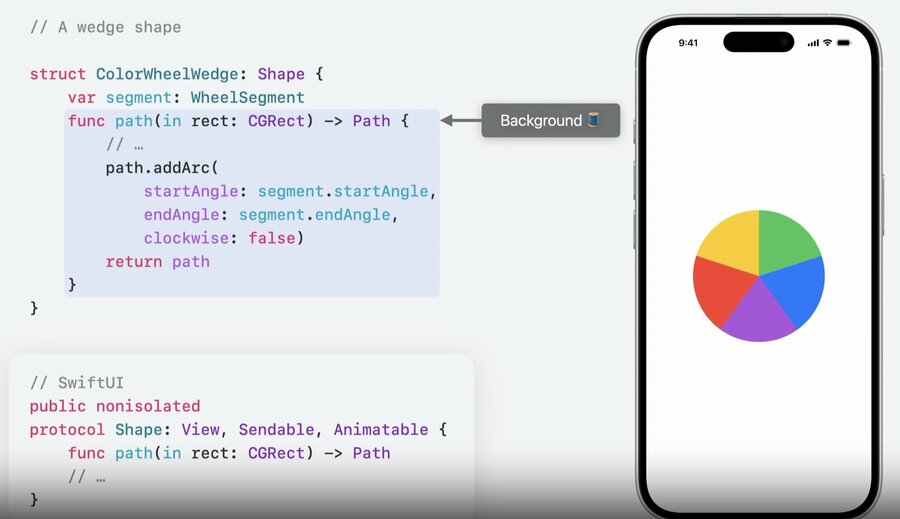
SwiftUI can even run your own code off the main thread. Two common examples:
Shape: thepath(in:)requirement can be called from a background thread. A customWedgeShapein the color wheel has itspathrecomputed off the main thread while it animates
Closure arguments:
visualEffecttakes a closure describing effects on the subject view. Because effects can be expensive to render, SwiftUI may call this closure from a background thread (here it blurs the text aspulseflips)
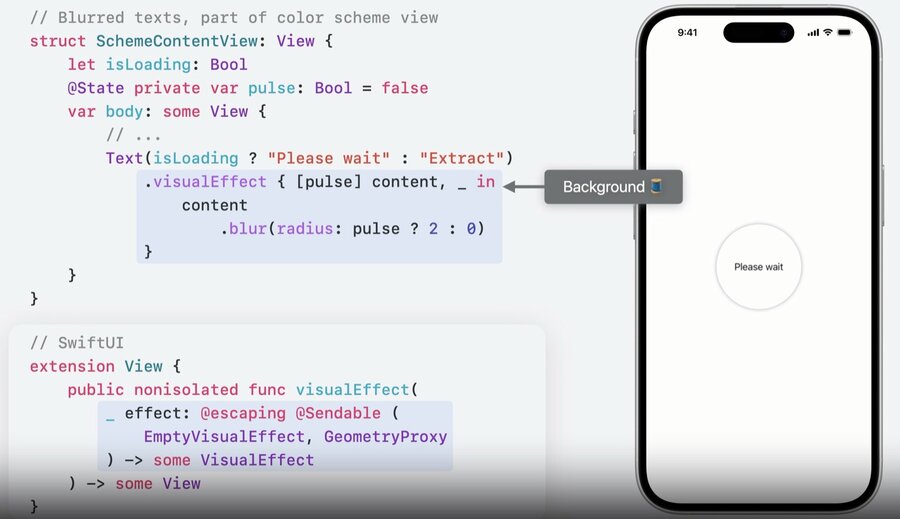
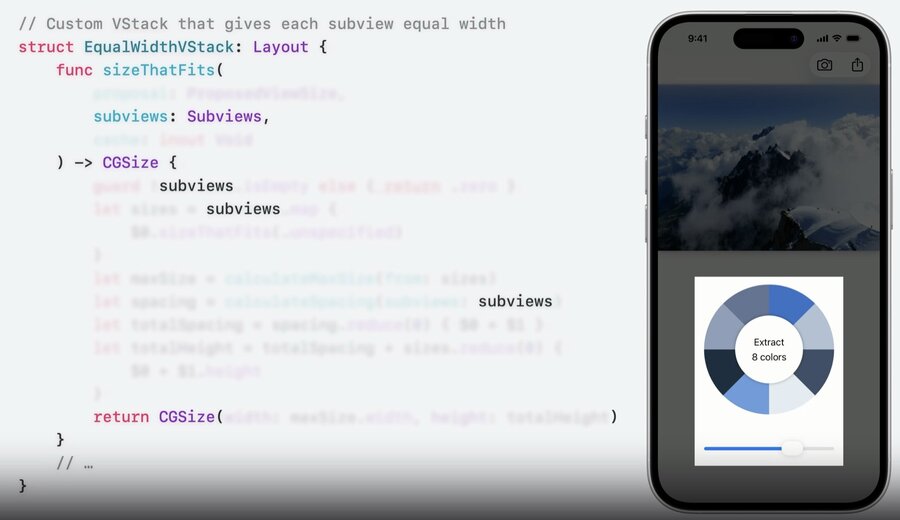
Layout’s requirement methods and the first closure ofonGeometryChangemay likewise run off the main threadSwiftUI expresses this runtime behavior (semantics) to the compiler — and to you — with
@Sendable; once again, the annotations reflect runtime semantics
// SwiftUI may call parts of these from a background thread

public nonisolated protocol Shape: View, Sendable, Animatable { ... }

public protocol Layout: Animatable, Sendable { ... }

extension View {
    public nonisolated func visualEffect(
        _ effect: @escaping @Sendable (
            EmptyVisualEffect, GeometryProxy
        ) -> some VisualEffect
    ) -> some View

    public nonisolated func onGeometryChange<T>(
        of value: @escaping @Sendable (GeometryProxy) -> T,
        do action: @escaping (T) -> Void
    ) -> some View
}
Race condition
@Sendableis a reminder about potential data races when sharing data from the@MainActor— Swift reliably finds these and flags them with compiler errorsBest strategy: don’t share data between concurrent tasks at all
When an API requires a sendable function, the framework passes most of the values you need as arguments → you can do sophisticated work without touching any external variables
If you do need a variable external to a sendable function, two things must happen:
selfmust be sent across the boundary into the background region → requiresselfto beSendable(aViewis, because it’s@MainActor-protected)the property you read must be
nonisolated(not isolated to any actor)
A
@MainActor-isolated property likepulsefails rule 2 → fix it by copying the value in the closure’s capture list, so you send aBoolcopy instead ofself
struct SchemeContentView: View { // Sendable (implied)
    let isLoading: Bool

    // @MainActor (implied)
    @State private var pulse: Bool = false

    var body: some View {
        Text(isLoading ? "Please wait" : "Extract")
            // Before: references self.pulse directly inside a @Sendable closure
            .visualEffect { content, _ in
                content.blur(radius: self.pulse ? 2 : 0) // Main actor-isolated property cannot be referenced from a Sendable closure
            }

            // After: capture pulse in the capture list so its value is copied
            .visualEffect { [pulse] content, _ in
                content.blur(radius: pulse ? 2 : 0)
            }
    }
}
Attraction 3. Code Camp
the relationship between concurrent code and SwiftUI APIs.
Most SwiftUI APIs (e.g. a Button’s action callback) are synchronous → to call async code you first switch to an async context with a
TaskWhy doesn’t
Buttonaccept an async closure?Synchronous updates matter for a good user experience —
before kicking off a long-running task, you want to update the UI (like a loading state) synchronously, especially to drive time-sensitive animations
Pattern: synchronously flip a loading state with
withAnimation, start theTask, then reverse the state synchronously once it finishes
.onTapGesture {
    guard !model.isExtracting else { return }
    withAnimation { model.isExtracting = true }       // synchronous: show loading
    Task {
        await model.extractColorScheme()              // async: the heavy work
        withAnimation { model.isExtracting = false }  // synchronous: hide loading
    }
}
Async functions need extra care with animations. →
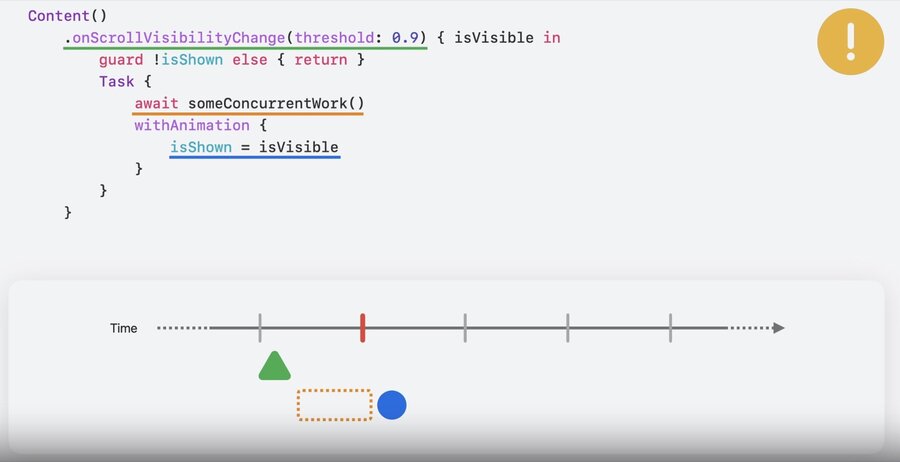
awaitcreates a suspension point: the compiler splits the function in two, and the runtime may pause between the halves for an arbitrary amount of timeIf a state mutation sits after an
await, it may resume past the device’s screen-refresh deadline → the animation looks laggy and out of step, so mutating inside an async function may not achieve your goal
SwiftUI provides synchronous callbacks by default
updating UI inside a synchronous closure is easy to get right
synchronous code is a great starting and ending point for most apps
Organizing concurrent code
If your app does a lot of concurrent work, find the boundaries between UI code and non-UI code → best to separate the async logic from the view logic
Use a piece of state as a bridge that decouples the UI from the async code: the view starts an async task, and when the work finishes it synchronously mutates the state so the UI reacts
Keep the code inside the async context simple: its job is just to inform the model about a UI event
Bonus: because the async code is now independent of the UI, it’s much easier to write unit tests for it (ideally without importing SwiftUI)
