
Presenter
Franz Busch, Swift on Server Team
Key takeaways
⚡️ C-like performance
🤓 Low memory footprint
🤞 Safe and expressive - strong-typing, optionals, and memory safety
🧮 First-class concurrency features
SSWG
The Swift Server Workgroup was founded in 2016 is the oldest of the workgroups.
Defining and prioritizing efforts to address the needs of the server community
Reducing duplication by incubating packages
Increase Compatibility
Promote best practices
Server Package IDE’s
Xcode
VSCode (Example)
Neovim
Any editor supporting Language Server Protocol
Example Package
// swift-tools-version:5.9
import PackageDescription

let package = Package(
    name: "EventService",
    platforms: [.macOS(.v14)],
    dependencies: [
        .package(
            url: "https://github.com/apple/swift-openapi-generator",
            from: "1.2.1"
        ),
        .package(
            url: "https://github.com/apple/swift-openapi-runtime",
            from: "1.4.0"
        ),
        .package(
            url: "https://github.com/vapor/vapor",
            from: "4.99.2"
        ),
        .package(
            url: "https://github.com/swift-server/swift-openapi-vapor",
            from: "1.0.1"
        ),
    ],
    targets: [
        .target(
            name: "EventAPI",
            dependencies: [
                .product(
                    name: "OpenAPIRuntime",
                    package: "swift-openapi-runtime"
                ),
            ],
            plugins: [
                .plugin(
                    name: "OpenAPIGenerator",
                    package: "swift-openapi-generator"
                )
            ]
        ),
        .executableTarget(
            name: "EventService",
            dependencies: [
                "EventAPI",
                .product(
                    name: "OpenAPIRuntime",
                    package: "swift-openapi-runtime"
                ),
                .product(
                    name: "OpenAPIVapor",
                    package: "swift-openapi-vapor"
                ),
                .product(
                    name: "Vapor",
                    package: "vapor"
                ),
            ]
        ),
    ]
)
The two targets of the Package are the EventAPI which has the OpenAPIGenerator plugin configured and the EventService executableTarget.
Swift OpenAPI Generator
service documentation in YAML
openapi: "3.1.0"
info:
    title: "EventService"
    version: "1.0.0"
servers:
    - url: "https://localhost:8080/api"
        description: "Example service deployment."
paths:
    /events:
        get:
            operationId: "listEvents"
            responses:
                "200":
                    description: "A success response with all events."
                    content:
                        application/json:
                            schema:
                                type: "array"
                                items:
                                    $ref: "#/components/schemas/Event"
        post:
            operationId: "createEvent"
            requestBody:
                description: "The event to create."
                required: true
                content:
                    application/json:
                        schema:
                            $ref: '#/components/schemas/Event'
            responses:
                '201':
                    description: "A success indicating the event was created."
                '400':
                    description: "A failure indicating the event wasn't created."
components:
    schemas:
        Event:
            type: "object"
            description: "An event."
            properties:
                name:
                    type: "string"
                    description: "The event's name."
                date:
                    type: "string"
                    format: "date"
                    description: "The day of the event."
                attendee:
                    type: "string"
                    description: "The name of the person attending the event."
            required:
                - "name"
                - "date"
                - "attendee"
Defined are both operations in the events path.
The first operation is a get method called
listEvents. The operation returns a success response containing an array of events.The second operation is a post method called
createEvent. This operation takes a JSON body of an event and depending if the creation was successful the operation returns a 201 or a 400 status code.
Main Entry Point
import OpenAPIRuntime
import OpenAPIVapor
import Vapor
import EventAPI

@main
struct Service {
    static func main() async throws {
        let application = try await Vapor.Application.make()
        let transport = VaporTransport(routesBuilder: application)

        let service = Service()
        try service.registerHandlers(
            on: transport,
            serverURL: URL(string: "/api")!
        )

        try await application.execute()
    }
}
Vapor application
OpenAPI
VaporTransportInstance of Service
Register Service with Trasport
Execute Vapor application - starting an HTTP server listening for incomming connections
extension Service: APIProtocol {
    func listEvents(
        _ input: Operations.listEvents.Input
    ) async throws -> Operations.listEvents.Output {
        let events: [Components.Schemas.Event] = [
            .init(name: "Server-Side Swift Conference", date: "26.09.2024", attendee: "Gus"),
            .init(name: "Oktoberfest", date: "21.09.2024", attendee: "Werner"),
        ]

        return .ok(.init(body: .json(events)))
    }

    func createEvent(
        _ input: Operations.createEvent.Input
    ) async throws -> Operations.createEvent.Output {
        return .undocumented(statusCode: 501, .init())
    }
}
Service implements generated APIProtocol
Array of Events returned by listEvents method
“Not Implemented” status code returned by createEvent
Running Server
Upon running server your terminal will display

List all events by querying service in another terminal using curl
curl -X GET "localhost:8080/api/events"Returning
[
    {
        "attendee" : "Gus"
        "date" : "26.09.2024"
        "name" : "Server-Side Swift Conference"
    },
    {
        "attendee" : "Werner"
        "date" : "21.09.2024"
        "name" : "Oktoberfest"
    }
]
Database Drivers
PostgreSQL
MySQL
Cassandra
MongoDB
Etc.
PostgresNIO 1.21
PostgresClient provides a completely new asynchronous interface and comes with a built-in connection pool which leverages structured concurrency, making it resilient against intermittent networking failures to the database. Additionally, the connection pool improves throughput by distributing queries over multiple connections and prewarming connections for faster query execution.
Add Dependency to Package
// swift-tools-version:5.9
import PackageDescription

let package = Package(
    name: "EventService",
    platforms: [.macOS(.v14)],
    dependencies: [
        ...
        Other Dependencies
        ...
        .package(
            url: "https://github.com/vapor/postgres-nio",
            from: "1.19.1"
        ),
    ],
    targets: [
        .target(
            name: "EventAPI",
            dependencies: [
                .product(
                    name: "OpenAPIRuntime",
                    package: "swift-openapi-runtime"
                ),
            ],
            plugins: [
                .plugin(
                    name: "OpenAPIGenerator",
                    package: "swift-openapi-generator"
                )
            ]
        ),
        .executableTarget(
            name: "EventService",
            dependencies: [
                "EventAPI",
                ...
                Other Dependencies
                ...
                .product(
                    name: "PostgresNIO",
                    package: "postgres-nio"
                ),
            ]
        ),
    ]
)
Add property to service
...
Other imported frameworks
...
import PostgresNIO

@main
struct Service {
    let postgresClient: PostgresClient

    static func main() async throws {
        let application = try await Vapor.Application.make()
        let transport = VaporTransport(routesBuilder: application)

        let postgresClient = PostgresClient(
            configuration: .init(
                host: "localhost",
                username: "postgres",
                password: nil,
                database: nil,
                tls: .disable
            )
        )
        let service = Service(postgresClient: postgresClient)
        try service.registerHandlers(
            on: transport,
            serverURL: URL(string: "/api")!
        )

        try await withThrowingDiscardingTaskGroup { group in
            group.addTask {
                await postgresClient.run()
            }

            group.addTask {
                try await application.execute()
            }
        }
    }
}

extension Service: APIProtocol {
    func listEvents(
        _ input: Operations.listEvents.Input
    ) async throws -> Operations.listEvents.Output {
        let rows = try await self.postgresClient.query("SELECT name, date, attendee FROM events")

        var events = [Components.Schemas.Event]()
        for try await (name, date, attendee) in rows.decode((String, String, String).self) {
            events.append(.init(name: name, date: date, attendee: attendee))
        }

        return .ok(.init(body: .json(events)))
    }

    func createEvent(
        _ input: Operations.createEvent.Input
    ) async throws -> Operations.createEvent.Output {
        return .undocumented(statusCode: 501, .init())
    }
}
Import PostgresNIO
Add
PostgresClientpropertyReturn an AsyncSequence of rows by using the client to query the database in the listEvents method
Replace the hard coded list of events by
Iterating over the rows
Decoding the fields
Creating an event for each row
The AsyncSequence returned by the query method will automatically prefetch rows from the database speeding up performance.
Create a PostgresClient
Pass database to Service
Create discarding task group
Add child task that runs PostgresClient
Move Vapor application execution into separate child task
Create Event Method
func createEvent(
    _ input: Operations.createEvent.Input
) async throws -> Operations.createEvent.Output {
    switch input.body {
    case .json(let event):
        try await self.postgresClient.query(
            """
            INSERT INTO events (name, date, attendee)
            VALUES (\(event.name), \(event.date), \(event.attendee))
            """
        )
        return .created(.init())
    }
}
switch over the input
extract the JSON event
query the database inserting new event
return created event
Mitigating SQL injection
var query = PostgresQuery(
    """
    INSERT INTO events (name, date, attendee)
    VALUES ($0, $1, $2)
    """
)

query.binds.append(event.name)
query.binds.append(event.date)
query.binds.append(event.attendee)
Note: Even though this looks like a string it isn’t a string, but uses Swift’s String interpolation feature to transform the string query into a parameterised query with value binding. Making it completely safe from SQL injection attacks.
Restarting
Again use curl to create two events
curl -X POST "localhost:8080/api/events" \
-H "Content-Type: application/json" \
-d '{"name": "Oktoberfest", "date": "21.09.2024", "attendee": "Werner"}'
curl -X POST "localhost:8080/api/events" \
-H "Content-Type: application/json" \
-d '{"name": "Server-Side Swift Conference", "date": "26.09.2024", "attendee": "Gus"}'Then view events List all events by querying service in another terminal using curl
curl -X GET "localhost:8080/api/events"Returning
[
{
"attendee" : "Gus"
"date" : "26.09.2024"
"name" : "Server-Side Swift Conference"
},
{
"attendee" : "Werner"
"date" : "21.09.2024"
"name" : "Oktoberfest"
}
]Adding Duplicate Entry
curl -X POST "localhost:8080/api/events" \
-H "Content-Type: application/json" \
-d '{"name": "Server-Side Swift Conference", "date": "26.09.2024", "attendee": "Gus"}'When entered the database returns an error
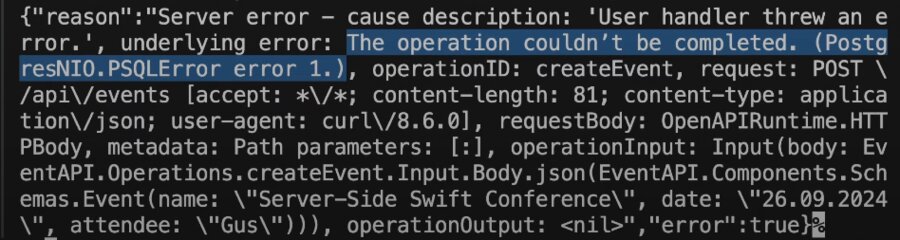
The description of PSQLError intentionally omits detailed information to prevent accidental leakage of database information such as the schemas of your table. Use observability to assist troubleshooting.
Observability
Logging - Helps understanding exactly what a service did and allows digging into the detail
Metrics - Allow a high level overview of service health at a glance
Tracing - Helps understanding what path a single request took through system
Troubleshooting
func listEvents(
    _ input: Operations.listEvents.Input
) async throws -> Operations.listEvents.Output {
    let logger = Logger(label: "ListEvents")
    logger.info("Handling request", metadata: ["operation": "\(Operations.listEvents.id)"])

    Counter(label: "list.events.counter").increment()

    return try await withSpan("database query") { span in
        let rows = try await postgresClient.query("SELECT name, date, attendee FROM events")
        return try await .ok(.init(body: .json(decodeEvents(rows))))
    }
}
Use
swift-logto emit a log when handling a new listEvents request.swift-logsupports structured logging by adding metadata to log messages providing additional context when troubleshooting problems.Add a counter from
swift-metricsthat increments on each request to track how many requests the service has processed.Add
swift-distributed-tracingcreating a span around database query, which helps while troubleshooting a request end to end through system.
Bootstrapping
The Swift on Server ecosystem contains many different backends for logging, metrics and distributed tracing. Choosing the backends is done by calling the bootstrapping methods of the three libraries. Bootstrapping should only be done in executables and should happen as early as possible (main()) to ensure no observability event is lost.
LoggingSystem
LoggingSystem.bootstrap(StreamLogHandler.standardError)MetricSystem - Prometheus
let registry = PrometheusCollectiorRegistry()
MetricSystem.bootstrap(PrometheusMetricsFactory(registry: registry))
InstrumentationSystem - OpenTelemetry
let otelTracer = Otel.Tracer(...)
InstrmentationSystem.bootstrap(otelTracer)
Logging Methods
Add Logging
.package(
    url: "https://github.com/apple/swift-log",
    from: "1.5.4"
),.product(
name: "Logging",
package: "swift-log"
),func createEvent(
_ input: Operations.createEvent.Input
) async throws -> Operations.createEvent.Output {
switch input.body {
case .json(let event):
do {
try await self.postgresClient.query(
"""
INSERT INTO events (name, date, attendee)
VALUES (\(event.name), \(event.date), \(event.attendee))
"""
)
return .created(.init())
} catch let error as PSQLError {
let logger = Logger(label: "CreateEvent")
if let message = error.serverInfo?[.message] {
logger.info(
"Failed to create event",
metadata: ["error.message": "\(message)"]
)
}
return .badRequest(.init())
}
}
}Import the Logging module
Catch the errors thrown by the query method - The query method throws a PSQLError in the case something went wrong when executing the query.
Create a logger
Extract the error message
Emit the log The PSQLError contains detailed information about what went wrong in the serverInfo property.
Return a badRequest response
New Error

Swift on Server Example Libraries
Metrics
PostgresNIO
Vapor
StatsClient
Hummingbird
AsyncHTTPClient
MongoKitten
OTel
Smoke
SQLiteNIO
GraphQL
DataDogLog
Tracing
StackdriverLogging
Puppy
MQTTNIO
Crypto
X509
Protobuf
BSON
MySQLNIO
NIO
ASN1
OpenAPI Generator
CassandraClient
Prometheus
OracleNIO
Soto
DiscordBM
GRPC
RediStack
KafkaClient
DistributedCluster
Logging
MongoSwift
APNSwift
Citadel
Graphiti
