
Key Takeaways
⌚ Live Activities can now be viewed on Apple Watch
🏝️ A default Smart Stack view is created for all Live Activities
🎨 Custom view can be created using the
.smallActivity Family🌗 Live Activities can respond to Always On screen states
Presenters
Anne Hitchcock, Watch Frameworks Engineer
Review your Live Activity
If a Live Activity does not have an Apple Watch component a default layout will be used to show the Live Activity in the Smart Stack.
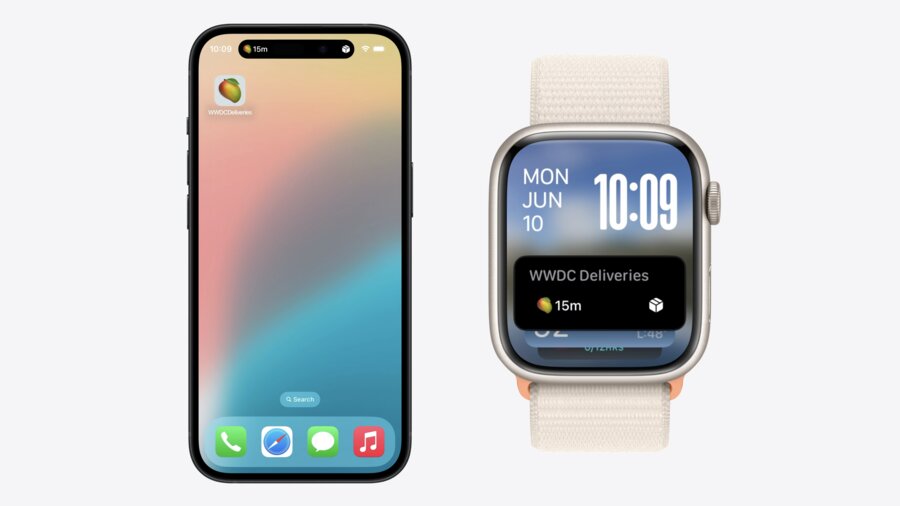
Default Component
The leading and trailing compact views will be displayed with the title of your app
Alerting updates will display the alert and then transition back to the live activity
Tapping the live activity will show a full screen version of the Live Activity with an option to “Open on iPhone”
Customize for Apple Watch
The default presentation for an Apple Watch Live Activity is
.compactUse the
.smallactivity family to create a custom Live Activity for the Smart Stack
struct DeliveryLiveActivity: Widget {
    var body: some WidgetConfiguration {
        ActivityConfiguration(
            for: DeliveryActivityAttributes.self
        ) { context in
            DeliveryActivityContent(context: context)
        } dynamicIsland: { context in ... }
        .supplementalActivityFamilies([.small])     // <-- Support for Smart Stack
    }
}
Use the
activityFamilyenvironment variable to provide different views for each Live Activity format
struct DeliveryActivityContent: View {
    @Environment(\.activityFamily) var activityFamily
    var context: ActivityViewContext<DeliveryActivityAttributes>

    var body: some View {
        switch activityFamily {
        case .small:
            DeliverySmallContent(context: context)  // <-- Content for Smart Stack
        case .medium:
            DeliverySmallContent(context: context)  // <-- Content for iOS Lock Screen
        }
    }
}
Keep it Live
Update Frequency
Updates between iPhone and Apple Watch are synchronized
Synchronization is budgeted to protect battery life
High frequency updates are supported when requested
Always on Display
Use the
isLuminanceReducedenvironment variable to modify your view for the always on display
struct DeliveryGauge: View {
    @Environment(\.(isLuminanceReduced) var isLuminanceReduced
    var context: ActivityViewContext<DeliveryActivityAttributes>

    var body: some View {
        Gauge(value: context.state.progressPercent) {
            GaugeLabel(context: context)
        }
        .tint(isLuminanceReduced ? .gaugeDim : .gauge)
    }
}
Set the preferred color scheme to light to use light mode
Dark mode will still be used for Always on Display with Reduced Luminance
struct DeliveryActivityContent: View {
    @Environment(\.activityFamily) var activityFamily
    var context: ActivityViewContext<DeliveryActivityAttributes>

    var body: some View {
        switch activityFamily {
            case .small:
                DeliverySmallContent(context: context)
                    .preferredColorScheme(.light)
        }
    }
}