
Anatomy of a window
Windows are a fundamental unit for drawing UI on the Mac.
A typical window has a few recognizable components.
From front to back: toolbar, content, background, and shadow.
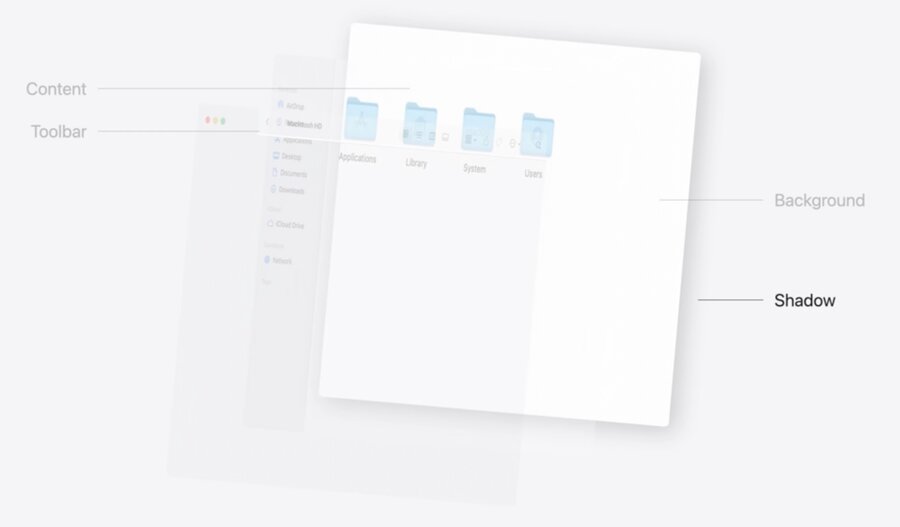
These components can be customized using SwiftUI.
To learn more about windows and scenes in SwiftUI, watch Bring multiple windows to your SwiftUI app and Work with windows in SwiftUI.
Style toolbars
The title in the toolbar can be removed using the new
.toolbar(removing:)modifier.Customize the background of a toolbar using
.toolbarBackgroundVisibility(_:for:).Both modifiers are applied to the root view of the scene.
Refine behaviors
Apply material to windows
You can now apply a material directly to the root view of a window.
Use the
.containerBackground(_:,for:)on the root view of the scene.
Window("Title", id: "about") {
    AboutView()
        .containerBackground(.thickMaterial, for: .window)
}
Disable window controls
Customize the visibility of the Minimize traffic light button using
.windowMinimizeBehavior(_:).The modifier applies to the root view.
Change state restoration behavior using
.restorationBehavior(_:).SwiftUI enables state restoration for windows by default.
Windows like the About window should not restore state.
This is a scene modifier, so it applies to the window scene instead of its root view.
Adjust window placement
Customize where your windows appear on the screen.
Initial placement
Control where on the screen the window appears initially.
Use the
.defaultWindowPlacement(_:)modifier, which accepts a closure.2 arguments will be supplied to you:
content: A proxy view for querying the size of the content.context: The information about the display.
Compute the size and position inside the closure.
Return a
WindowPlacementinstance from the closure.The modifier applies to the scene.
Ideal placement
Account for ways the window can be resized while it is open.
Use the
.windowIdealPlacement(_:)modifier.The closure is similar to one used for
.defaultWindowPlacement(_:).
More to explore
Borderless windows using
.windowStyle(_:).Default launch behavior using
.defaultLaunchBehavior(_:).
