
Key Takeaways
‼️ The New Data Store Protocol
🏄🏽♂️ Use custom persistence backends
🌩️ SwiftData storage in the cloud
🧰 JSON as an archival persistent store
Presenter
Luvena Huo, SwiftData Engineer
Overview
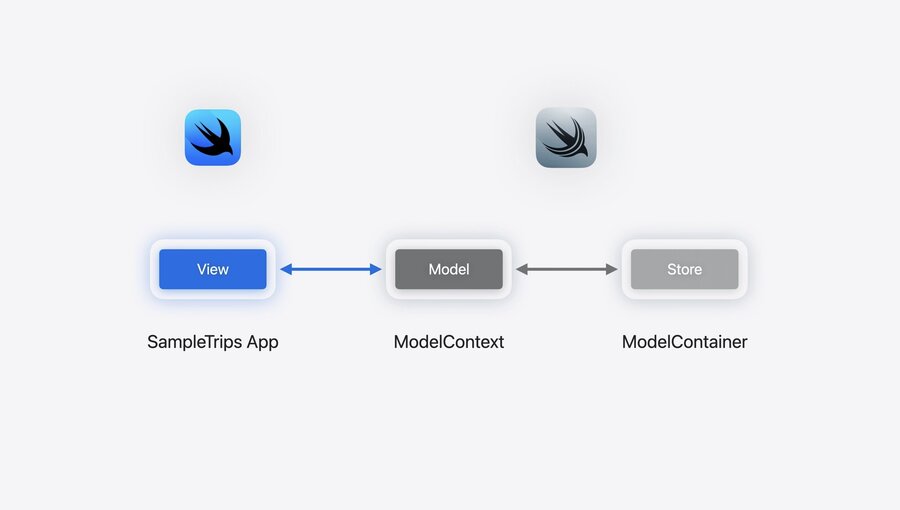
The View consumes data from a Model in a ModelContext.
The ModelContext reads and writes data using a ModelContainer with an associated Store.
The Store fetch and save data (from the persistence backend) required to support the persistent models.
The Store in SwiftData ecoverse:
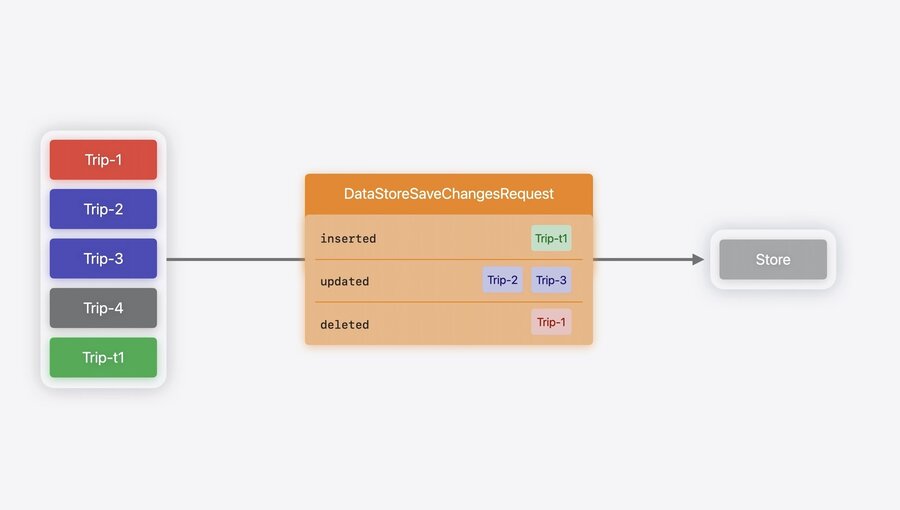
The ModelContext instantiates persistent models with associated persistent identifiers and track changes to be saved to the permanent Store.
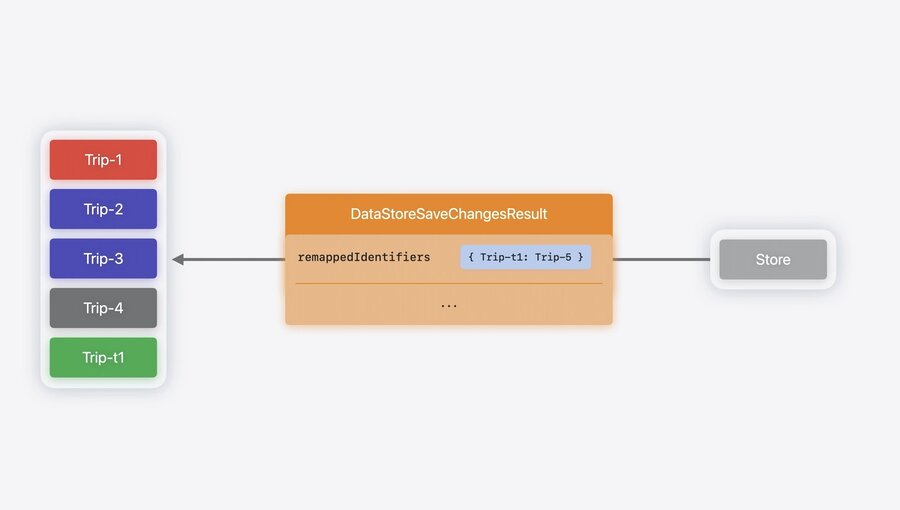
Remaping: is the process of assigning a permanent persistent identifier to a temporary one. The temporary persistent identifiers are generated when changes are translated by the View in the ModelContext to objects not yet persisted to the Store.
Snapshots: are used as a method of communication between the ModelContext and the Store (and viceversa). Snapshots are “sendable, codable containers of the values in the model at that point in time”.
The New DataStore Protocol
Allows the ModelContext to R&W model data to any storage format.
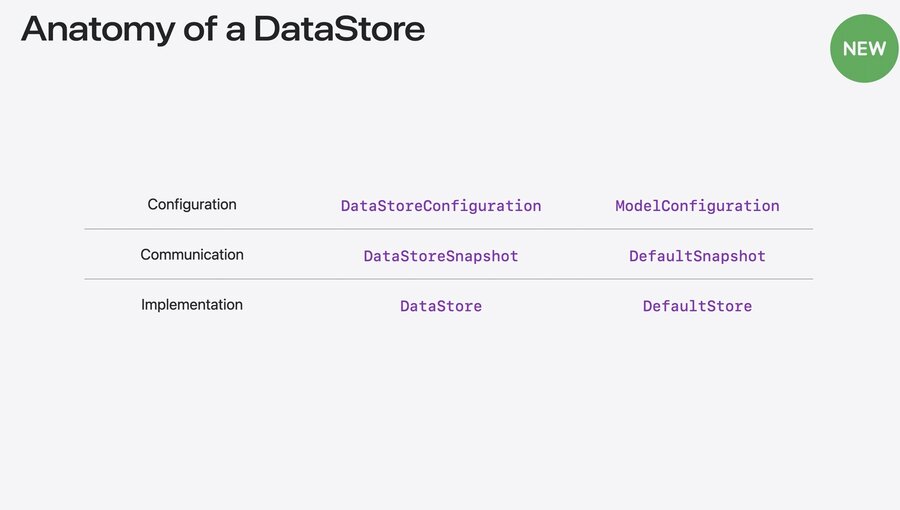
There are 3 protocols related to a store:
Data Store Configuration: describe the store.
Data Store Snapshot: communication protocol between the Store and the ModelContext. Data Store fetch request & Data Store fetch result. Associated snapshots & remapping.
Data Store: functionality needed by the ModelContext to use the Data Store.
Additional protocols: History protocol (check related session notes).
JSON Store type as an example
Example of using JSON as a file to persist the models. This is an archival store, meaning that the entire file is loaded & saved when performing R||W operations to the Store.
The data is stored as an array of snapshots in the file.
Steps
Reference using associated types.
Declare snapshot usage.
final class JSONStoreConfiguration: DataStoreConfiguration {
    // (1): cross reference
    typealias StoreType = JSONStore
    ...
}

final class JSONStore: DataStore {
    // (1): cross reference
    typealias Configuration = JSONStoreConfiguration
    // (2): no need to customize the default data encoding/decoding
    typealias Snapshot = DefaultSnapshot
    ...
}
Implement the required methods: fetch & save. You need to implement these two methods to make the Store usable by the ModelContext.
Implement fetch (R): load data from the store & return results.
class JSONStore: DataStore {
    func fetch<T>(_ request: DataStoreFetchRequest<T>) throws -> DataStoreFetchResult<T, DefaultSnapshot> where T : PersistentModel {

        // (1): load data from the store
        let decoder = JSONDecoder ()
        let data = try Data(contentsof: configuration.fileURL)
        let trips = try decoder decode ([DefaultSnapshot].self, from: data)

        // (2): return results
        return DataStoreFetchResult(descriptor: request.descriptor, fetchedSnapshots: trips)
    }
}
Implement save (CUD): write the snapshots into the JSON file.
Steps:
Read the current content of the file: read()
var snapshotsByIdentifier = [PersistentIdentifier: DefaultSnapshot]()
try self.read().forEach { snapshotsByIdentifier[$0.persistentIdentifier] = $0 }
Assigning and remapping identifiers (create or update from temporary to permanent ones).
var remappedIdentifiers = [PersistentIdentifier: PersistentIdentifier]()
for snapshot in request. inserted {
    let entityName = snapshot.persistentIdentifier.entityName
    let permanentIdentifier = try PersistentIdentifier.identifier(for: identifier, entityName: entityName, primaryKey: UUID())
    let snapshotCopy = snapshot.copy(persistentIdentifier: permanentIdentifier)
    remappedIdentifiers[snapshot.persistentIdentifier] = permanentIdentifier
    snapshotsByIdentifier[permanentIdentifier] = snapshotCopy
}
for snapshot in request.updated {
snapshotsByIdentifier[snapshot.persistentIdentifier] = snapshot
}Remove deleted snapshots.
for snapshot in request.deleted {
    snapshotsByIdentifier[snapshot.persistentIdentifier] = nil
}
Save working snapshot copy to disk.
for snapshot in request.updated {
let snapshots = snapshotsByIdentifier.values.map(‹ $0 })
let encoder = JSONEncoder()
let jsonData = try encoder. encode(snapshots)
try jsonData.write(to: configuration.fileURL)
Return the save() operation result with the remapped persistent identifiers.
return DataStoreSaveChangesResult(for: self.identifier,
remappedIdentifiers: remappedIdentifiers)