
Summary
Apple Pay on web now works across all browsers on iOS 18+, enabling seamless payments via QR code scanning.
New
applePayCapabilities()API replaces deprecatedcanMakePaymentsWithActiveCard(), offering improved capability detection for Apple Pay button display.Funds transfer support expands to web, allowing users to send money to Apple Pay cards with instant transfer option via
"supportsInstantFundsOut".Ticketing passes gain richer UI with semantic tags, new artwork assets, event guides, and integrated live activity for easier event info access.
Developers must update Wallet pass JSON and Apple Pay JS SDK to leverage new features; CSS-only Apple Pay buttons are no longer supported.
Presenters
Tanya Al-Rehani, Wallet and Apple Pay Engineer
Masha Koubenski, Wallet and Apple Pay Engineer
Apple Pay on the Web Updates
Cross-Browser Support with iOS 18
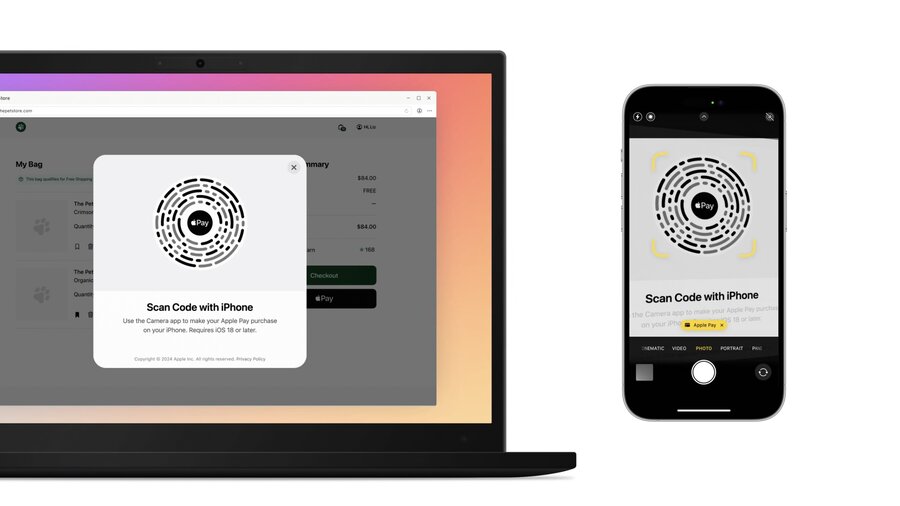
Users can complete Apple Pay checkout on any browser by scanning a QR code generated at payment.
Payment flow is secure, private, and mirrors Safari Apple Pay transactions without extra developer effort.
Existing Safari-based Apple Pay JS code largely works unmodified.
Integration Checklist
Use Apple Pay JavaScript SDK v1.2.0+; import in
<head>for quick load.Use Apple Pay button component from JS SDK, not CSS button implementations, to support non-Safari browsers.
Switch from
canMakePaymentsWithActiveCard()to the newapplePayCapabilities()API for better feature detection and button prioritization.canMakePayments()remains valid for basic Apple Pay availability checks.
applePayCapabilities() API
Returns an object containing paymentCredentialStatus with these values:
paymentCredentialsAvailable: Device supports Apple Pay and has active cards; show Apple Pay button as primary.paymentCredentialsUnavailable: Device can pay, but no active cards; do not show the button.paymentCredentialStatusUnknown: Apple Pay supported, but card info unavailable (e.g., non-Safari browsers); show button, ordering up to developer.applePayUnsupported: Apple Pay not supported; do not display button.
Refer to Apple guidelines on button usage and UX.
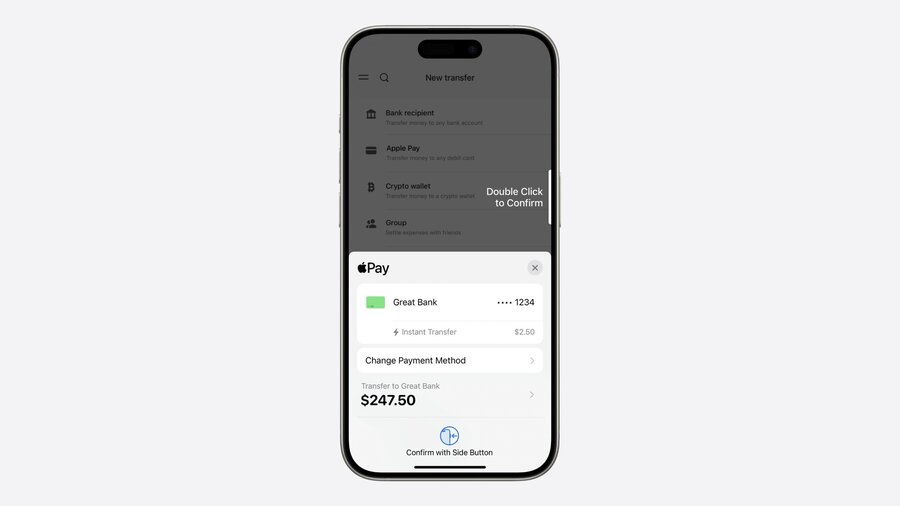
Funds Transfer on the Web
New Web Capability (iOS 18+, macOS 15+)
Supports sending funds from stored value or bank accounts to Apple Pay cards.
Requires payment processor support for disbursements.
Uses
disbursementRequestinside Payment Request API modifiers.
Payment Request Setup
Add
"supports3DS"for typical funds transfer.Add
"supportsInstantFundsOut"to merchant capabilities for instant transfers.Include fees as additional line items, setting amount to zero if no fee applies.
Disable shipping options by setting
requestShipping=false, since goods are not shipped.
// Instant funds transfer availability check

const paymentMethodData = {
  supportedMethods: "https://apple.com/apple-pay/",
  data: {
    version: 14,
    merchantIdentifier: "merchant.identifier.example",
    merchantCapabilities: ["supports3DS", "supportsInstantFundsOut"],
    supportedNetworks: [
      /* networks here */
    ],
    countryCode: "US",
  },
};

// Define PaymentOptions

const paymentOptions = {
  requestPayerName: false,
  requestBillingAddress: false,
  requestPayerEmail: true,
  requestPayerPhone: true,
  requestShipping: false,
};
// Modify payment details to support instant funds out fee
const paymentDetails = {
total: {
/* ... */
},
modifiers: [
{
supportedMethods: "https://apple.com/apple-pay",
data: 1,
disbursementRequest: {
requiredRecipientContactFields: ["email", "name"],
},
additionalLineltems: [
{
label: "Total Amount",
amount: "15.00",
},
{
label: "Instant Transfer Fee",
amount: "0.15",
disbursementLineItemType: "instantFundsOutFee",
},
{
label: "Merchant Name",
amount: "14.85",
disbursementLineItemType: "disbursement",
},
],
},
],
};Error Handling
Use
ApplePayErrorwith transaction type context.Errors:
unsupportedCard: Card can’t accept funds.recipientContactInvalid: User contact info issue.
Merchant Category Codes (MCC) Support
Specify MCC in payment requests to classify business type.
Helps Apple Pay show only valid payment cards, improving transaction success.
MCC codes must follow ISO standard 79450.
Check with your payment processor for your business MCC.
Ticketing Updates in Wallet
Richer Pass Experience
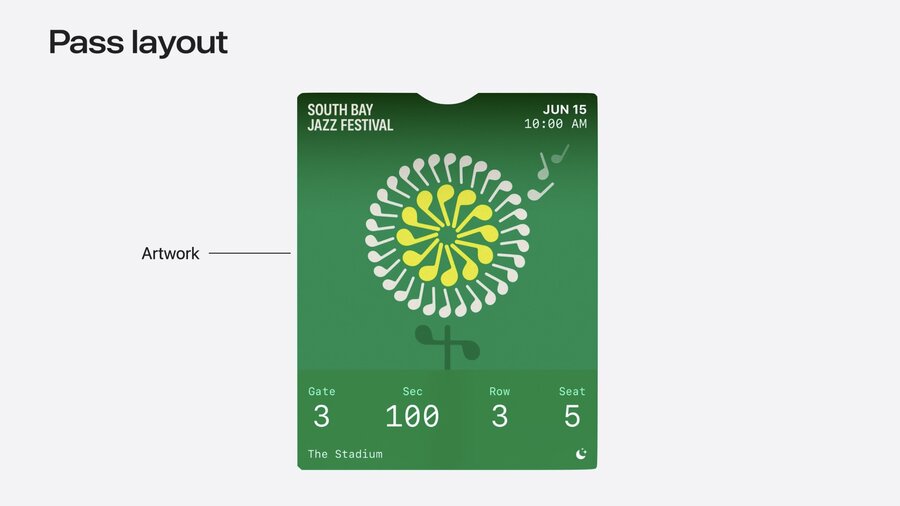
New pass style “poster event ticket” with updated UI:
Event logo, date/time prominently displayed.
Footer with primary seating info and secondary logo.
Artwork assets added (artwork, secondaryLogo) support new layout while preserving backward compatibility.
Enhanced Ticket Requirements
Include semantically tagged metadata for system features like event guides, map, weather, and music integration.
Specify preferred style as
posterEventTicketin pass.json for new layout.Include NFC entitlement to enable contactless entry.
Include all primary, secondary, auxiliary fields for backward compatibility.
{
  "preferredStyleSchemes": ["posterEventTicket", "eventTicket"],
  "semantics": {
    "eventType": "PKEventTypeLivePerformance",
    "eventName": "South Bay Jazz Festival",
    "eventStartDate": "2024-06-15T10:00:00-06:00",
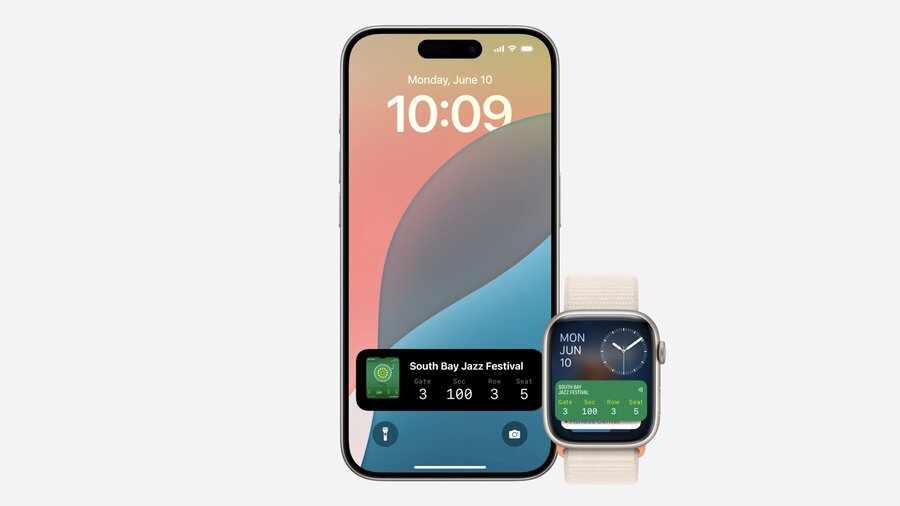
    "seats": [
      {
        "seatDescription": "Normal Seat",
        "seatIdentifier": "112-12-16",
        "seatNumber": "5",
        "seatRow": "3",
        "seatSection": "100",
        "venueEntranceGate": "3"
      }
    ]
  }
}
{
"preferredStyleSchemes": ["posterEventTicket", "eventTicket"],
"semantics": {
"eventType": "PKEventTypeLivePerformance",
"eventName": "South Bay Jazz Festival",
"relevantDates": [
{
"startDate": "2024-06-15T10:00:00-06:00",
"endDate": "2024-06-17T17:00:00-06:00"
}
],
"admissionLevel": "General Admission"
}
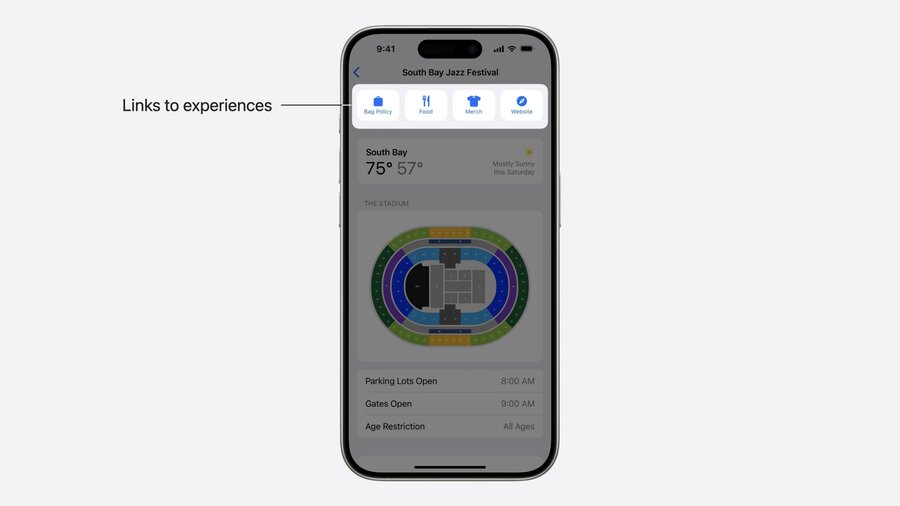
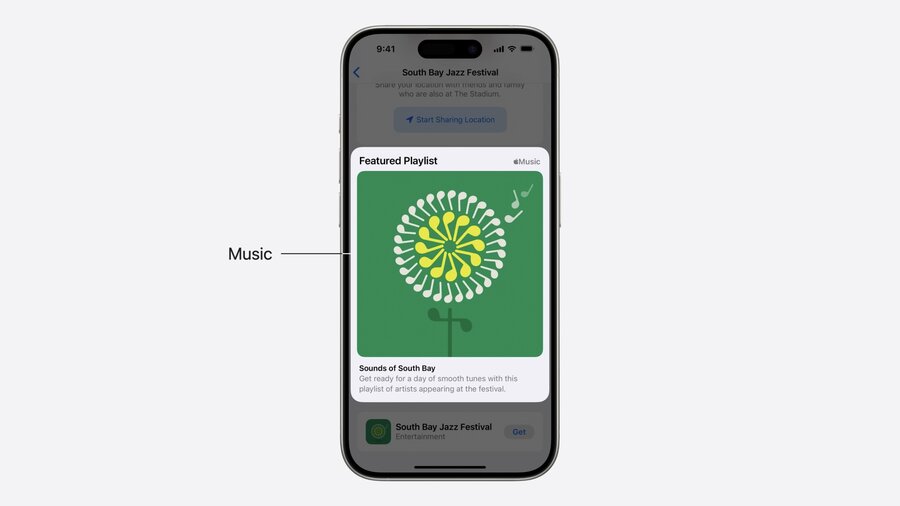
}New Event Guide Tile
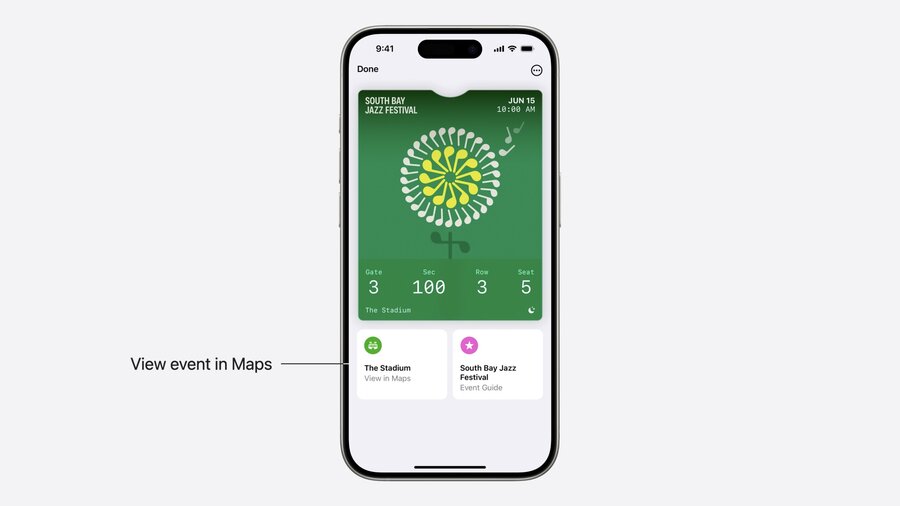
Provides:
Links to ordering apps, merchandise, policies, etc.
Live weather forecast.
Venue map with queue info.
Playlist integration via artist IDs or event names.
{
  "bagPolicyURL": "https://www.southbayjazzfestival.com/bag-policy",
  "orderFoodURL": "https://www.orderfoodsamplewebsite.com",
  "parkingInformationURL": "https://www.southbayjazzfestival.com/parking",
  "preferredStyleSchemes": ["posterEventTicket", "eventTicket"],
  "semantics": {
    "venueParkingLotsOpenDate": "2024-06-15T08:00:00-06:00",
    "venueGatesOpenDate": "2024-06-15T09:00:00-06:00",
    "venueEntrance": "18",
    "venueLocation": {
      "latitude": 37.332279,
      "longitude": -122.010979
    },
    "performerNames": ["Jane Appleseed"],
    "artistIDs": ["1126808565"],
    "venueRegionName": "Cupertino, CA"
  }
}
Live Activities
Pass triggers Live Activity on lock screen and Apple Watch with key seating and entry info based on
seatsdictionary in pass JSON.
Best Practices & Tips
Import Apple Pay JS SDK early (in
<head>).Do not use CSS-only Apple Pay buttons.
Migrate to
applePayCapabilities()for better button control.For funds transfer, ensure merchant capabilities and
disbursementRequestfields are correctly configured.Use semantic tags extensively in passes to unlock new Wallet and event guide features.
Keep legacy fields to ensure pass validation on older OS versions.
