
Speaker recommends to check out this session, if you are new to App Intents: Bring your apps core features to users with App Intents.
Key Takeaways
🔍 Index entities in Spotlight
🤝 Standardized representations of entities
🔗 Universal links support
🍹 Mixed parameter types
🖊️ Auto generated parameter names
📦 Improved framework support
Spotlight Integration
Show entities directly in Spotlight search results via the IndexedEntity protocol.
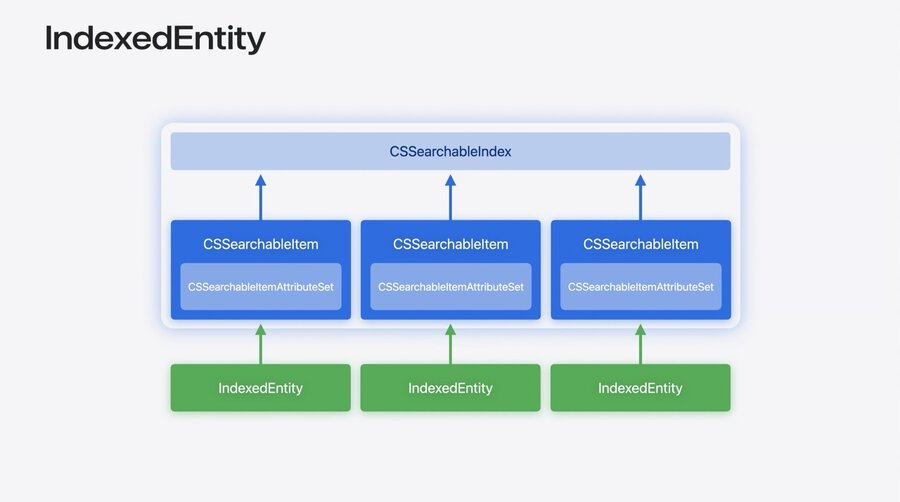
CSSearchableIndexindexes the app information viaCSSearchableItemAny
CSSearchableItemhas an attribute set to extend the informationIndexedEntityprovides easy way to index entities toCSSearchableIndex, while giving ability to customize the attribute set
I’ve only noted down the intro part of this segment. More details and specific code implementation are missing here.
Entities and files
Transferable AppEntity
Represent an AppEntity in standardized formats like PDF, images, rich text, etc. via Transferable to pass on custom data to other shortcuts or apps.
// Transferable

extension ActivityStatisticsSummary: Transferable {
    static var transferRepresentation: some TransferRepresentation {
        DataRepresentation(exportedContentType: .rtf) { summary in
            // Custom method to convert to rich text
            try summary.asRTFData
        }

        FileRepresentation(exportedContentType: .png) { summary in
            // Custom method to create PNG file
            SentTransferredFile(try summary.asImageFile)
        }
    }
}
The order of transferable representations is important → highest to lowest fidelity.
The representation type can be customized in the Shortcuts app via the variable type (tap on variable).
Restrictions:
Xcode reads transferable representations at compile time
ProxyRepresentationonly works for references with the@Property:// Transferable extraction considerations struct SomeAppEntity: AppEntity { var id: String @Property(title: "Name") var name: String var description: String { "\(id):\(name)" } } extension SomeAppEntity: Transferable { static var transferRepresentation: some TransferRepresentation { ProxyRepresentation(exporting: \.name) // Works ProxyRepresentation(exporting: \.description) // Doesn't work } }
IntentFile & FileEntity
I’ve skimmed over this section.
Universal links
Deep-link to app content, allow actions to open URL’s and make them sharable via URLRepresentation:
URLRepresentableEntityURLRepresentableEnumURLRepresentableIntent
// Universal links

extension TrailEntity: URLRepresentableEntity {
    static var urlRepresentation: URLRepresentation {
        "https://trailsapp.example/trail/\(.id)/details"
    }
}

struct OpenTrailIntent: OpenIntent, URLRepresentableIntent {
    static var title: LocalizedStringResource = "Open Trail"

    static var parameterSummary: some ParameterSummary {
        Summary("Open \(\.$target)")
    }

    @Parameter (title: "Trail")
    var target: TrailEntity
}
Use any entity
@Propertyattribute inside the URLConforming to
OpenIntentdoesn’t require aperform()
Alternatively, return OpenURLIntent from perform to open provided URL or the URLRepresentation of an AppEntity:
// OpensIntent

func perform() async throws -> some OpensIntent {
    .result(
        opensIntent: OpenURLIntent(
            "https://developer.apple.com"
        )
    )
}
// OpensIntent
func perform() async throws -> some OpensIntent {
let newTrail = TrailEntity(name: name)
return .result(
opensIntent: OpenURLIntent(urlRepresentable: newTrail)
)
}Developer experience
UnionValue
Use the @UnionValue macro for parameters that can represented by a set of different types – basically an “or” parameter:
@UnionValue
enum DayPassType {
    case park(ParkEntity)
    case trail(TrailEntity)
}

struct BuyDayPass: AppIntent {
    // …
    @Parameter var passType: DayPassType
    // …
    func perform() async throws -> some IntentResult {
        switch passType {
        case let .park(park):
            // purchase for park
        case let .trail(trail):
            // purchase for trail
        }
    }
}Each case must have exactly one value. Non associated values or multiple cases with the same values are not possible.
Generated titles
Xcode 16 doesn’t require the title for AppEntity properties or AppIntent parameters anymore. It can generate them based on the name of the struct’s property.
struct SuggestTrails: AppIntent {
    @Parameter(title: "Activity")
    var activity: ActivityStyle

    @Parameter(title: "Search Radius")
    var searchRadius: Measurement<UnitLength>?

    @Parameter(title: "Location")
    var location: String?

    @Parameter(title: "Featured Collection")
    var trailCollection: TrailCollection?
}
struct SuggestTrails: AppIntent {
@Parameter var activity: ActivityStyle
@Parameter var searchRadius: Measurement<UnitLength>?
@Parameter var location: String?
// Still possible to explicitly name them
@Parameter(title: "Featured Collection")
var trailCollection: TrailCollection?
}Framework improvements
Xcode 16 now allows to have App Intent types in different modules. E.g. putting an AppEntity in a framework and the AppIntent in the app works now.
“Only frameworks are supported at this time. Libraries outside of a framework are not.”
