
Key takeaways
🛠️ SwiftUI is built with a foundation of declarative, compositional, and state-driven views. It provides platform-idiomatic capabilities and integration with a wide SDK allowing you to build apps across all of Apple’s platforms.
🎓 SwiftUI is not Write Once and Run Everywhere. It’s a set of tools you can learn once and use in any context or on any Apple platform.
✨ These help you focus on what makes your app unique, with less code, provide a wide range of components that results in idiomatic and engaging applications, and enable incremental adoption along every step of the way.
Presenters
Taylor Kelly, SwiftUI Engineer
Fundamentals of views
Views are the basic building blocks of user interfaces, and are important to everything you do in SwiftUI. Every pixel you see onscreen is in some way defined by a view. There are three qualities that make SwiftUI views special: they’re declarative, compositional, and state-driven.
Declarative
You describe what view you want in your user interface, and SwiftUI produces the result. You can create text, Images using SF Symbols, and controls, like buttons.
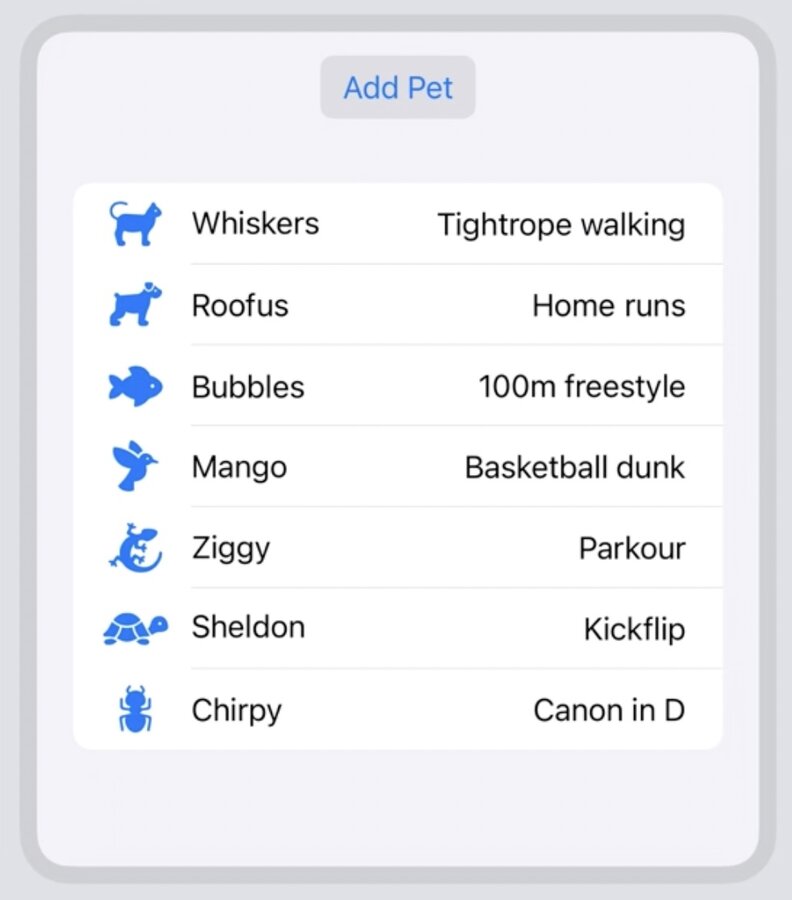
struct ContentView: View {
    @State private var pets = Pet.samplePets

    var body: some View {
        Button("Add Pet") {
            pets.append(Pet("Toby", kind: .dog, trick: "WWDC Presenter"))
        }

        List(pets) { pet in
            HStack {
                Label(pet.name, systemImage: pet.kind.systemImage)

                Spacer()

                Text(pet.trick)
            }
        }
    }
}
This list above is given a collection of pets and creates a horizontal stack for each one using the properties of each pet.
At no point did we need to describe the actions necessary to produce this UI, such as adding and removing rows to the list. This is the difference between declarative and imperative programming.
Declarative and Imperative programming are not mutually exclusive. Declarative code enables you to focus on the expected result, instead of the steps to get there. And imperative code is great when making a change to state, or when there might not be an existing declarative component. SwiftUI embraces both.
A great example of this is Button. Buttons are added to the user interface declaratively, and part of its declaration is the action to perform when tapped. This action uses imperative code to make a change: in this case, adding a new pet to the list.
Compositional
SwiftUI views are not long-lived object instances but rather descriptions of the current state of the UI. These views are value types, defined using structs, which allow SwiftUI to create an efficient data structure to manage them. This structure is used to render the UI, handle interactions, and manage accessibility.
Since views are declarative descriptions, splitting a view into multiple smaller views does not impact performance, allowing developers to organize their code without compromising efficiency.
Composition plays an important role in another SwiftUI pattern called View modifiers. View modifiers apply modifications onto a base view and can change any aspect of that view. Syntactically, this looks very different but it results in a similar hierarchical structure. The hierarchy and order of effect is defined based on the exact order of the modifiers. Chaining modifiers together makes it clear how a result is produced and how to customize that result; all in an easy to read syntax.
View hierarchies can be encapsulated into custom views and view modifiers. A custom view conforms to the View protocol and has a body property to return the view it represents. You can create additional view properties to help keep your code organized as you’d like.
Composition is used throughout SwiftUI, and is an essential part of every user interface.
State-Driven
SwiftUI will automatically keep your UI up to date as you View’s state changes over time.
Data that is used by a View in SwiftUI is a considered a dependency of that View. SwiftUI has important tools for state management including Observable, State, and Binding. When you mark a view property as @State, SwiftUI manages its storage and provides it back for the view to read and write. A Binding creates a two-way reference to the state of some other view. Changes to state that are wrapped in a withAnimation block will animate with a default cross-fade when rendered. You may change how updates are rendered by applying a .contentTransition view modifier to the View receiving the updated state.
Built-in capability
SwiftUI provides built in capabilities for things like dark mode, dynamic type, and localization. These can be previewed (with interactivity) using Xcode Previews without needed to run the app over and over.
One benefit to SwiftUI’s declarative views is adaptivity. Views provided by SwiftUI often describe the purpose of their functionality as opposed to their exact visual construction. Most views adapt to the context that they are being used in while still maintaining their fundamental properties. Most views can also adopt to many different styles. For example a Button in SwiftUI can be used standalone or in different contexts like swipe actions, menus or forms. They can also adapt to many different styles such as Borderless, Bordered or Prominent. All while maintaining the fundamental property of being an action and the label that describes the action. This adaptability is provided by SwiftUI for many different types of Views.
Across all platforms
SwiftUI is available when building an app, for any Apple platform. It’s capabilities extend to any platform it’s used on and enable you to take your investments in one platform and build native apps on others.
While SwiftUI enables code sharing in these ways, it is not Write Once and Run Everywhere. It’s a set of tools you can learn once and use in any context or on any Apple platform.
SwiftUI has a common set of these high and low level components across platforms, but it also has specialized APIs for each platform. Every platform is unique in how it is used and therefore in how it is designed. The Human Interface Guidelines describes components, patterns, and their platform considerations.
SDK interoperability
SwiftUI provides interoperability for many frameworks even imperative ones such as UIKit or AppKit. This is done by creating a UIViewRepresentable, a special SwiftUI view protocol for creating and updating an associated UIKit or AppKit view, using imperative code. The result is a View that can be used within SwiftUI’s declarative view builders and can be used like any other view.
SwiftUI also offers a UIHostingController for the purpose of embedding a SwiftUI View into the view hierarchy of UIKit or AppKit.
Both of these tools allow incremental adoption of SwiftUI into an existing app or when a brand new SwiftUI app and incorporating UIKit or AppKit views.
You can use many apple frameworks when building apps with SwiftUI such as SwiftData which enables you to add persistent models to your app quickly, and comes with APIs to connect and query those models from your SwiftUI views. Or Swift Charts, a highly customizable charting framework that is built on top of SwiftUI making it easy to create gorgeous information visualizations.
