
Modules
Modules are units of code distribution that describe the interface of a framework.
Modules in Swift are built by code interfaces that are marked as public (or open).
In Objective-C, the modules interface is hand-authored with .h (header) files and a module map.
Using modules
There are two high-level kind of modules: Implicitly built modules and Explicitly built modules.
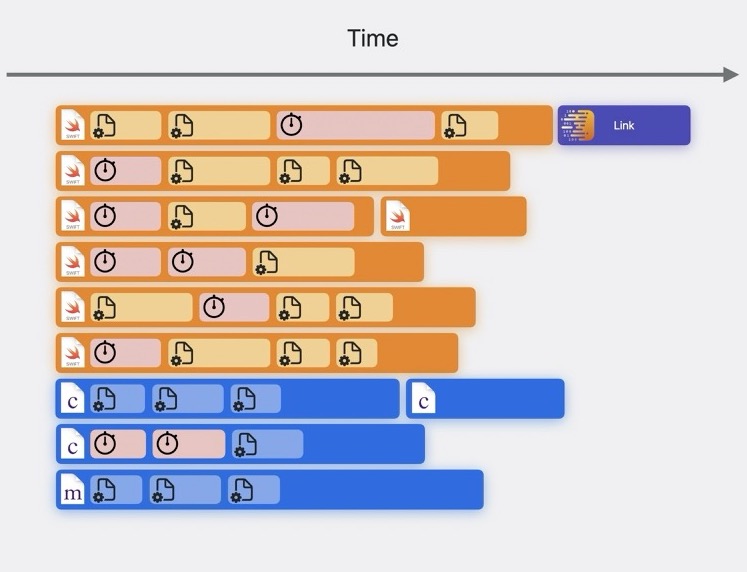
This animation shows the difference between the structure of tasks during building between implicitly (start) and explicitly (end) built modules:
Implicit means that compilers coordinate among themselves to decide which modules to build – without Xcode being aware. Swift and Clang work that way.
Explicit means that Xcode scans the source graph, builds the required modules it detected, and then builds the source.
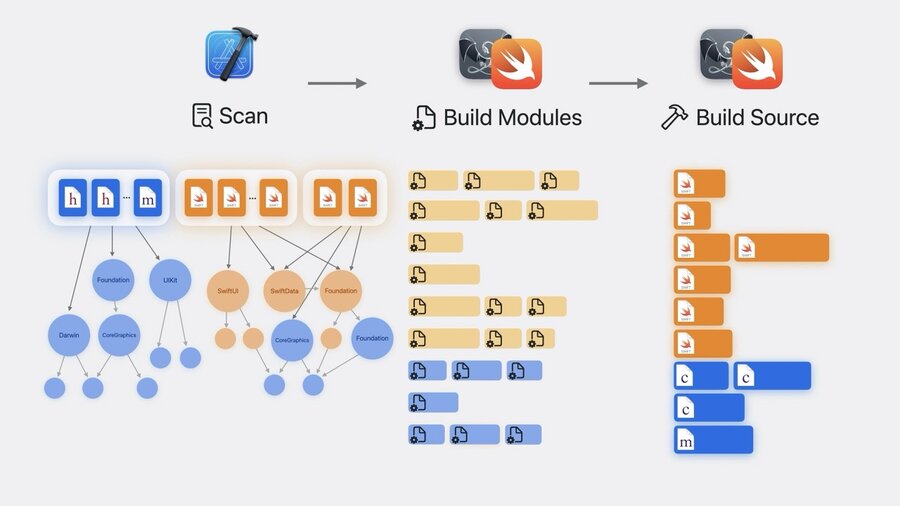
This makes builds faster overall thanks to more efficient use of available execution lanes:
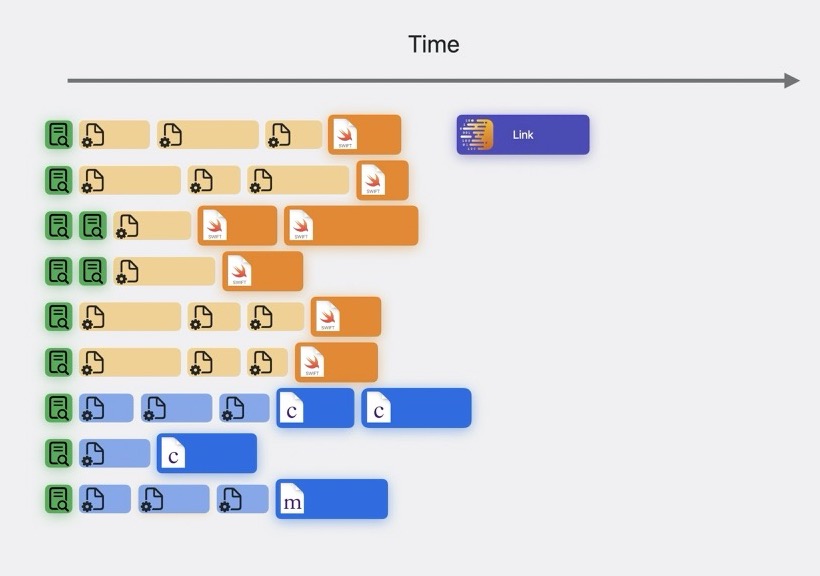
Explicitly built modules also ensure that builds are more reliable thanks to precise dependencies and determinstic build graphs. No implicit state maintained elsewhere, which improves reproducability of build issues.
This also means that clean builds also rebuild modules. And, the debugger no longer has a separate build graph, so it can reuse the already built modules. This improves debugging performance, such as when using p or po.
Module build log
In Xcode 16 explicitly built modules are used fo all C and Objective-C code. It can be enabled as a preview for Swift. Just set the build setting “Explicitly Built Modules” to “Yes”.
Some modules like UIKit may need to be built multiple times when different combinations of build settings are needed. This happened with implicitly built modules as well, but was more difficult to notice.
Optimize your build
To detect multiple variants built for your modules, clean your project and choose “Build with Timing Summary” in the “Product -> Perform Action” menu. Then your build logs will show entries like “Generate Clang modules report” which list how many variants of each module was built.
Common reasons for multiple variants of a module needing to be built are:
Pre-processore macros
Language modes or versions
Disabling of Automatic Reference Counting (ARC)
This means, you can improve your build times by making sure all your targets have the same settings for these, such as for pre-processor macros. For example, move settings from a specific target to the entire project (or even workspace) level instead like so:
