
Key takeaways
☁️ Continuous Integration
🚂 Delivery
🤖 Built into Xcode
🎟️ Available on App Store Connect
🏎️ Accelerates Development
🌪️ Cloud-based
🔨 Builds Apps
✔️ Run automated tests
🛫 Deliver Apps to Testers
💬 Manage user feedback
Presenters
Daniel Yount, Xcode Engineer Colin Dignazio, Xcode Cloud Engineer
Workflow
Environment
Decide which Xcode and macOS version
Start Conditions
when a workflow runs
Source control events
Branch Update
Pull Request
git Tag update
Schedule
Manually
Build Actions
What Xcode Cloud does with source code
Build apps
Run Tests
Analyze
Archive for distribution
Post Actions
What happens after build actions complete
Slack notifications
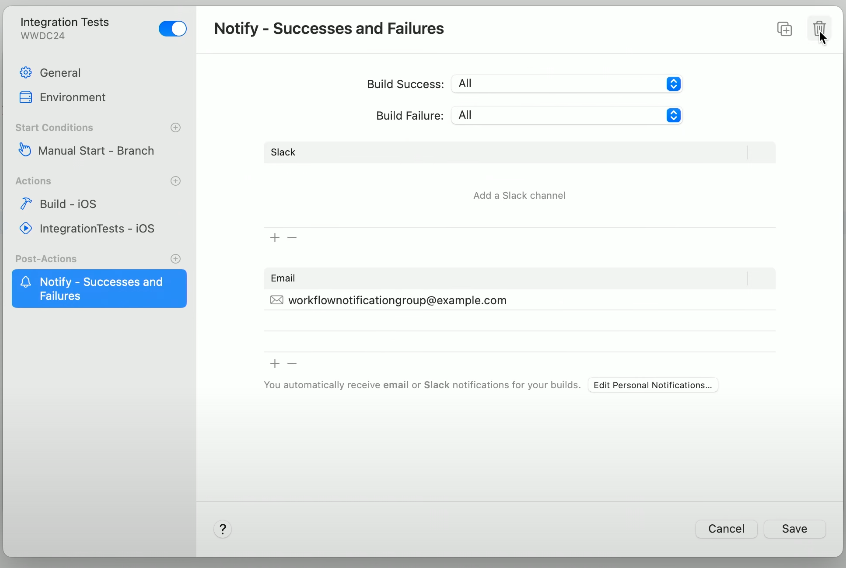
Manually Configuring Test only Workflows
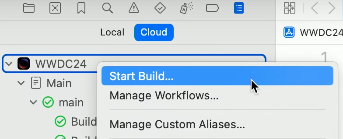
Access workflows by a secondary click on app in the Cloud reports navigator
Duplicate by a secondary click on existing workflow
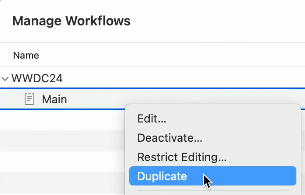
Rename workflow
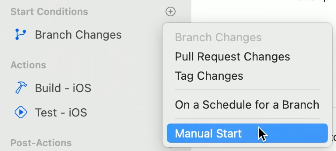
Add manual start condition
Change Test Action to run IntegrationTests test plan
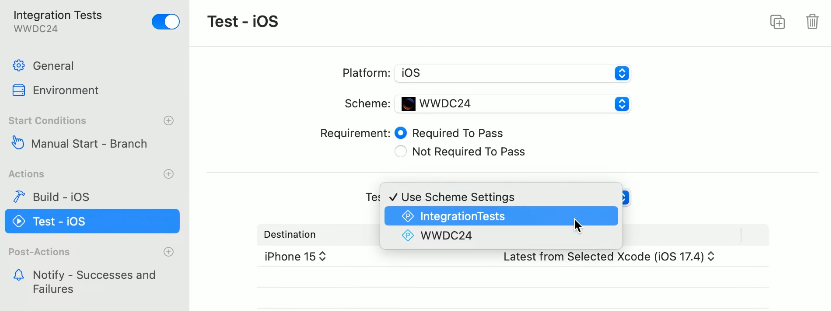
Remove Post Action
Custom Aliases
New in Xcode 15.3
Latest Release - workflow runs on latest version
Workflows run using version of Xcode or macOS specified in the alias
updating alias updates all of workflows using it
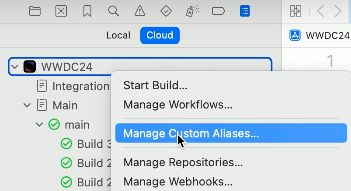
Access Custom Alias by a secondary click on the App in the Cloud Navigator
Create new alias using the plus button
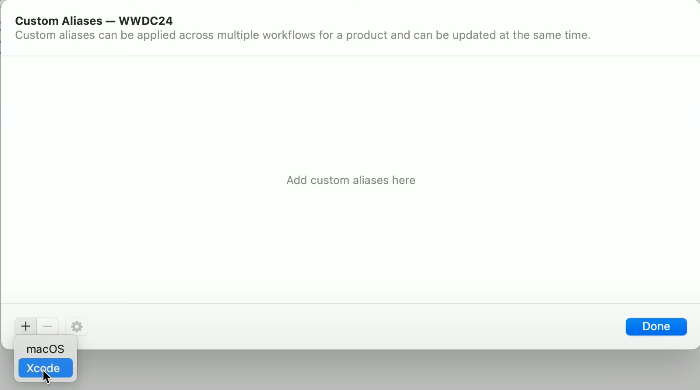
Give alias a name
Select Xcode Version
Repeat for a macOS alias
Configure workflow to use alias in Environment Tab
Quickly create and manage Custom Aliases from the version selector drop down menu or from the Integrations menu item
Custom Scripts
Define custom scripts inside repository
Cloning
before xcodebuild
after xcodebuild
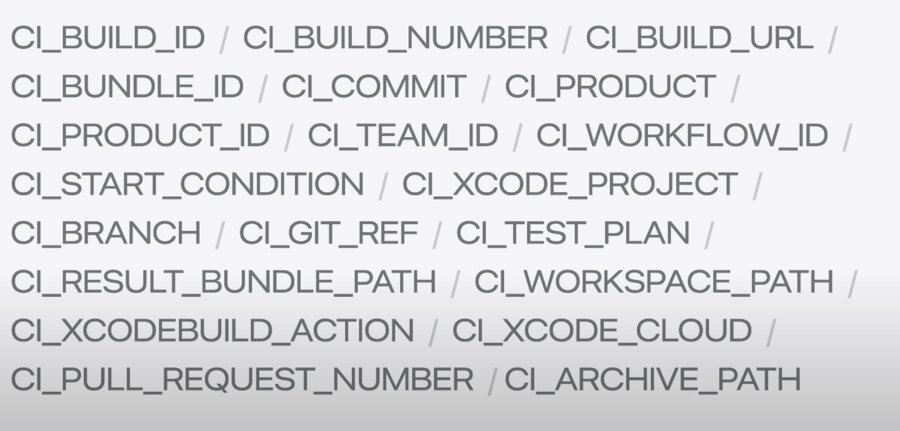
All environment variables defined in your workflow, as well as environment variables provided by Xcode Cloud are available to use in these scripts.
Xcode Cloud expects all custom scripts to be in a folder called ci_scripts in the root of project.
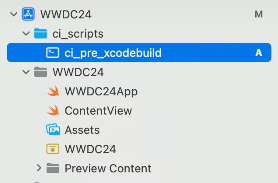
The script’s file name determines the point in the build when it will be executed.
set -e

if [[ $CI_XCODEBUILD_ACTION == "test-without-building" && $CI_WORKFLOW_ID == "82D89C93-B69C-46B5-A794-A2BCFD3EE487" ]]
then
curl https://example.com/health --fail
fi
Checks for the test build action
Checks workflow matches an identifier
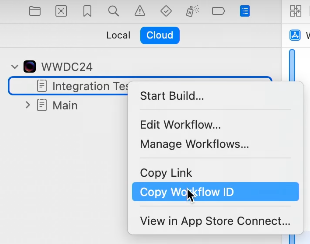
Call server’s health check endpoint using curl
print detailed error logs on failure
setting
-eexits script immediately if error is encountered
Xcode Cloud builds run on ephemeral task workers, the range of IP addresses that the host uses will vary.
Add required IP address ranges to server’s firewall’s inbound allowlist
Specifics on which IP address to allow available in
Requirements for using Xcode Cloud
Connecting outside of Xcode Cloud
Use App Store Connect API to automatically start a build whenever test server has new changes.
Xcode Cloud Workflows and Builds
Create new Xcode Cloud builds using
.ciBuildRunsendpointworkflow identifiers
Branch
gitReference
Calling
scmRepositoriesendpoint using arepositoryIDfetches all branches, tags, and pull requestsQuery the
repositoryIDusing CiWorkflows.
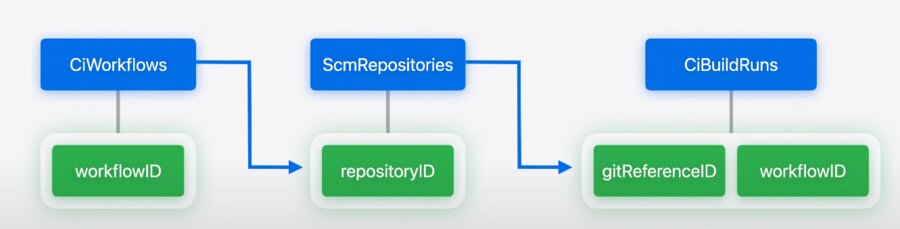
extension Client {
    func repoID(workflowID: String) async throws -> String {
        return try await ciWorkflowsGetInstance(
            path: .init(id: workflowID),
            query: .init(include: [.repository])
        ).ok.body.json.data.relationships!.repository!.data!.id
    }

    func branchID(repoID: String, name: String) async throws -> String {
        return try await scmRepositoriesGitReferencesGetToManyRelated(
            path: .init(id: repoID)
        )
        .ok.body.json.data
        .filter { $0.attributes!.kind == .BRANCH &&     $0.attributes!.name == name }
        .first!.id
    }

    func startBuild(workflowID: String, gitReferenceID: String) async throws {
        _ = try await ciBuildRunsCreateInstance(
            body: .json(.init(
                data: .init(
                    _type: .ciBuildRuns,
                    relationships: .init(
                        workflow: .init(data: .init(
                            _type: .ciWorkflows,
                            id: workflowID
                        )),
                        sourceBranchOrTag: .init(data: .init(
                            _type: .scmGitReferences,
                            id: gitReferenceID
                        ))
                    )
                )
            ))
        ).created
    }
}workflowIDas parameterFetch
ciWorkflowresourceReturn
repositoryIDFetch
gitReferencesusingscmRepositoriesReturn
gitReferenceIDPass
workflowIDandgitReferenceIDtociBuildRuns
static func main() async throws {
    let client = try Client(
        serverURL: Servers.server1(),
        configuration: .init(dateTranscoder: .iso8601WithFractionalSeconds),
        transport: URLSessionTransport(),
        middlewares: [AuthMiddleware(token: ProcessInfo.processInfo.environment["TOKEN"]!)]
    )

    let workflowID = "82D89C93-B69C-46B5-A794-A2BCFD3EE487"
    let repoID = try await client.repoID(workflowID: workflowID)

    let branchName = "main"
    let branchID = try await client.branchID(repoID: repoID, name: branchName)

    try await client.startBuild(workflowID: workflowID, gitReferenceID: branchID)
}
Call
repoIDfunctions with theworkflowIDCall
branchIDwith the name of branchCall
startBuldusingworkflowIDandgitReferenceID
Builds started by the App Store Connect API are considered manual
Xcode Cloud Webhooks
Allow services to respond to build events
Only need an HTTP server
Configuring webhooks in Xcode Cloud
When configuring a webhook, Xcode Cloud will send requests containing a JSON payload with detailed information about different build events.
struct WebhookPayload: Content {
    let ciWorkflow: CiWorkflow
    let ciBuildRun: CiBuildRun

    struct CiWorkflow: Content {
        let id: String
    }

    struct CiBuildRun: Content {
        let id: String
        let executionProgress: String
        let completionStatus: String
    }
}
Define
WebhookPayloadstruct
func routes(_ app: Application) throws {
    let deploymentService = ExampleDeploymentClient()
    let workflowID = "82D89C93-B69C-46B5-A794-A2BCFD3EE487"

    app.post("webhook") { req async throws -> HTTPStatus in
        let payload = try req.content.decode(WebhookPaylaod.self)

        if (payload.ciWorkflow.id == workflowID &&
            payload.ciBuildRen.executionProgress == "COMPLETE" &&
            payload.ciBuildRen.executionProgress == "SUCCESS") {
            await deploymentService.deploy(buildID: payload.ciBuildRun.id)
        }
        return HTTPStatus.ok
    }
}
Decode the webhook request using struct
Add logic comparing payload workflowID to Integration Tests workflowID
Tell Xcode Cloud to send build events to webhook
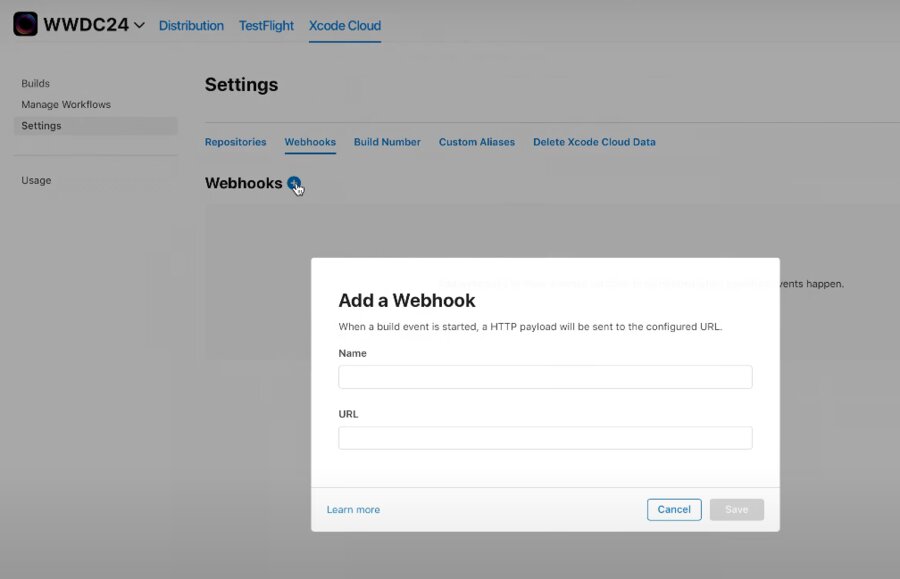
Give webhook a name
Add URL of Listener
Review
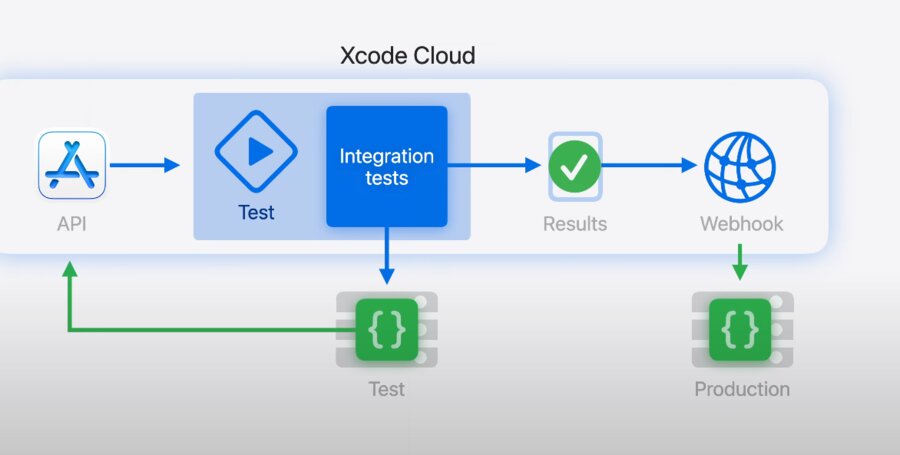
New code change is deployed to service’s test environment,
A call to App Store Connect API starts a build of Integration Tests workflow
Tests validate the integration between app and test server
Results are processed by webhook listener
If all the tests pass
changes are deployed to production
Server change is pushed which causes issues
Integration Tests fails
Webhook listener prevents deployment change
