
Introduction
The session first reviewed how the CoffeeTracker sample app was migrated to Swift concurrency in this session from WWDC21:
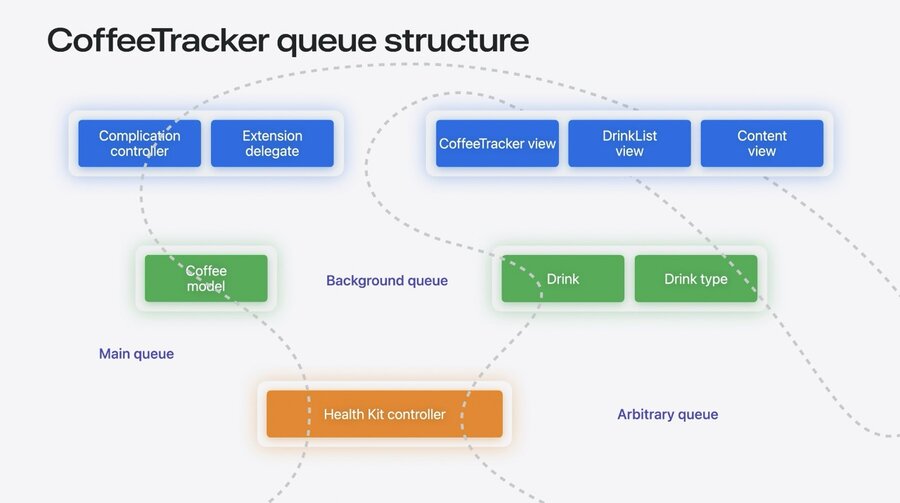
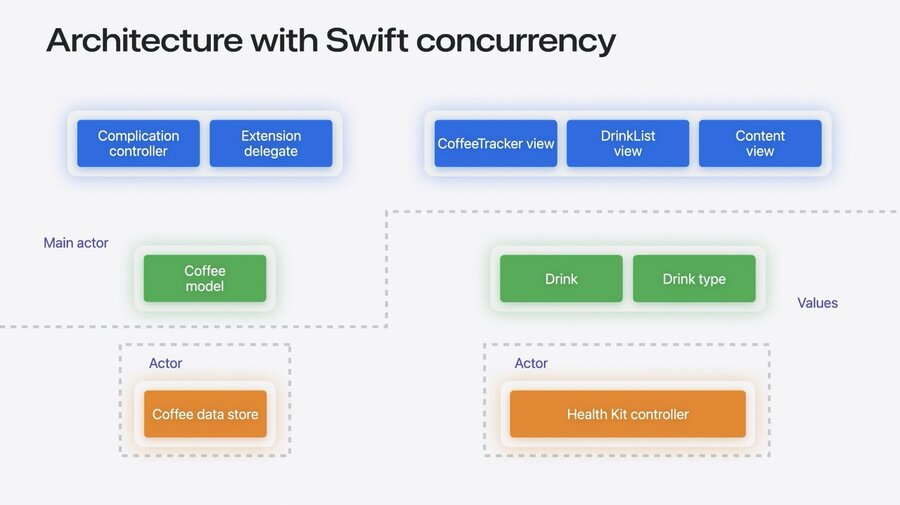
During the refactoring, value types and actors were used while following all the guidelines. That was lot of responsibility on the developer to figure out how to avoid data races though.
If reference types were used, for example, this would have broken the mutual exclusion provided by actors, which can lead to data races that can cause crashes or corrupt user data.
One of the benefits in Swift 6 is data-race safety. The compiler will prevent accidental sharing of state between tasks and actors.
When to migrate to Swift 6
The Swift 6 language mode is opt-in, even for new projects. But turning it on will help avoid hard-to-reproduce crashes due to data races.
If you maintain a public Swift package that uses concurrenct code, you should adopt Swift 6 language mode fast so the community can benefit.
You can follow along with how the Swift package ecosystem has been adopting Swift 6 language mode on this Swift Package Index site.
In June 2024 (when Swift 6 beta was released), roughly 1,500 of 3,400 total packages were Swift 6 ready, which accounts to ~42%. While this sounds great, it includes also packages that have no concurrency code involved at all. So you should focus on the change over time – no new packages will be considered for the graph on the site.
What the graph looked like in June 2024:

You might have a data-race free code base already, thanks to hard work and fixed bug reports. But the real feature of Swift 6 is that you can avoid data-race safety issues in new code.
How to migrate to Swift 6
It’s recommended to migrate each of your modules step by step – the language modes are compatible across targets or packages. For each module, do these steps:
Enable complete concurrency checking. It will leave your module in Swift 5 mode but enables warnings that would be errors in Swift 6. This way you can tackle the warnings step by step over time.
Enable Swift 6 mode. This locks in the data-race safety and prevents new code to be introduced with such issues as the compiler will fail.
You might want to audit any unsafe opt-outs that you applied while migrating in the first step to see if you can refactor to safer code.
Do not try to do significant refactoring (like migrating to Swift concurrency) AND enabling data-race safety at the same time. Go one at a time.
Enabling Complete Concurrency Checking
To apply the first step in your app, select a target in Xcode (prefer extension targets first), go to Build Settings and search for Strict Concurrency Checking. By default it will be set to Minimal, change that to Complete.
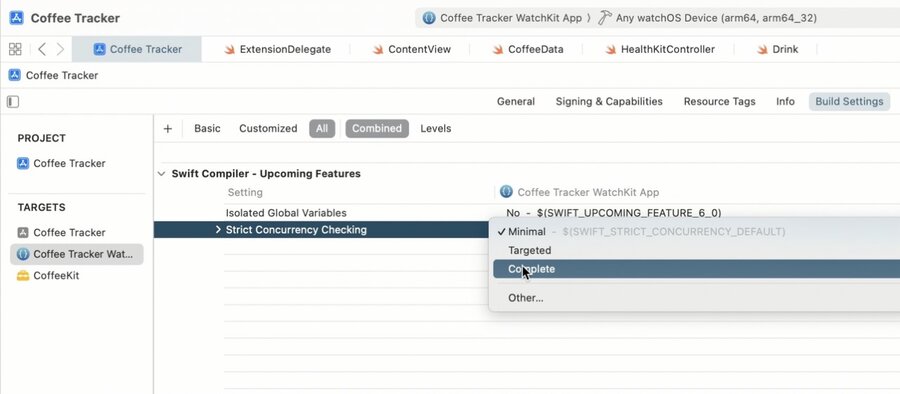
Now build your target and you’ll see the warnings to fix.
You might run into hundreds or even thousands of warnings, depending on your code base. But don’t panic: It’s common for a large number of warnings to stem from just a few issues. Many of them are quick to fix. See the common issues below and fix the easy ones first. Try to find root causes for the warnings to save time. Use the latest SDKs. And take your time, you can still ship your app with these warnings and you can turn complete checking off anytime if you’re annoyed by them.
Fixing Common Issues
Global Variables
The most common kind of issue are global variables, such as a global logger. If you expand the warnings in Xcode, you will find multiple suggestions how to fix these warnings.
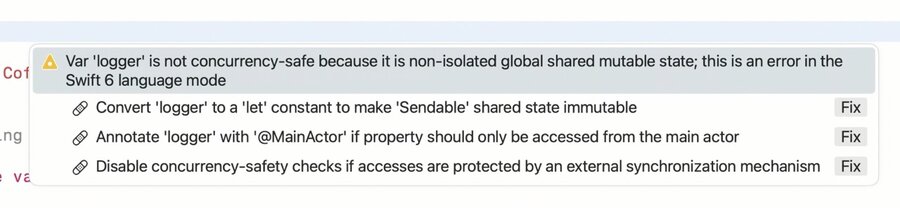
If a type conforms to Sendable (which Logger does), then marking it as let (rather than var) is the easiest and best fix for the warning if applicable.
If you need to change the value over time though, consider if all access happens from the Main actor. If yes, annotate the global variable with @MainActor. You can just give it a try if you’re not sure, the compiler will give you new warnings if there is access from outside the main actor.
If you already have your own logic to prevent data races, such as guarding access with a DispatchQueue, you can annotate the variable with nonisolated(unsafe) to tell the compiler that you’re taking responsibility. But this should be your last resort, prefer the other options wherever you can.
Call to main-actor isolated methods
Another common issue is access to the main actor from outside the main actor:

Such access is implicitly marked as async so you need to add an await keyword and also a concurrent environment if you’re not in one already, either by marking itself as async or by starting a new Task.
Alternatively, you can annotate the current function itself as @MainActor to avoid access from outside the main actor context. Which can cause new warnings if you call this function from outside the main actor.
If you want to know if a type conforms to @MainActor, just option-click it to see the full type annotation:
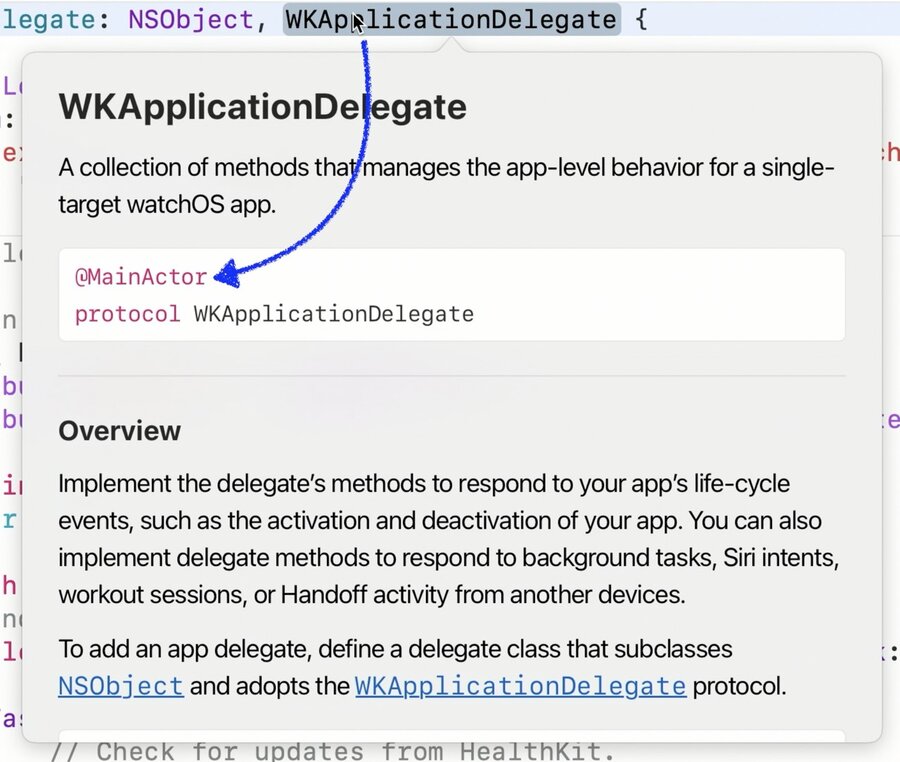
In the latest SDKs that come with Xcode 16, many types that are designed to work in the main actor – including SwiftUI View protocol – are already annotated with @MainActor so you don’t have to add the annotation all the time.
Callbacks without isolation guarantees
Many APIs use (delegate) callbacks to hook into behavior. By default, Swift treats them as nonisolated, which means they don’t provide any guarantees as to which thread they’ll be called on.
In the latest SDKs, Apple frameworks mark callbacks that are guaranteed to be called on the main thread as @MainActor, ensuring you don’t get any unnecessary warnings.
If you call such a delegate inside a main-actor isolated context (such as a view), you’ll get a warning:
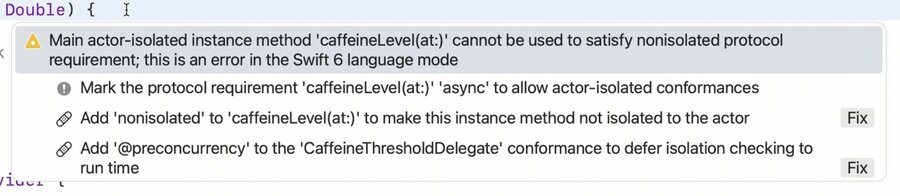
For such callbacks, you have two options:
Mark the protocol where the callback is defined as
@MainActoritself.Mark the (implicitly main-actor isolated) function as
nonisolatedto leave the main actor.
If the protocol were defined by another party you don’t have edit access to, you might be left with the latter option only. Inside the nonisolated function you have two options to access main-actor isolated properties:
You can create a new
Task { @MainActor in /* your code */ }to make changes concurrently.You can tell the compiler that the call is made from the main via
MainActor.assumeIsolated { /* your code */ }.
@MainActor
class Recaffeinater: ObservableObject {
    @Published var recaffeinate: Bool = false
    var minimumCaffeine: Double = 0.0
}

extension Recaffeinater: @preconcurrency CaffeineThresholdDelegate {
    nonisolated public func caffeineLevel(at level: Double) {
        MainActor.assumeIsolated {
            if level < minimumCaffeine {
                // TODO: alert user to drink more coffee!
            }
        }
    }
}
When using assumeIsolated it will assert that it’s on the actor specified during runtime – and crash if the assumption is wrong. While this isn’t ideal, it might be better than corrupting user data with a race condition. At least you’ll know where the problem is.
You can use @preconcurrency as a shorthand for the combination of nonisolated and the assumeIsolated call. @preconcurrency will automatically assume the code is called on the actor the current type is isolated to (which is MainActor in the above example):
extension Recaffeinater: @preconcurrency CaffeineThresholdDelegate {
    public func caffeineLevel(at level: Double) {
        if level < minimumCaffeine {
            // TODO: alert user to drink more coffee!
        }
    }
}Once the other party adopts Swift 6 and marks callbacks as main-actor isolated, you’ll get a warning telling you that you no longer need the @preconcurrency annotation. Just remove it and you’re safe.
Enabling Swift 6 Mode
Once all warnings are fixed with complete concurrency checking, you can finally opt-in to Swift 6 language mode. Set the build setting “Swift Language Version” to Swift 6 to do that for your target in Xcode.
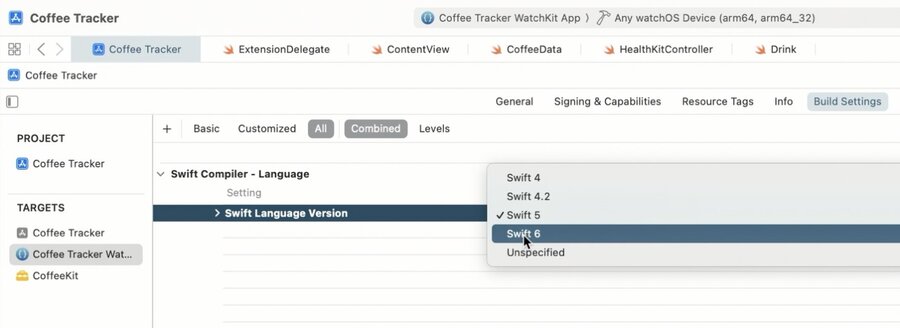
With that enabled, you’ll get errors whenever new code could cause data races, making sure your code base stays free of them.
Sendable conformance
When data is sent across actors, it’s safe if the data is Sendable. For value types (like structs and enums), Swift will automatically infer any internal types to be Sendable for you where possible, so you should get less warnings.
But for shared code where you mark potentially sendable types as public, you need to manually add Sendable conformance. This ensures no unintended guarantees are made to consumers of your API, so you have to opt-in.
If you have a reference type or a mutable value type and you know that your instance is always a freshly created or copied one, you can mark the mutable property as Sendable with the nonisolated(unsafe) annotation like so:
nonisolated(unsafe)
public let type: DrinkType?
Dealing with Pre-Concurrency Code
If you have a pre-concurrency type whose thread can be dynamic based on where it was created (such as old CLLocationManager), use nonisolated together with assumeIsolated like outlined above to work around this.
