
Key Takeaways
Updates on Lock Screen, Dynamic Island, StandBy, Watch
Split static and dynamic data, build in WidgetKit and SwiftUI
Update via ActivityKit or push
Tailor each surface and add interactivity
Presenters
Adi Ayyakad, System Experience Engineer
Overview
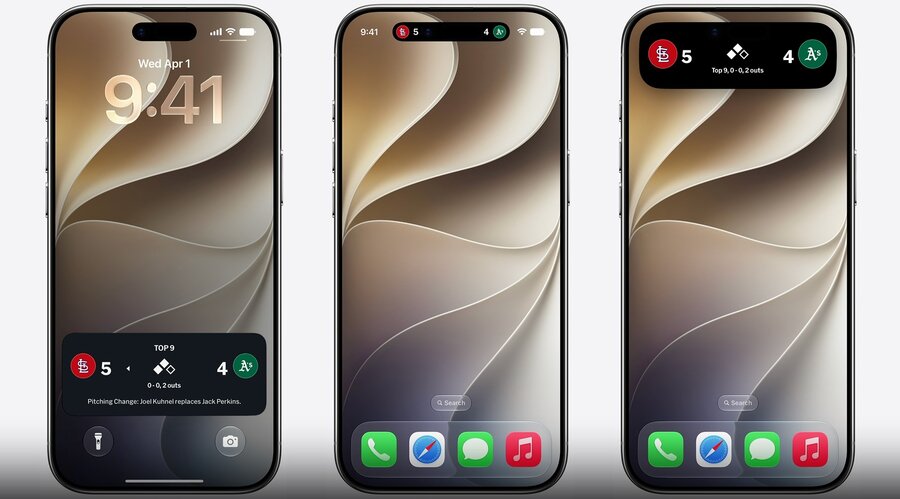
Live Activities give apps a way to provide timely, glanceable updates for something happening right now
Appear across many surfaces:
Lock Screen
Dynamic Island, compact and expanded (iOS 27: also shown in landscape, with an expanded view on alert or long-press)
StandBy (iPhone charging in landscape)
Apple Watch Smart Stack (forwarded from iPhone)
macOS menu bar, CarPlay Dashboard
Built with WidgetKit and SwiftUI for the views, and updated in real time through ActivityKit (local) or push notifications (background)
Create Live Activity
1. Build data model
Design the Live Activity around the information that matters at a glance
Learn more: Design dynamic Live Activities
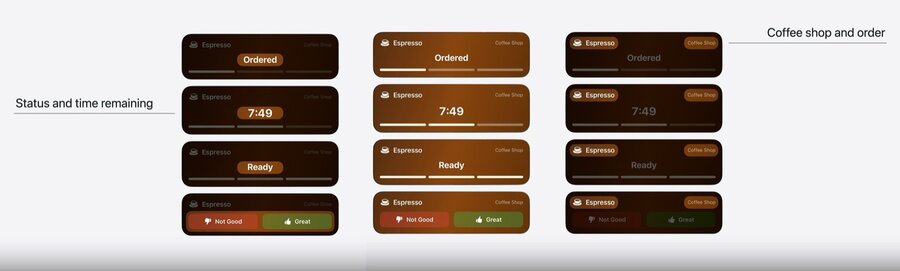
Model static and dynamic data separately, since Live Activities treat them differently for efficient updates
Only the dynamic data can be updated during the Live Activity’s lifetime
Static data lives in a
structconforming toActivityAttributesDynamic data lives in a nested
ContentStatestruct, kept small
import ActivityKit

public struct DrinkOrderAttributes: ActivityAttributes {
    // static data
    let shopName: String
    let drink: Drink
    let orderID: UUID

    // dynamic data
    public struct ContentState: Codable, Hashable {
        var phase: Drink.Order.Phase
        var estimatedReadyDate: Date
        var rating: Drink.Order.Rating?
    }
}
2. Create views
The Live Activity interface is built with WidgetKit and SwiftUI
Define it with an
ActivityConfigurationinside aWidgetcontent closure: the Lock Screen / StandBy view, a SwiftUI view reading the attributes and content state
dynamicIsland:closure: the Dynamic Island, with expanded regions (.leading/.center/.trailing/.bottom) pluscompactLeading,compactTrailing, andminimal
Tailor each presentation to show only the essential info, especially the minimal view someone just glances at
import ActivityKit
import WidgetKit

struct DrinkOrderLiveActivity: Widget {
    var body: some WidgetConfiguration {
        ActivityConfiguration(
            for: DrinkOrderAttributes.self
        ) { context in
            ActivityView(context: context)
        } dynamicIsland: { context in
            DynamicIsland {
                // expanded: reference to Image
            } compactLeading: {
                CompactLeadingView(context: context)
            } compactTrailing: {
                CompactTrailingView(context: context)
            } minimal: {
                MinimalView(context: context)
            }
        }
    }
}
3. Provide updates
Check that Live Activities are enabled (
ActivityAuthorizationInfo().areActivitiesEnabled) before starting oneStart a Live Activity in a few ways:
directly with ActivityKit (
Activity.request) while the app is in the foregroundscheduled to start in advance at a specific time
remotely from a push notification
Update it over time by calling
activity.update(ActivityContent(...))with a newContentState(only the dynamic data changes)ContentStatehas astaleDatemarking when the content is out-of-date, so the views can indicate staleness
// Start a Live Activity
func launchLiveActivity(order: Drink.Order) throws {
    guard ActivityAuthorizationInfo().areActivitiesEnabled else { return }
    let attributes = DrinkOrderAttributes(
        shopName: "Coffee Shop", drink: order.drink, orderID: order.id)
    let estimatedReadyDate = Date.now + (15 * 60)
    let contentState = DrinkOrderAttributes.ContentState(
        phase: .ordered, estimatedReadyDate: estimatedReadyDate)
    let activityContent = ActivityContent(state: contentState, staleDate: nil)
    let activity = try Activity.request(attributes: attributes, content: activityContent)
}

// Update a Live Activity
await activity.update(ActivityContent(
    state: DrinkOrderAttributes.ContentState(
        phase: .preparing,
        estimatedReadyDate: estimatedReadyDate
    ), staleDate: nil)
)
Remote updates use one of two push strategies:
Broadcast: the server sends to everyone via a broadcast channel that the Live Activity subscribes to, best for hundreds/thousands running the same activity at once
Push notifications: obtain a per-Live-Activity push token and use it to target updates to specific devices, best for everything else
Learn more: ActivityKit push notifications
Optimize
Landscape Dynamic Island
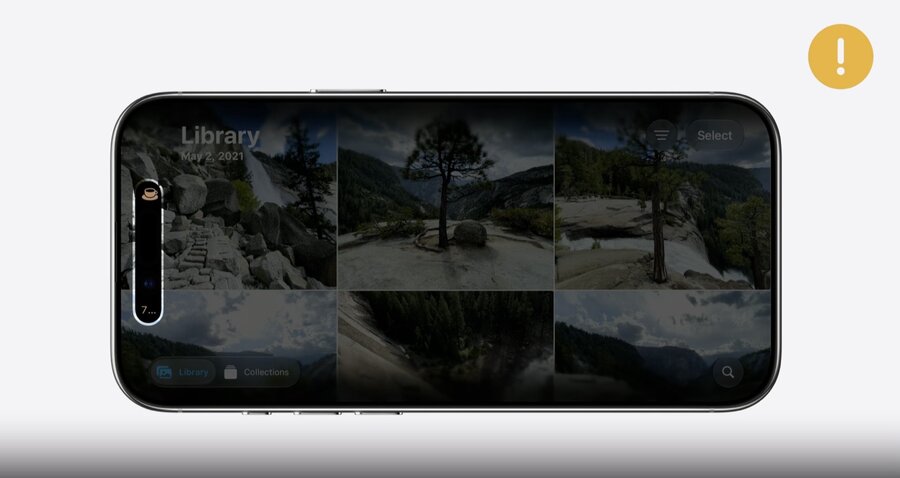
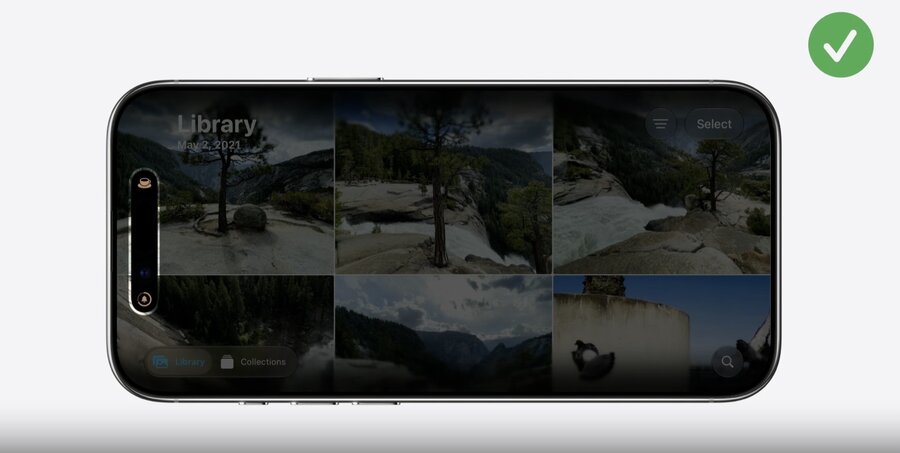
iOS 27: the Dynamic Island compact and minimal views are visible in both portrait and landscape
In portrait, compact views are flexible in width, but in landscape they have no room to grow, so account for the constrained width
Read
\.isDynamicIslandLimitedInWidthand show a more compact representation when it’strue
struct CompactTrailingView: View {
    // true when the Dynamic Island has limited width (e.g. landscape)
    @Environment(\.isDynamicIslandLimitedInWidth) var isDynamicIslandLimitedInWidth
    var context: ActivityViewContext<DrinkOrderAttributes>

    var body: some View {
        if isDynamicIslandLimitedInWidth {
            // limited width: show a more compact representation
            StepProgressIconView(context: context)
        } else if context.state.phase.showsTimer {
            EstimatedReadyView(context: context, font: .system(.body).monospacedDigit())
                .multilineTextAlignment(.trailing)
                .frame(maxWidth: maximumTimeLabelWidth)
        } else {
            OrderPhaseLabelView(context: context, font: .caption2.bold(), color: .brown)
                .multilineTextAlignment(.trailing)
        }
    }
}
StandBy
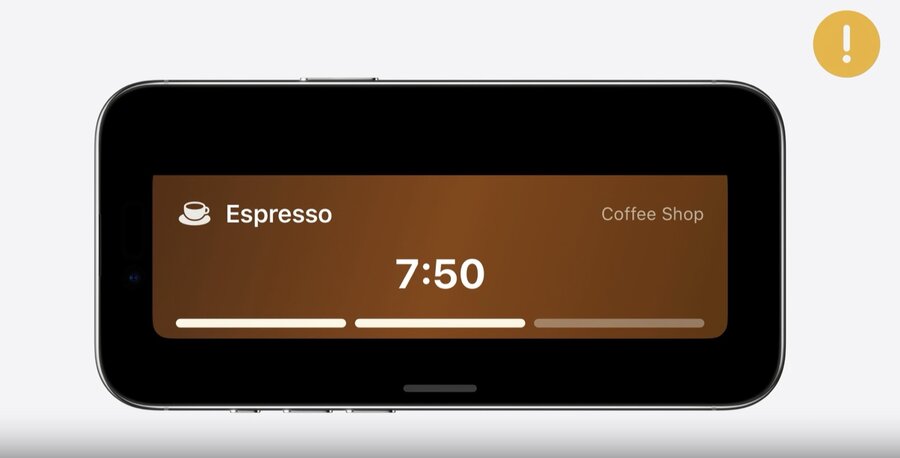
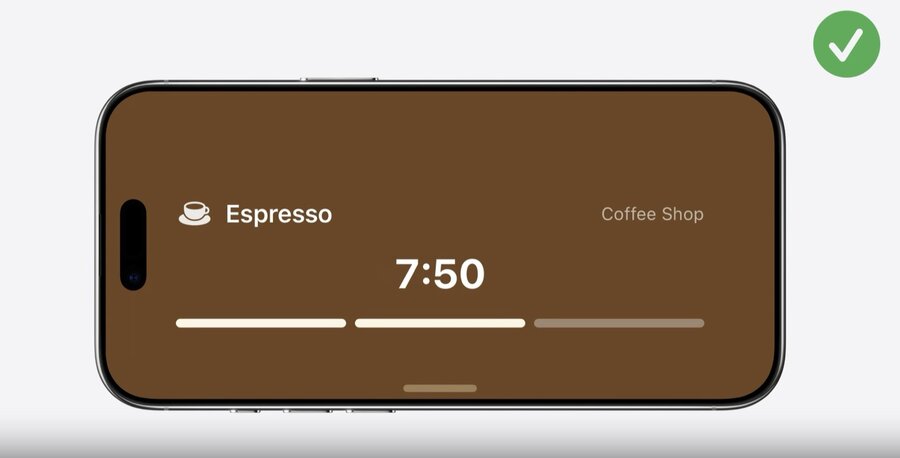
Appears when iPhone is charging in landscape, reusing the Lock Screen view scaled up to 200%
A gradient that suits the Lock Screen can leave lots of blank space here
Read
\.showsWidgetContainerBackgroundto extend the background, and setactivityBackgroundTintfor an edge-to-edge tint
struct ActivityView: View {
    // true when the system shows a background behind the widget (e.g. StandBy)
    @Environment(\.showsWidgetContainerBackground) var showsWidgetContainerBackground
    var context: ActivityViewContext<DrinkOrderAttributes>

    var body: some View {
        DetailView(context: context)
            .background {
                if showsWidgetContainerBackground {
                    LinearGradient.barista
                }
            }
            .activityBackgroundTint(.espresso)
    }
}
Small Activity Family
Live Activities also appear in the Apple Watch Smart Stack and CarPlay
Add support for the small device family with
supplementalActivityFamilies([.small])Read
\.activityFamilyand show a tailoredSmallViewwhen it’s.small
// Add support for activityFamily small
struct DrinkOrderLiveActivity: Widget {
    var body: some WidgetConfiguration {
        ActivityConfiguration(
            for: DrinkOrderAttributes.self
        ) { ... } dynamicIsland: { context in
            DynamicIsland {
                DynamicIslandExpandedRegion(.leading) { ... }
                DynamicIslandExpandedRegion(.trailing) { ... }
                DynamicIslandExpandedRegion(.bottom) { ... }
            } compactLeading: { ... } compactTrailing: { ... } minimal: { ... }
        }
        .supplementalActivityFamilies([.small])
    }
}
// Optimize for small family
struct ActivityView: View {
@Environment(\.activityFamily) var activityFamily
var context: ActivityViewContext<DrinkOrderAttributes>
var body: some View { ... }
@ViewBuilder
var contentView: some View {
if activityFamily == .small {
SmallView(context: context)
} else {
DetailView(context: context)
}
}
}Bring interactivity to the view
Live Activities can offer quick, immediate actions through interactivity
Define a
LiveActivityIntent, then attach it to aButtonorTogglein the view, and tapping runs the intent
struct RateDrinkIntent: LiveActivityIntent {
    static var title: LocalizedStringResource = "Rate Drink"

    @Parameter(title: "Order ID")
    var orderID: String

    @Parameter(title: "Positive")
    var isPositive: Bool

    func perform() async throws -> some IntentResult {
        await updateLocalDatastore(rating: isPositive ? .great : .poor, dismissPolicy: .after(.now + 15))
        return .result()
    }
}

struct RatingButtons: View {
    var context: ActivityViewContext<DrinkOrderAttributes>
    var body: some View {
        HStack(spacing: 12) {
            Button(intent: RateDrinkIntent(
                orderID: context.attributes.orderID.uuidString, isPositive: false)) {
                Label("Not Good", systemImage: "hand.thumbsdown.fill")
            }
            .buttonStyle(RatingButtonStyle(color: .red))

            Button(intent: RateDrinkIntent(
                orderID: context.attributes.orderID.uuidString, isPositive: true)) {
                Label("Great", systemImage: "hand.thumbsup.fill")
            }
            .buttonStyle(RatingButtonStyle(color: .green))
        }
    }
}