
Key Takeaways
📐 Only visible views render, rest is estimated
🧱 Keep each subview shape stable, filter data
⚡ Set up state in init for prefetch
🎯 Use scrollTo(id:), keep layout stable
Prerequisites: This session assumes basic familiarity with SwiftUI layout using stacks.
Recommended: Stacks Grids and Outlines in SwiftUI
Presenters
Rens Breur, UI Frameworks Engineer
LazyVStack layout
Unlike a
VStack, aLazyVStackonly evaluates/renders the visible viewsLays out top to bottom, stops once the visible rect is filled; off-screen views are removed
Typically used inside a
ScrollViewwith aForEach
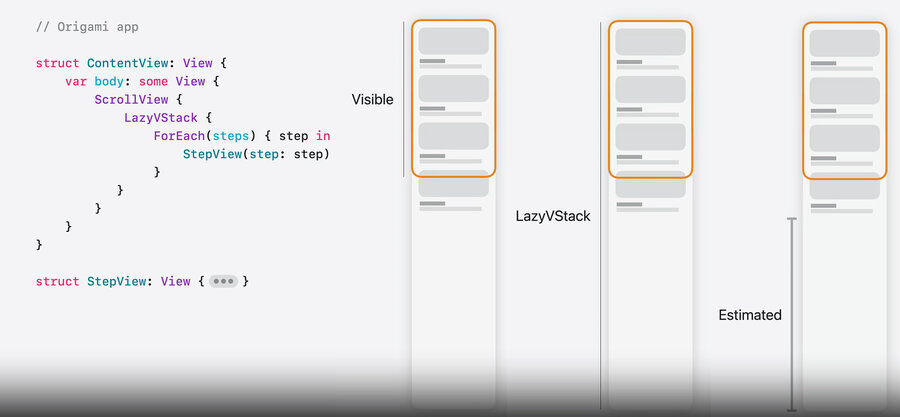
More efficient than a
VStackwhen there are many subviews (with few subviews, a plainVStackis fine)
Being lazy has a correctness cost — the unloaded parts of the layout must be estimated
Height of off-screen subviews is estimated (avg size placed so far × remaining count) → refined while scrolling, so the scroll indicator adjusts
Width is not lazy → ideal width = the first subview’s width (a flexible first view → full screen width)
Content offset depends on the estimated space above the visible rect → the stack & scroll view coordinate it so views don’t jump; scrolling to the top ends at exactly
0
LazyHStack layout
Horizontal mirror of
LazyVStack: width is estimated, height = first subview’s heightCan’t know the tallest view up front → fix the height: set a line limit and reserve space for shorter text
Patterns to avoid
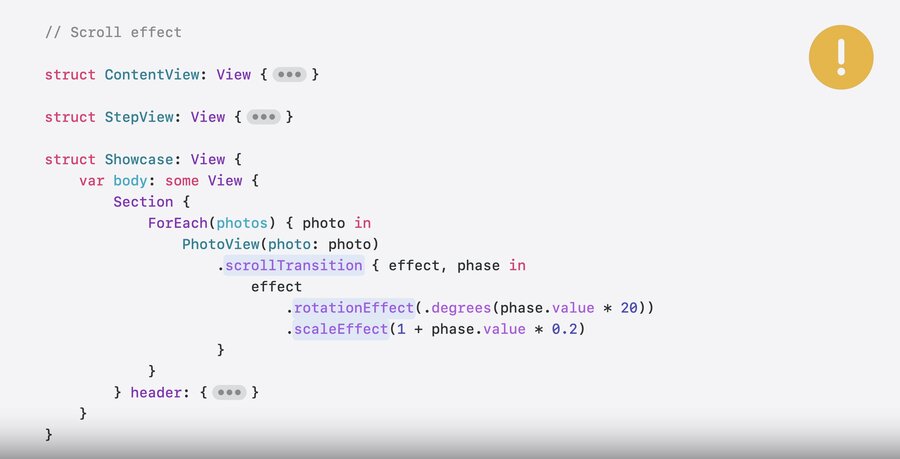
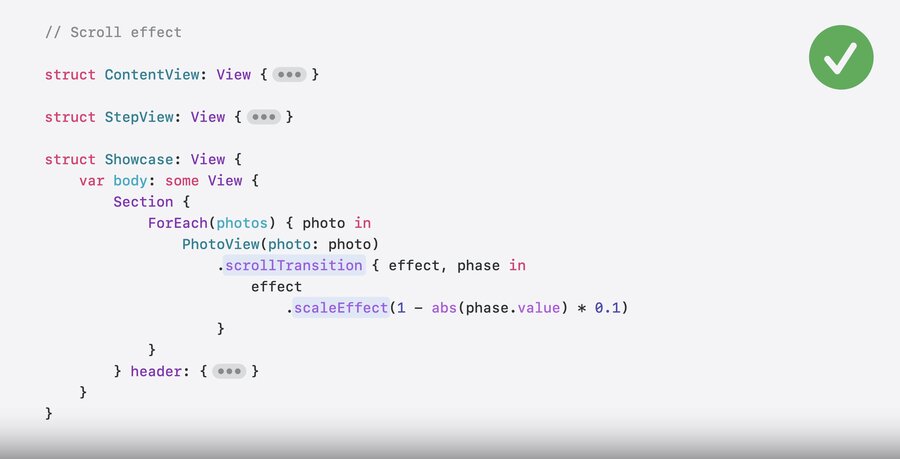
Lazy stacks only load on-screen views based on their original frame — don’t break that:
.scrollTransitionthat moves a view out of its frame (scale up / rotate) → it vanishes though it should be visibleFine: keep the transform inside the frame (e.g. scale down)
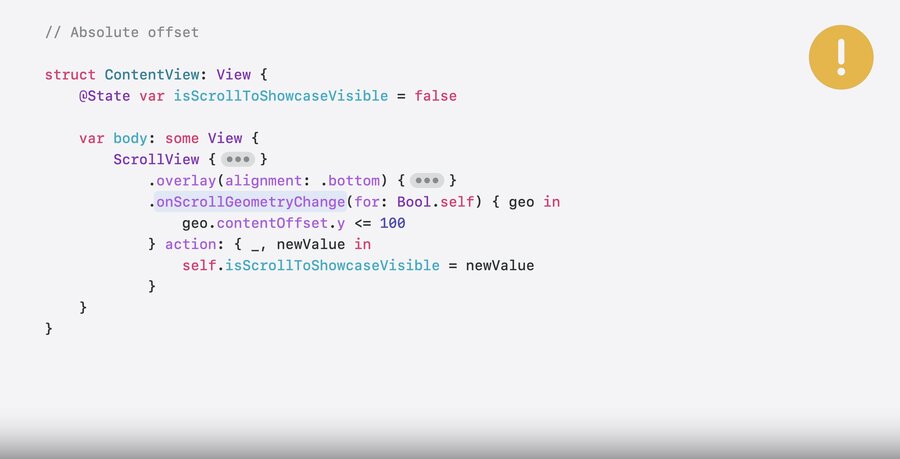
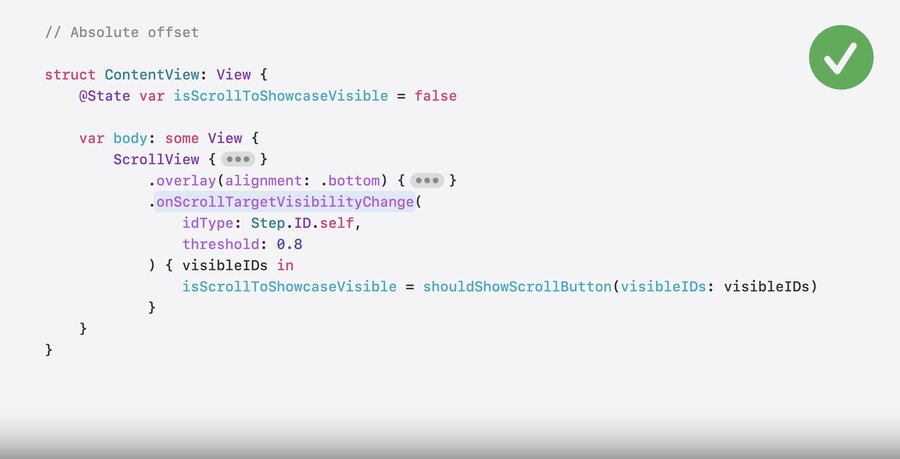
State from the absolute
contentOffset(onScrollGeometryChange) is unstable (offset is estimated)Fine: use relative visibility with
onScrollTargetVisibilityChange
Subview loading
A lazy stack loads only the on-screen views and addresses the visible subviews by their index
A view struct can resolve to one subview or several
e.g. a
StepViewwhose body returnsStepDiagramandStepInstructions→ the lazy stack loads them as two separate subviews
So the number of subviews a struct produces matters — if it varies, the index-based addressing breaks
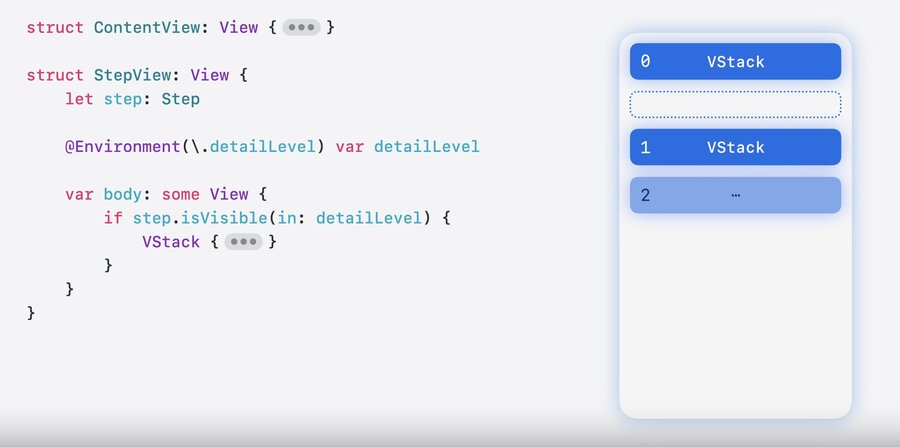
Writing efficient subviews
Write leaf subviews (created many times in a ForEach) so the lazy stack can load them cheaply.
Avoid a dynamic number of subviews — keep each subview’s body structure stable
If the count can change (e.g. based on
detailLevel), the lazy stack has to keep earlier views around, since the change would shift indicesAn unrelated environment value used in the body (e.g.
writingStyle) also forces body re-evaluations for off-screen viewsInstead, filter at the data level so the count is known up front
// Avoid: body structure depends on runtime values
struct StepView: View {
    let step: Step
    @Environment(\.detailLevel) var detailLevel
    var body: some View {
        if step.isVisible(in: detailLevel) { ... }
    }
}

// Prefer: filter the data, so every StepView has the same shape
struct ContentView: View {
    @Query var steps: [Step]
    init(detailLevel: DetailLevel) {
        _steps = Query(filter: #Predicate<Step> { $0.detailLevel >= detailLevel })
    }
}
Optional unwrapping in the body has the same effect — inject a non-optional dependency instead (handle the missing case higher up)
// Avoid: if let token { ... } → structure varies
struct StepView: View {
    @Environment(\.apiToken) var token
    var body: some View {
        if let token { ... }
    }
}

// Prefer: a value that's always there
struct StepView: View {
    @Environment(NetworkClient.self) var networkClient
    var body: some View { ... }
}Lazy stacks prefetch — part of a view’s work (body evaluation, layout) is done before it scrolls on screen, spreading the cost across frames to avoid hitches
Set up the view in
init, notonAppear— anonAppearsetup makes the prefetched work useless (thrown away and redone on appear; with reversed scrollingonAppearmay never fire)Fine:
onAppearwhen reacting to appearance is the point — e.g. a trailingProgressViewthat loads the next page
// Avoid: setup in onAppear → prefetched work is discarded and redone on appear
struct StepView: View {
    let id: Step.ID
    @State var viewModel = StepViewModel()

    var body: some View {
        VStack {
            if let content = viewModel.content { ... }
        }
        .onAppear {
            viewModel.configure(with: id)
        }
    }
}

// Prefer: set up state in init, so the view is ready during prefetching
struct StepView: View {
    @State var viewModel: StepViewModel
    init(id: Step.ID) {
        _viewModel = State(initialValue: StepViewModel(id: id))
    }
}
Async loading benefits from prefetching too — start it in
init, not.task, so the fetch can begin before the view is on screen
// Avoid: .task starts loading only once the view appears
struct StepView: View {
    let step: Step
    @State var diagramLoader = DiagramLoader()
    @State var diagram: Diagram?

    var body: some View {
        VStack { ... }
            .task {
                diagram = await diagramLoader.loadDiagram(id: step.id)
            }
    }
}

// Prefer: start loading in init, so prefetching fetches the diagram earlier
struct StepView: View {
    let step: Step
    @State var diagramLoader: DiagramLoader

    init(step: Step) {
        self.step = step
        _diagramLoader = State(initialValue: DiagramLoader(id: step.id))
    }

    var body: some View { ... }
}
Don’t keep per-item UI state as local
@State— off-screen views are kept briefly, then deleted along with their statelift important state to the parent (or a model)
// Avoid: isHighlighted resets when StepView is recycled
struct StepView: View {
    @State var isHighlighted = false
}

// Prefer: parent owns the state, child binds to it
struct ContentView: View {
    @State var highlighted: Set<Step.ID> = []
}
struct StepView: View {
    @Binding var highlighted: Set<Step.ID>
}
Programmatic scrolling
Bind a
ScrollPositionwith.scrollPosition($scrollPosition), then callscrollPosition.scrollTo(id:)to move to a subview by its identityWorks even when the target isn’t on screen
Prefer id-based scrolling over an absolute offset — the lazy stack can find the target in the
ForEachwithout building views, and re-estimates its position every frame during an animated scroll (an absolute offset is estimated and unstable)
struct ContentView: View {
    @State var scrollPosition = ScrollPosition()

    var body: some View {
        ScrollView { ... }
            .scrollPosition($scrollPosition)
            .overlay(alignment: .bottom) {
                Button { scrollToShowcase() } label: { ... }
            }
    }

    func scrollToShowcase() {
        withAnimation {
            scrollPosition.scrollTo(id: "showcase-header")
        }
    }
}
Don’t change layout after views appear
Changing a view’s size after it appears (measure, then feed the result back into the layout) invalidates the lazy stack’s size estimates → jumpy, less reliable scrolling
Common culprit:
onGeometryChangesets a@Statethat a later layout pass consumes
Fix: compute the size up front with a custom
Layout, so it’s correct on the first pass — no post-appearance adjustment
Learn more about writing a custom layout in doc:WWDC22-10056-Compose-custom-layouts-with-SwiftUI
// Avoid: measure the subtitle height, then feed it back into the layout
struct StepView: View {
    let step: Step
    @State var subtitleHeight: CGFloat?

    var body: some View {
        VStack {
            StepDiagram(diagram: step.diagram)
                .frame(height: diagramHeight(subtitleHeight: subtitleHeight))
            Title(step.title)
            Subtitle(step.subtitle)
                .onGeometryChange(for: CGFloat.self, of: \.size.height) { _, value in
                    subtitleHeight = value
                }
        }
    }
}

// Prefer: a custom Layout sizes everything in one pass
struct StepView: View {
    let step: Step

    var body: some View {
        StepLayout {
            StepDiagram(diagram: step.diagram)
            Title(step.title)
            Subtitle(step.subtitle)
        }
    }
}

struct StepLayout: Layout { ... }