
Key Takeaways
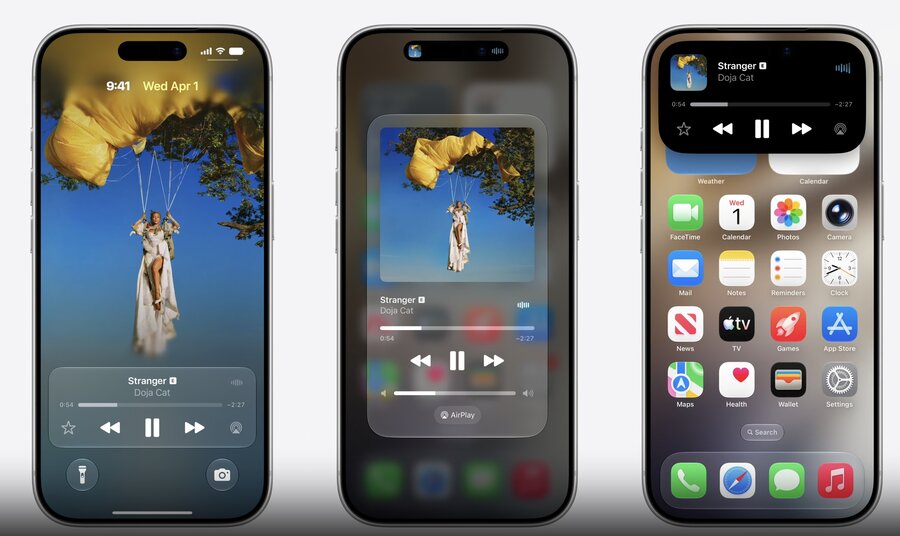
📱 Surface app media on Lock Screen & CarPlay
🎧 Adopt
MediaSessionRepresentablein your model📡 Represent remote playback via a Remote Session
🔀 Route media via Media Sharing Extensions
Presenters
Leonardo Formaggio, Media Frameworks
Media Session API: describe what’s playing
MediaSessionconnects your session representation to the systemInitialize it with your
@Observablemodel (where you set up the audio engine)It observes the model and keeps the Now Playing surfaces (Lock Screen, Control Center, Dynamic Island…) up to date automatically
import NowPlaying

struct PlayerController {
    let player: SoundPlayer
    let model: PlayerModel
    let session: MediaSession<PlayerModel>

    init() {
        self.player = SoundPlayer()
        self.model = PlayerModel(player: player)
        self.session = MediaSession(model)
    }
}

// Existing PlayerModel implementation

import Observation

@Observable
final class PlayerModel {
    let player: SoundPlayer
    var sound: Sound { player.currentSound }

    init(player: SoundPlayer) {
        self.player = player
    }

    ...
}
Conform your model to
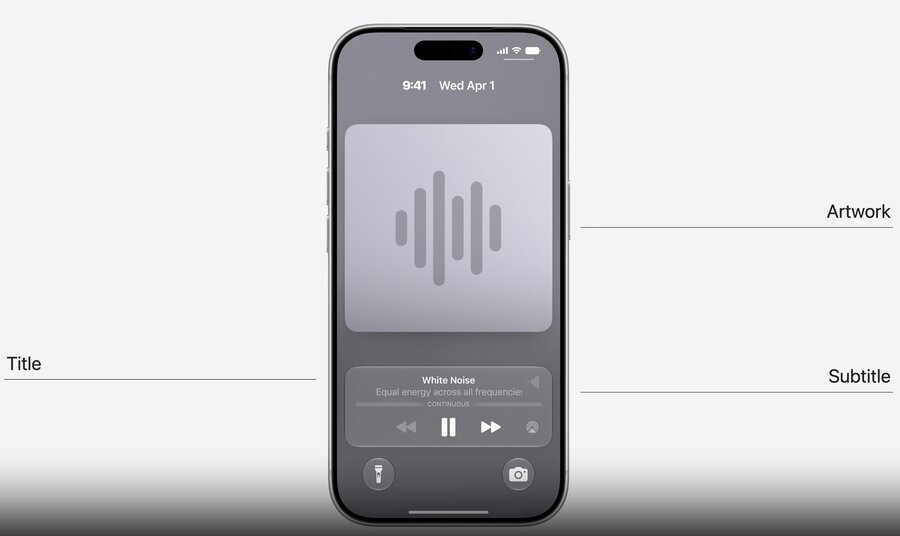
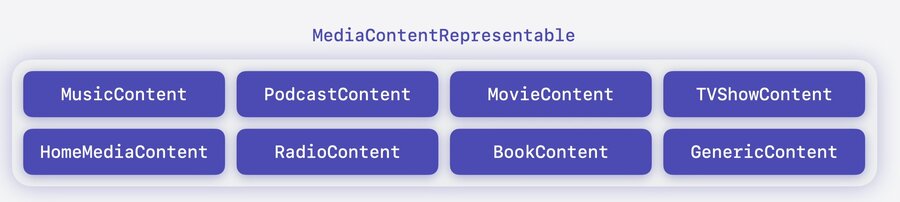
MediaSessionRepresentable— a contract that tells the system what you’re playing and how to handle interactions (skip, pause…)id: a unique identifier for the sessioncontent: what’s playing, as aMediaContentRepresentableplaybackSnapshot: the current playback state (e.g. playing / paused)commands: the actions you support; each has a closure the system calls when that action is triggered
import NowPlaying

extension PlayerModel: MediaSessionRepresentable {
    var id: String { "ambient-sound-session" }

    var content: (any MediaContentRepresentable)? {
        return GenericContent(
            id: sound.id,
            title: sound.name,
            subtitle: sound.description,
            type: .audio,
            duration: .continuous,
            artwork: Artwork(id: sound.id) { size in
                let data = try await self.artworkData(size: size)
                return try ArtworkRepresentation(data: data)
            }
        )
    }

    var playbackSnapshot: MediaPlaybackSnapshot? {
        MediaPlaybackSnapshot(
            state: player.isPlaying ? .playing() : .paused
        )
    }

    var commands: [MediaCommand] { [
        .play { self.player.play() },
        .pause { self.player.pause() },
        .previous { self.player.previous() },
        .next { self.player.next() }
    ]}
}
Remote Media Session API: control media on other devices
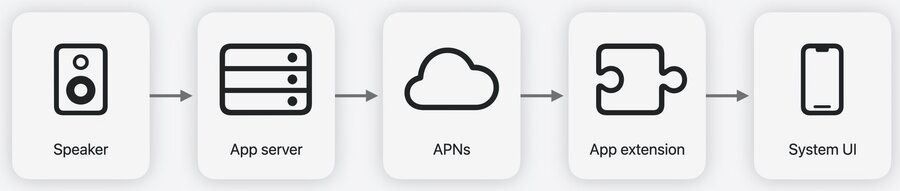
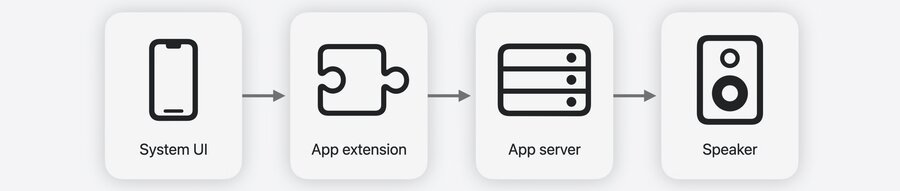
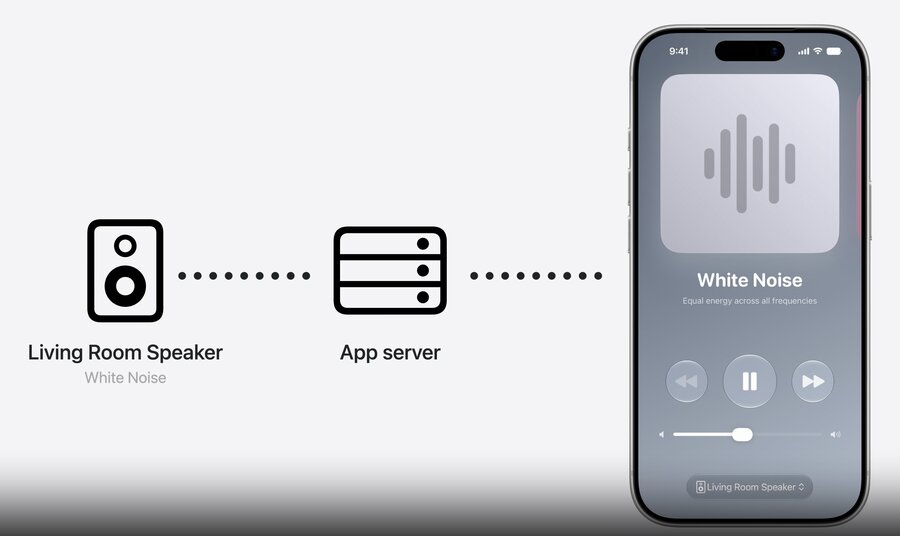
Represents/controls media playing on another device (e.g. a smart speaker), not locally
Flow: speaker → server → APNs push → the system launches your app extension with the updated state
Commands from iPhone system UI → system calls your extension’s handler → it sends the command to the server → server updates the speaker
Implemented as an app extension conforming to
RemoteMediaSessionExtensionconfiguration:RemoteMediaSessionExtensionConfigurationextensionPoint: identifier (host: "com.apple.nowplaying",name: "remote-media")session(_:): builds your model from the pushedRemotePlayerState
import ExtensionFoundation
import NowPlaying

@main
final class RemotePlayerAppExtension: @MainActor RemoteMediaSessionExtension {
    var configuration: some AppExtensionConfiguration {
        RemoteMediaSessionExtensionConfiguration(extension: self)
    }

    var extensionPoint: AppExtensionPoint {
        AppExtensionPoint.Identifier(host: "com.apple.nowplaying", name: "remote-media")
    }

    func session(_ state: RemotePlayerState) async throws -> RemotePlayerModel {
        RemotePlayerModel(state: state)
    }
}
Build a
RemotePlayerModel(@Observable,@MainActor) as the foundation for the representation
import Observation

@Observable
@MainActor
final class RemotePlayerModel: @MainActor RemoteMediaSessionRepresentable {
    let client: ServerClient
    var state: RemotePlayerState

    init(state: RemotePlayerState) {
        self.client = ServerClient(sessionID: state.sessionID)
        self.state = state
    }
}
Provide the same core properties as a local session, plus device info and state updates
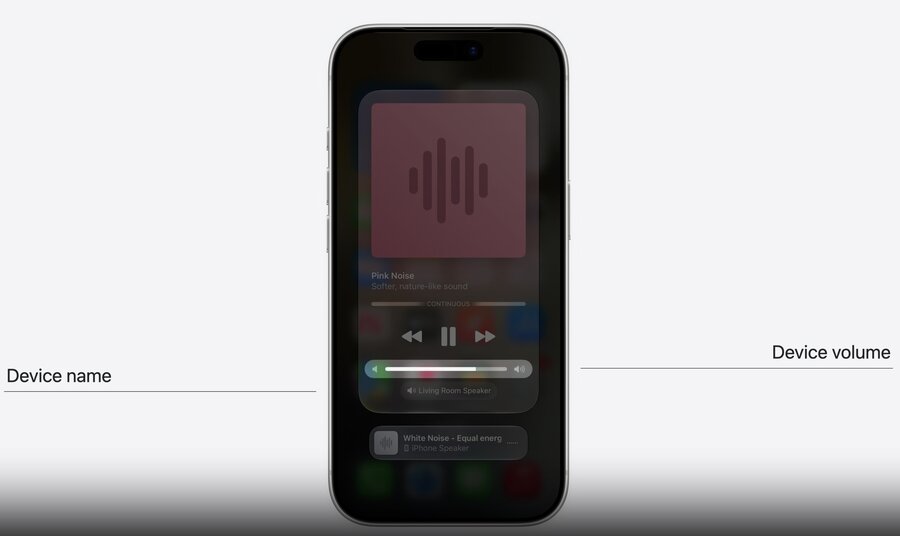
id/content/playbackSnapshot: same shape as a local session, built fromstatecommands: forward each action to the server via theclientdevices: list ofMediaDevice(e.g..speaker) with capabilities like.absoluteVolumeupdate(_:): apply the newRemotePlayerStatedelivered by a push
import NowPlaying

extension RemotePlayerModel {
    var id: String { state.sessionID }

    var content: (any MediaContentRepresentable)? {
        GenericContent(
            id: state.sound.id,
            title: state.sound.name,
            subtitle: state.sound.description,
            type: .audio,
            duration: .continuous,
            artwork: Artwork(id: state.sound.id) { size in
                let data = try await self.artworkData(size: size)
                return try ArtworkRepresentation(data: data)
            }
        )
    }

    var playbackSnapshot: MediaPlaybackSnapshot? {
        MediaPlaybackSnapshot(state: state.isPlaying ? .playing() : .paused)
    }

    var commands: [MediaCommand] {[
        .play { try await self.client.send(.play) },
        .pause { try await self.client.send(.pause) },
        .previous { try await self.client.send(.previous) },
        .next { try await self.client.send(.next) }
    ]}

    var devices: [MediaDevice] {
        state.devices.map { device in
            MediaDevice(
                id: device.id,
                name: device.name,
                type: .speaker,
                capabilities: [
                    .absoluteVolume(device.volume) { volume in
                        // send volume change to server
                    }
                ]
            )
        }
    }

    func update(_ state: RemotePlayerState) {
        self.state = state
    }
}
Media Sharing Extensions: simplify playing media from iPhone
Use the system device picker for all the media protocols your app supports
Protocol implementations live outside your app, managed by the system
Traditionally you had to embed each protocol’s SDK in your app bundle
Now your app focuses on the media content, not the playback technology
As new protocols arrive, apps get them without adopting another SDK
Learn more: Routing media to third-party devices
