
Key Takeaways
Deeper integrations into and beyond the OS
Wider variety of models (on-device, PCC, third-party)
New primitives for building agentic experiences
Core framework going open source
Model updates
1. On-Device Model
New on-device model, rebuilt from the ground up - more intelligent, better at logic and tool calling
iOS 26.4: new APIs for inspecting the model’s context size and counting tokens
Improved guardrails: fewer false positives
Added Vision capabilities to the on-device model
// Attachable image types

let response = try await session.respond {
    "What animal is this?"

    Attachment(UIImage(...))

    Attachment(NSImage(...))

    Attachment(CGImage(...))

    Attachment(CIImage(...))

    Attachment(CVPixelBuffer(...))
}
2. Private Cloud Compute Language Model (PCC)
Much bigger model than the on-device ones (32K context size)
No account setup, authentication, or API keys to worry about
Prompts are never stored
No API costs for under 2M first-time downloads
For more, see Build with the new Apple Foundation Model on Private Cloud Compute.
import Foundation
import FoundationModels
import Playgrounds

#Playground {
    let session = LanguageModelSession(
        model: PrivateCloudComputeLanguageModel()
    )

    let response = try await session.respond(
        to: "How many folds are in a paper crane?",
        contextOptions: ContextOptions(reasoningLevel: .deep)
    )
}
3. Model Abstraction Layer
New
LanguageModelprotocolAllows local or server models to back a
LanguageModelSessionSystemLanguageModelandPrivateCloudComputeLanguageModelalready conform to this protocol
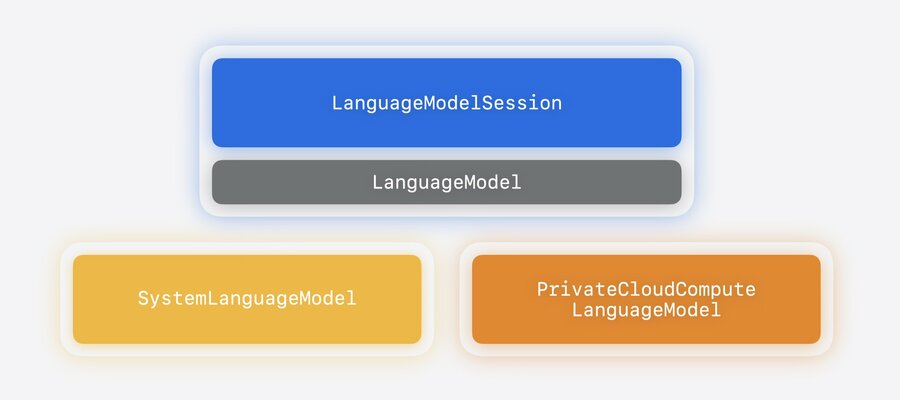
Open-sourcing implementations:
CoreAILanguageModelandMLXLanguageModelTo learn more about using LanguageModels and authoring your own LanguageModel package, see Bring an LLM provider to the Foundation Models framework
Model abstraction layer makes using third-party models simple
Never store private keys in your app binary. Always handle tokens with a secure mechanism like OAuth or Keychain.
import Foundation
import FoundationModels
import CoreAILanguageModels
import Playgrounds

#Playground {
    let model = try await CoreAILanguageModel(
        resourcesAt: Bundle.main.resourceURL!.appending(
            path: "qwen3_0_6b_4bit",
            directoryHint: .isDirectory
        )
    )
    let session = LanguageModelSession(model: model)
}
Easy to keep track of token usage
let response = try await session.respond(
    to: "Recommend a craft that doesn't require scissors.",
    contextOptions: ContextOptions(reasoningLevel: .light)
)

print(response.usage.input.totalTokenCount)
print(response.usage.input.cachedTokenCount)

print(response.usage.output.totalTokenCount)
print(response.usage.output.reasoningTokenCount)
System tools
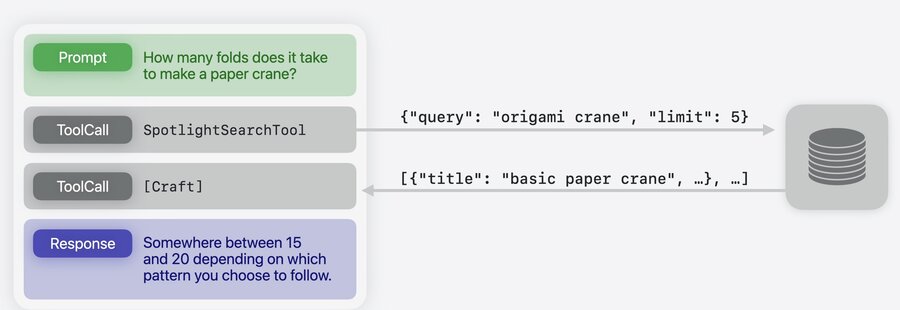
BarcodeReaderTool: reads information from barcodesOCRTool: extracts structured text from imagesSpotlightSearchTool: fully local retrieval-augmented generation (RAG), gives the model access to up-to-date personal or domain knowledgeLearn more about RAG: LLM search using Core Spotlight
Dynamic profiles
Background
Managing context and orchestrating an agentic system can involve a lot of boilerplate
Every mode switch requires manually managing sessions and preserving the transcript
Foundation Models introduces a declarative API, dynamic profiles → focus on what matters in the context, leave imperative control to the framework
Usage
Conform to the
DynamicProfileprotocolInitialize a session with a
DynamicProfileSpecify the instructions and tools for each
ProfileA
DynamicProfileresolves to a single activeProfileat any given timeUse conditionals to pick which
Profileis active, and the framework handles the transition for youGive the model a tool (e.g.
SwitchModeTool) so it can switch modes on its own
struct CraftProfile: LanguageModelSession.DynamicProfile {
    let states: CraftProjectStates

    var body: some DynamicProfile {
        switch states.mode {
        case .craftAnalysis:
            Profile {
                Instructions { ... }
                RecordImageAnalysisTool()
                SwitchModeTool(states: states) // can give the model a tool
            }
        case .brainstorm:
            Profile {
                Instructions { ... }
                BrainstormRecordTool()
                // intelligently switch to the context in this mode
            }
        }
    }
}
To keep the conversation context while varying the model or configuration per task, use modifiers
.model(): specify the model for a profile.reasoningLevel(): ask the model to think more thoroughly
struct CraftProfile: LanguageModelSession.DynamicProfile {
    let states: CraftProjectStates

    var body: some DynamicProfile {
        switch states.mode {
        case .craftAnalysis:
            Profile { ... }
        case .brainstorm:
            Profile { ... }
                .model(states.privateCloudCompute)
                .reasoningLevel(.deep)
        }
    }
}

let session = LanguageModelSession(
    profile: CraftProfile()
)
Evaluations framework
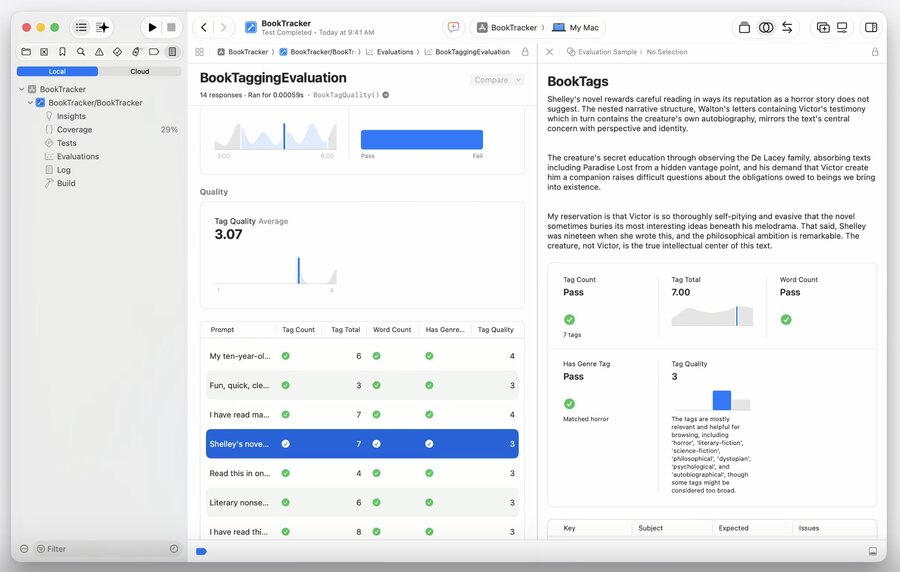
Language models are inherently non-deterministic → new framework to measure the quality of intelligence features
Learn more:
Tooling and open source
fmCLI: use the models from the command line with thefmcommand (macOS 27+)FoundationModels SDK for Python is also supported
Foundation Models framework utilities: transcript management, skill integration, chat completions language model
Core FoundationModels framework will be open source
