
Key Takeaways
📱 Device Hub ships with Xcode 27 for real devices and simulators
🎮 Canvas with live display, touch input, and hardware controls
🐛 Mirror a physical device onto a simulator to reproduce bugs quickly
⌨️
devicectlautomates device tasks in scripts and CI
Introduction
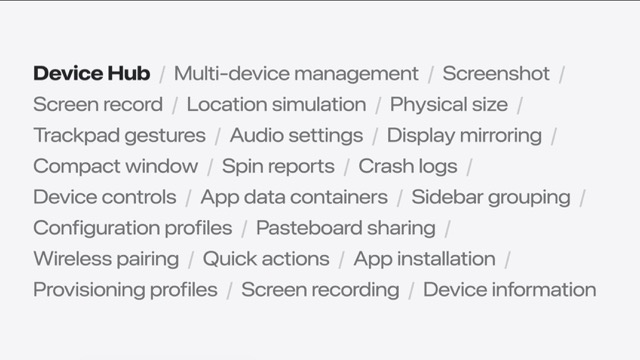
Device Hub is a new app in Xcode 27 for working with connected devices and simulators
Brings device management, interaction, and diagnostics into one place instead of scattering tools across Xcode
Device Hub overview
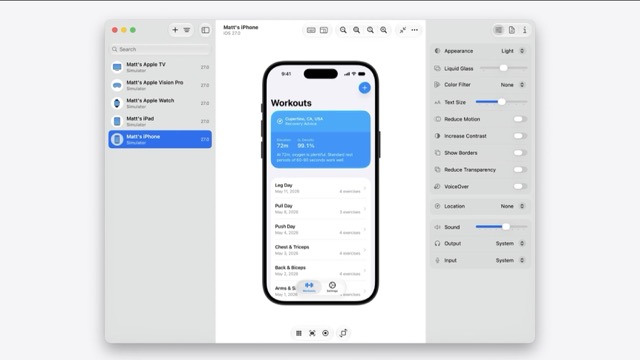
Two modes: compact and full window
Same workflows whether you are using a physical device or a simulator
Compact mode keeps a device visible while you work; full window mode exposes the full sidebar and inspector layout
Control
The canvas shows a live display of the selected device or simulator
Send touch input directly from your Mac
Hardware controls for buttons and other device inputs
Zoom and resize mode for inspecting layout at different sizes
Keyboard capture routes Mac keyboard input to the device
Organize
The sidebar lists your full device and simulator inventory
Filter, sort, and group devices to find what you need quickly
Open compact windows to keep multiple devices visible at once
devicectl
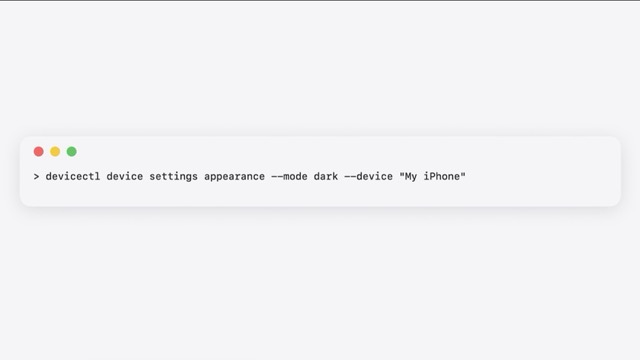
devicectlis the command-line companion to Device HubManage devices, install apps, and capture diagnostics from Terminal
Script common workflows and integrate device operations into CI pipelines
