
Summary
Expand Reach: Use Xcode’s agents for app localization to tap into global markets.
String Catalogs: Automatically track and organize localizable strings with Xcode’s built-in tools.
Agent-Assisted Translation: Leverage coding agents for context-aware translations directly in Xcode.
Review & Iterate: Use TestFlight and agentic tools to refine translations and catch UI issues.
Guidance & Best Practices: Provide translation guidance to enhance consistency and quality.
Presenters
Avery Vine, Software Localization Engineer
Localization Tools in Xcode
String Catalogs: Automatically track where and how strings are used in the code to provide context for translation.
Coding Agents: Translate strings directly in Xcode, utilizing context to enhance translation accuracy.
Translation Process
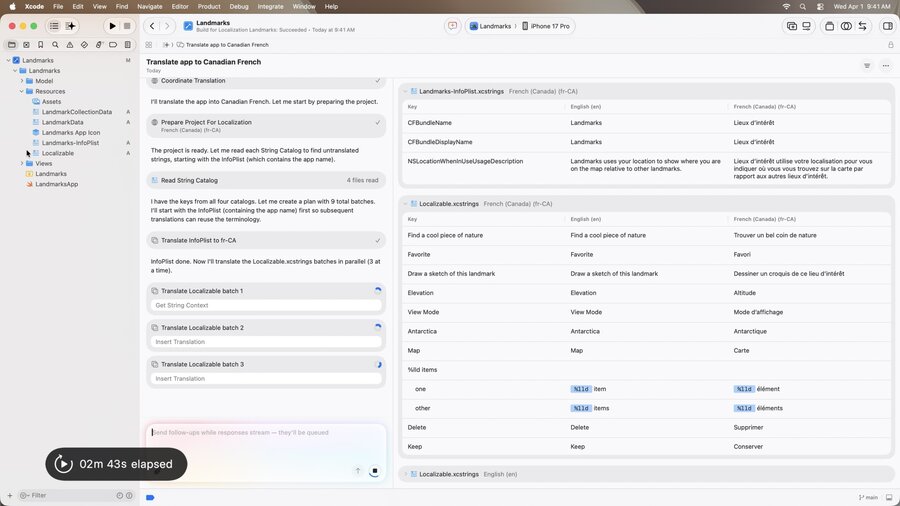
Preparation: Xcode adds languages to project settings and builds targets to identify localizable strings.
Translation: Agents split strings into batches and delegate to subagents for translation, ensuring correct pluralization and terminology.
Reviewing Translations
UI Checks: Run the app in different languages to verify text fits well without truncating.
Feedback: Use TestFlight to gather feedback from native speakers and refine translations.
Best Practices
Localization APIs: Ensure user-facing strings are localizable using APIs like
String(localized:).Translation Guidance: Provide style guides or glossaries in
TRANSLATION.mdfor agents to follow.Model Selection: Choose models with large context windows for consistent terminology across translations.
Additional Notes
Consider using models with better performance on less common languages.
Check the
leveraged-mtstate qualifier to identify agent-provided translations.
Recommendations
Leverage Xcode’s translation features to enhance app accessibility worldwide.
Continuously iterate on translations with feedback from native speakers and agents.
Explore additional resources like “Xcode, agents, and you” for more capabilities with agents in Xcode.
