
Deploy Passkeys at Work
Passkeys
Passkeys are replacements for passwords. Benefits of passkeys are:
Much faster and easier to sign in with
Guarenteed to be more secure because they are strong and unique
Phising resistant
Available on all devices via secure syncing
Great user experience
“passkey” is lowercase because it is an industry standard term like “password”
For more information https://developer.apple.com/videos/play/wwdc2022/10092
Phishing
Phising attacks on employers are one of the top attacks that enterprises have to defend against and are typically the initial foothold for attackers in major breaches. Because there is nothing to type, users cannot be tricked into putting their information in the wrong place. Passkeys are intrinsically linked to the website or app it’s used for.
Stolen Credentials
Typically passwords are stored as a hash on a server. This leads to a possibility of hashes being stolen and cracked. Passkeys, on the other hand, are stored as a public key. For hackers, this is not worth stealing as it does not provide any benefit.
2FA
Attackers are increasingly tricking users to bypass the three most popular forms of 2FA.
| Type of 2FA | Attack |
|---|---|
| SMS | Phishing |
| TOTP | Phishing |
| Push notifications | Push fatigue |
With passkeys, layering on SMS, time-based one-time password, and push notifications adds no extra security.
User Experience
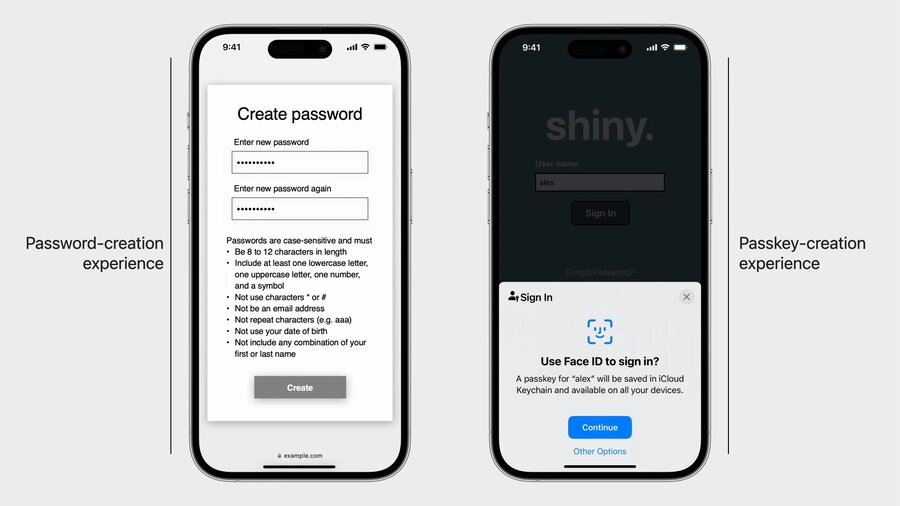
Using passkeys provides the user with a much better experience. Creating/signing in is as simple as using Face ID
Managing Passkeys at Work
Requirements in managed environments:
Manage the Apple IDs used with iCloud Keychain and passkeys
Ensure passkeys only sync to managed devices
Store passkeys created for work in iCloud Keychain of managed accounts
Prove to relying parties that passkey creation happens on managed devices
Turn off sharing of passkeys between employees
Access Management functionality
There are two different controls administrators can use.
Administrators can allow managed Apple ID on:
Any Device
Managed Devices Only
Supervised Devices Only
In addition they have the options for allowing iCloud on:
Any Device
Managed Devices Only
Supervised Devices Only
A new configuration to provision passkeys was added: com.apple.configuration.security.passkey.attestation. This new configuration:
References an identity asset
Provides identity attests enterprise passkeys
Is available on iOS, iPadOS, and macOS
Example passkey attestation configuration
// Example configuration: com.apple.configuration.security.passkey.attestation

{
    "Type": "com.apple.configuration.security.passkey.attestation",
    "Identifier": "B1DC0125-D380-433C-913A-89D98D68BA9C",
    "ServerToken": "8EAB1785-6FC4-4B4D-BD63-1D1D2A085106",
    "Payload": {
        "AttestationIdentityAssetReference": "88999A94-B8D6-481A-8323-BF2F029F4EF9",
        "RelyingParties": [
            "www.example.com"
        ]
    }
}
This is how the process works:
The MDM server sends the passkey attestation configuration and identity asset to the device
The identity certificate is provisioned from the corporate certificate authority server
The website a user connects to requests a passkey for access
The device generates a new passkey, attests to it using the provision identity certificate, and returns it to the website
The website verifies the attestation by checking that the device certificate inside the Web Authentication enterprise attestation payload chains back to the organization
Reliant parties will need to verify the attestation statement inside Web Authentication passkey creation response. They will do this by verifying the following:
The AAGUID came from an Apple Device
The algorithm is set to -7 for ES256 on Apple platforms
There is a byte string containing the attestation signature
There is an array with the attestation certificate and its certificate chain
Example
// WebAuthn Packed Attestation Statement Format

attestationObject: {
    "fmt": "packed",
    "attStmt": {
        "alg": -7, // for ES256
        "sig": bytes,
        "x5c": [ attestnCert: bytes, * (caCert: bytes) ]
    }
    "authData": {
        "attestedCredentialData": {
            "aaguid": “dd4ec289-e01d-41c9-bb89-70fa845d4bf2”, // for Apple devices
            <…>
        }
        <…>
    }
    <…>
}