
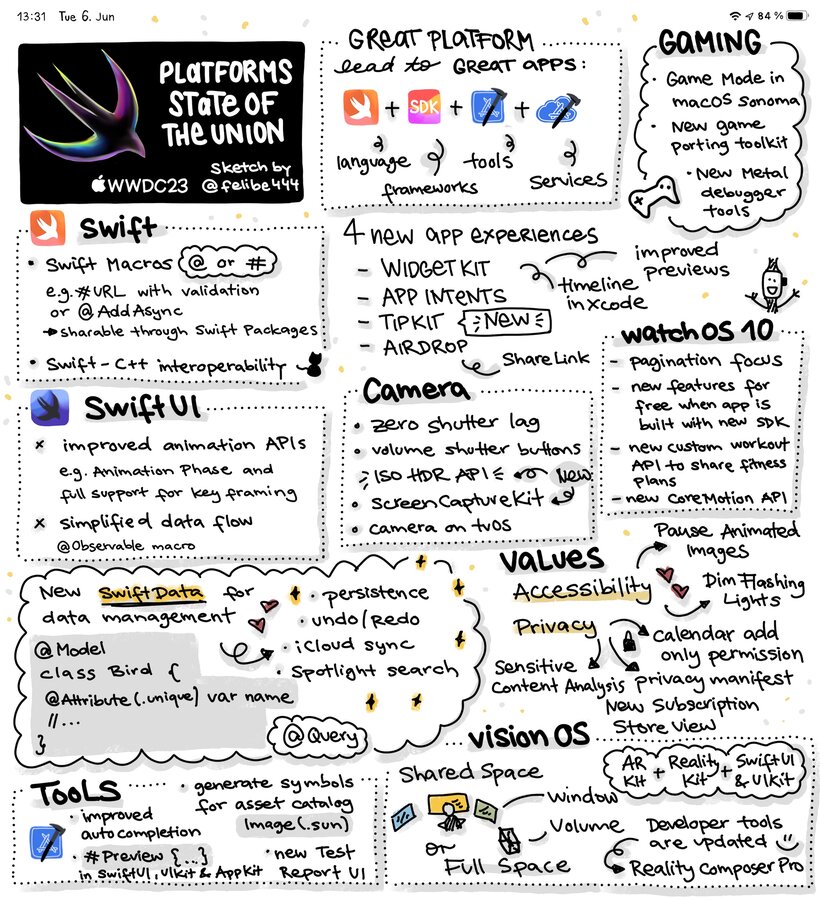
What is a good platform?
One where the most natural way to write code is also the best.
Swift
Swift Macros make APIs easier to use without boilerplate code
“expand macro” button in Xcode shows the generated code during the compilation process (to understand better)
@AddAsyncmacro makes any completion-handler function available as an async-await API, too
SwiftUI
Recent releases Logic Pro & Final Cut Pro make use of SwiftUI
Pie Charts coming to Swift Charts
More complete MapKit support
Animations improved: New default style is
.spring–> more bouncy appsAnimated SF Symbols
.animationPhaseand keyframing for more detailed animations
Data Flow
@Stateand@Environmentenough, no@StateObjector@EnvironmentObjectneeded anymore@Observablemacro replaces@PublishedandObservableObjectAutomatic detection of fields are refrenced in SwiftUI
Persistence
New Swift-native layer on top of Core Data
Uses
@Modelmacro to turn aclassinto a Model objectAutomatic support for persistence, iCloud, Redo/Undo
@Attribute(.unique)like APIs for marking fields@Query(sort: .name)like APIs for querying in views
WidgetKit
used in many places now (many OSes)
simple actions possible using
Buttonwe need to identify the background with
.containerBackgroundmodifier & update padding to support new placeseasy “magic move” like animations
@Previewmacro shows Timeline in SwiftUI previews
TipKit
customizable templates for educate users on first usage
syncs “already shown” state across devices
Misc
ShareLinkcan be used for new AirDrop supportGame porting toolkit: 1. Evaluate with emulation, 2. Convert & compile shaders, 3. Convert graphics code
AVCapture gets performance improvements
ISO HDR API to display images
Video Conferencing: Gesture-based animation effect triggers can be observed
New ScreenCaptureKit picker
external cameras can be added to IPad apps
tvOS apps can use camera, e.g. games with gestures, or gesture-remote – via
.continuityDevicePicker(...)
watchOS
New
.tabViewStyle(.verticalPage)for vertical pagescustom Workout API for workout plans
Accessibility
1.3 billion people worldwide with disabilities
Pauses Aimating Images (like GIFs)
Dims Flashing Lights (when AVFoundation used)
visionOD comes with many accessibility tools out of the box
Privacy
New “add-only” calendar permissions
“Private picker” mode in Photos for 3rd party apps
New “Privacy Manifests” for 3rd-party SDKs so Xcode can automatically fill form in App Store Connect
Communication Safety: sensitive content analysis framework, e.g. for nudity detection
StoreKit
Collection of views:
ProductView,SubscriptionStoreViewAutomatically displays applicable offers
SKAdNetwork now supports re-engangement
Xcode
Source Editor with better auto-completion
Type-safe color and image assets through
ImageResourceandColorResource(& more APIs)Git staging & unpushed commits built-in
Redesigned test reports with heatmap
UI tests now record video of interaction before fail
Xcode Cloud: Distribute to TestFligth, Notariation, Redesigned Linter (up to 5x faster), Mergeable libraries
visionOS
development with SwiftUI, RealityKit, and ARKit
Shared Space: Default, like Desktop
SwiftUI scenes: Window, Volume, Full Space (entire environment)
2D apps with 3D extends via
.offset(z: ...)ornaments for toolbars/menus (on the left)
RealityKit: Dynamic foveation (shaper where eyes look)
ARKit: understands space adround use, finger/wrist or head for visionOD selection
Simulator on macOS available – only VR mode, no AR mode (through iPhone Camera Continuity)
Reality Composer Pro: Preview 3D content, integrates with Xcode build process
TestFlight available on visionOS
Unity: all advantages of visionOS
User Input: hover effects via look (not communicated for privacy reasons), finger tap for click
Early Preview: “Spacial Personas” – for Vison Pro to Vision Pro FaceTime calls
Detailed Documentation & Tools available
VisionPro Developer Labs in 6 locations for testing: Lodon, Munich, Shanghai, Singapore, Tokyo, and Cupertino
WWDC23: 175 sessions, 40 for visionOS alone

