TipKit is a new framework that makes it easy to shop tips in your app (for feature discoverability)
Designed with education in mind to teach about brand new / hidden feature or faster way to accomplish a task
Available on iPhone, iPad, Mac, Apple Watch, and Apple TV (not in Vision Pro ?)
Create a tip
Conform custom type to
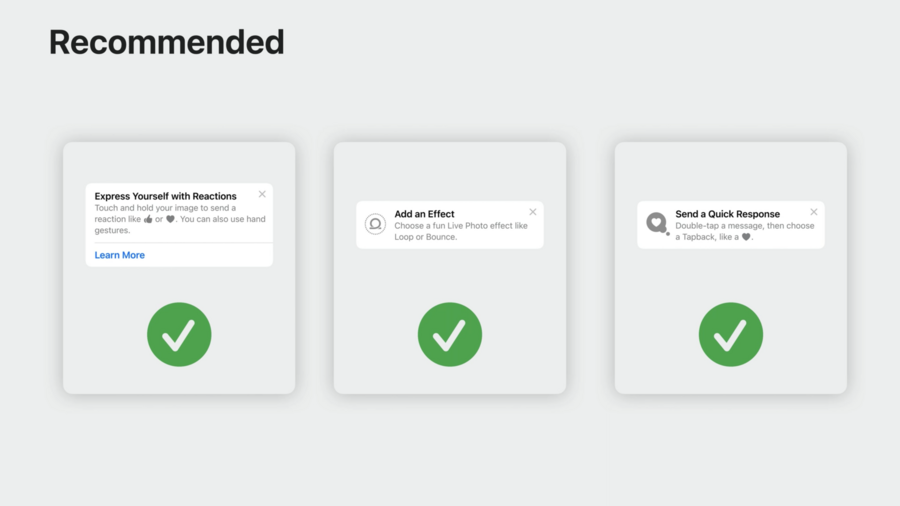
Tipwhich hastitle: Textandmessage: Textrequirements,Textview can be customizedRecommended usage when tips are: actionable, instructional, and easy to remember
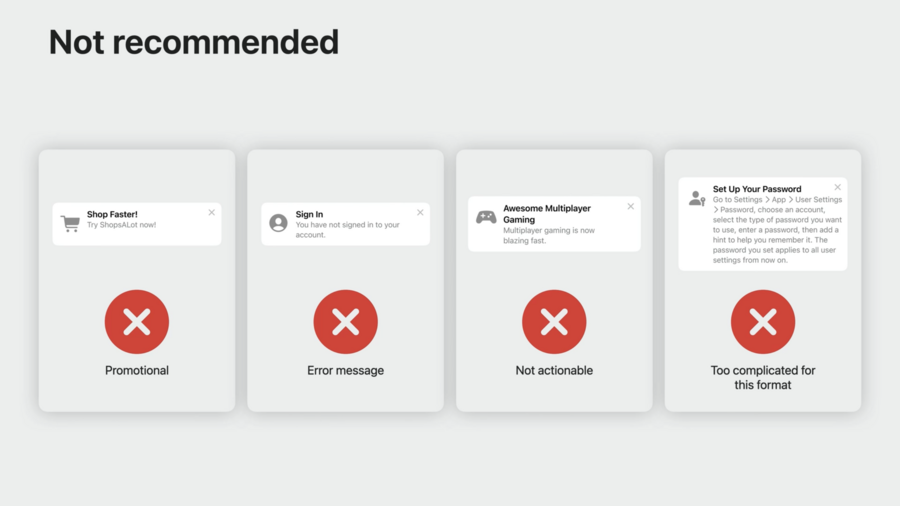
Not recommended for: Promotional messages, Error messages, pure information that is not actionable, too complex text
Call
TipsCenter.shared.configureon app start (e.g.init()ofApp)Tipprotocol optionally has anasset: Imageto show an icon alongside tipTipprotocol also optionally hasactions: [Action]where you can returnTip.Action(id:title:)instances for buttons (like “Learn More” or “Open Settings”)2 types of tip views:
.popoverMiniTip(tip: ...): Appears over app’s UI, no need to change app screen – on tvOS this is the only optionInline views: Adjusts the app’s UI to temporarily fit around it
Eligibility rules
2 types of rules to decide when to show a tip:
Parameter-based rules: State and Bool comparisons, persistent, best suited for Swift value types
Event-based rules: User actions that must be performed before showing tip
For parameter-based rule, use
@Parameteron a static stored propertty likestatic var isLoggedIn: Bool = falseof your customTipconforming type, and:Specify
#Rule(Self.$isLoggedIn) { $0 == true }in arules: Predicate<RuleInput...>computed property within your typeFor event-based rule, specify a static stored property like
static let appStarts: Event = Event<AppStartDonation>(id: "app-start"), and:Specify
#Rule(Self.appStarts) { $0.count >= 3 }in arules: Predicate<RuleInput...>computed property within your typeDon’t forget to “donate” the event when it happens, like calling
.onAppear { CustomTip.appStarts.donate() }
Example with both parameter-based and event-based rules combined:
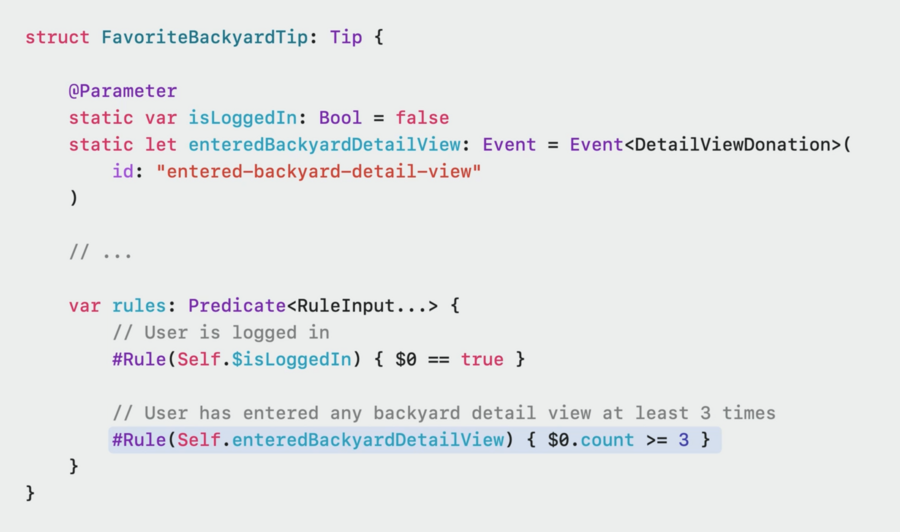
You can not only use
.countonEventbut also.donationswhich have adateproperty for more complex logic, like “3 times within last week”You can even specify your custom
DonationValuetypes with additional details likeIDs of your models or more
Display and dismissal
Display frequency of tips can be set so they appear at an ideal cadence, we don’t want to show them all at once
To show one tip per day, on app start use:
TipsCenter.shared.configure { DisplayFrequency(.daily) }(or.hourly, customTimeInterval, or.immediate)A specific
Tipconformance can override frequency via computed propertyoptions: [Option] { [.ignoresDisplayFrequency(true)] }Call
customTip.invalidate(reason: .userPerformedAction)to dismiss a tip that is presented or to never show a tip for an action the user has already performedAdditionally, you can provide a max display count via
options: [Option] { [.maxDisplayCount(5)] }computed property on aTiptypeTipKit can sync tip status via iCloud to sync multi-device on same app (didn’t explain how or if customizable)
Test tips
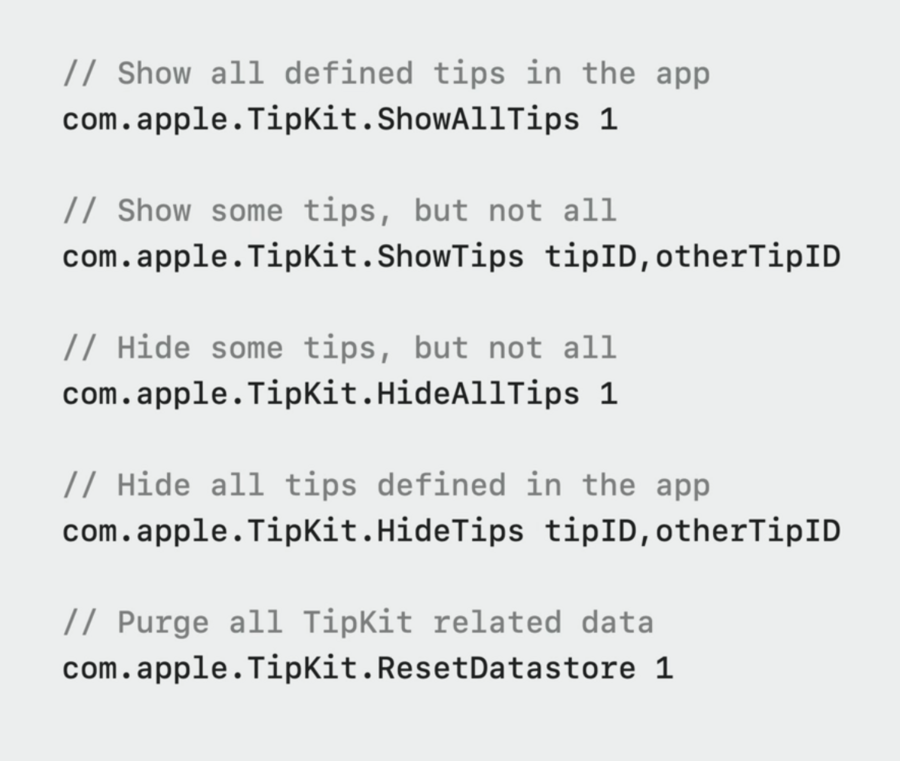
To inspect all tips without needing to satisfy the eligibility rules, perform
TipsCenter.showAllTips()for testingYou can also show certain tips via
TipsCenter.showTips([tip1, tip2, tip3])by passing their IDs, or hide them via.hideTips(...)To hide all tips to focus on a new feature for example, call
TipsCenter.hideAllTips()Use
TipsCenter.resetDatastore()to reset persisted eligibility data to get same experience on each run during developmentAll the above options can also be passed via launch arguments in Scheme Editor in Xcode: