
SharePlay is all about any activity done with others.
New to SharePlay
Groups are often already together when they use SharePlay, and the activities will often change over the duration of the group. SharePlay enables your app to take advantage of the group that’s already present.
New: SharePlay over AirDrop
AirDrop joins FaceTime & iMessage as existing group contexts you can use in SharePlay
tvOS 17 brings FaceTime to tvOS - and SharePlay works there too
When defining your Group Activity type, you’ll need to provide metadata so the system can best represent your activity:
var metadata: GroupActivityMetadata {
	var metadata = GroupActivityMetadata()
	metadata.title = "Order Tacos Together"
	metadata.type = .generic
	return metadata
}
In this piece of metadata, the type is set to .generic - and this tells the system (for example) what type of icon to use. In new OS versions, there are 6 additional types you can use.
Related WWDC videos:
Add SharePlay to your app
Adopting SharePlay brings a group directly into your app. Activities can be ephemeral, and switching between experiences is seamless.
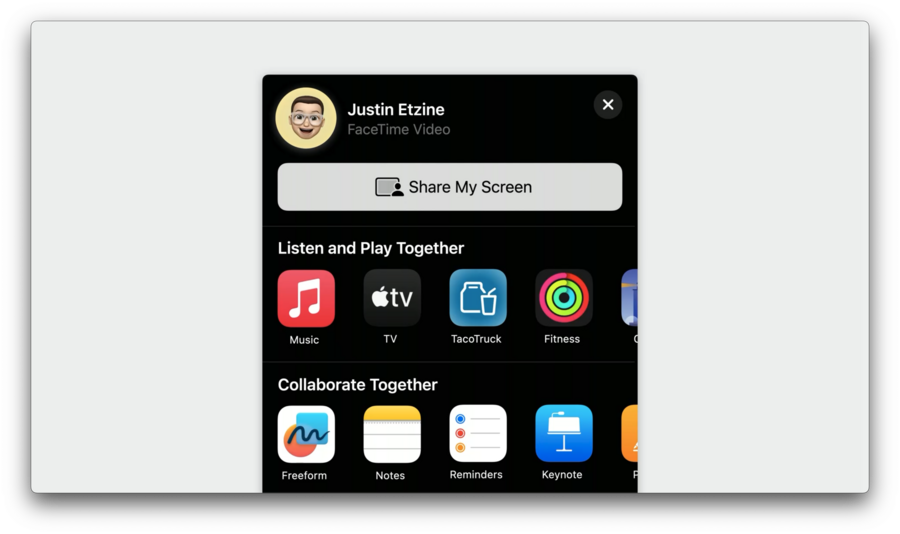
New: in iOS 17, tapping Share in an active FaceTime call presents a new share sheet showing apps that support SharePlay
Adopting Group Activities gives your app all the necessary UI elements for managing a group:
People picker
Notifications
State changes
You also get the fully encrypted, low-latency data channel for syncing your group’s activity
Adopting SharePlay
First, import the GroupActivities framework and create an activity that follows the GroupActivity protocol:
import GroupActivities

struct OrderTogether: GroupActivity {
	// Define a unique activity identifier for system to reference
	static let activityIdentifier = "com.example.apple-samplecode.TacoTruck.OrderTogether"
	// App-specific data so your app can launch the activity on others' devices
	let orderUUID: UUID
	let truckName: String

	var metadata: GroupActivityMetadata {
		var metadata = GroupActivityMetadata ()
		metadata.title = "Order Tacos Together"
		metadata.subtitle = truckName
		metadata.previewImage = UIImage (named: "ActivityImage" )?.cgImage
		metadata.type = .shopTogether
		return metadata
	}
}
The metadata is also used to provide joining options:
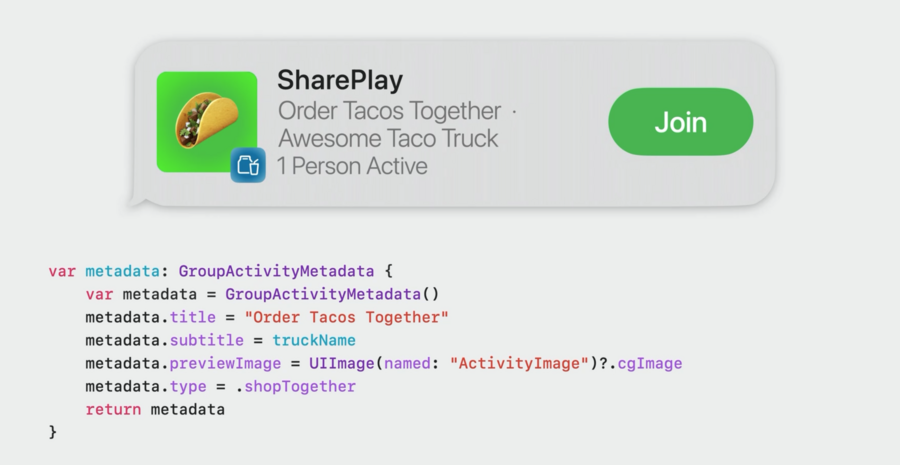
For more details on integrating SharePlay, see the SharePlay documentation
For more detail on using SharePlay to adapt to your use case: Build Custom Experiences with Group Activities - WWDC21
Best practices
Be specific to your use case
Think about how you would share this experience with friends - without any devices
Take notes of the parts of these experiences that make you feel connected to the people you’re sharing them with
Add elements to your apps design that might help preserves that feeling of togetherness
For more details: Make a Great SharePlay Experience - WWDC22
Design for all platforms your app supports
iOS, iPadOS, macOS, tvOS are all supported
Consider SharePlay for experiences far and near
Add an in-app SharePlay button
Don’t forget to adopt NSItemProvider
This will allow users to start a SharePlay sessions from the share sheet or via AirDrop
Define descriptive, contextual metadata, and state changes
Test your experience
You’ll need 2 or more devices to test effectively
Wrap Up
Every app has an opportunity for SharePlay:
Gives you access to existing groups via FaceTime, Messages, and now even AirDrop
Provides a performant and private data channel for syncing your app’s data
Takes care of group management UI like people pickers, notifications, and state management
