Skip to content

Designing for Adverse Network and Temperature Conditions

World-class apps deliver a great user experience, even in the most strenuous environments. Learn how to use Xcode to simulate adverse network and temperature conditions. Put your app through its paces and get a firsthand view of how it performs. Hear about best practices that you can adopt to respond to challenging conditions.

Pro-tip to boost test setup

  • Add IS_UNIT_TESTING environment variable

  • Ensure only unneeded functionality is skipped for unit testing

func application(
	_ application: UIApplication, 
	didFinishLaunchingWithOptions opts: ...
) -> Bool {
	let isUnitTesting = ProcessInfo.processInfo.environment["IS_UNIT_TESTING"] == "YES" 
	if !isUnitTesting { 
		// Do UI-related setup, which can be skipped when testing
	}
	return true 
}

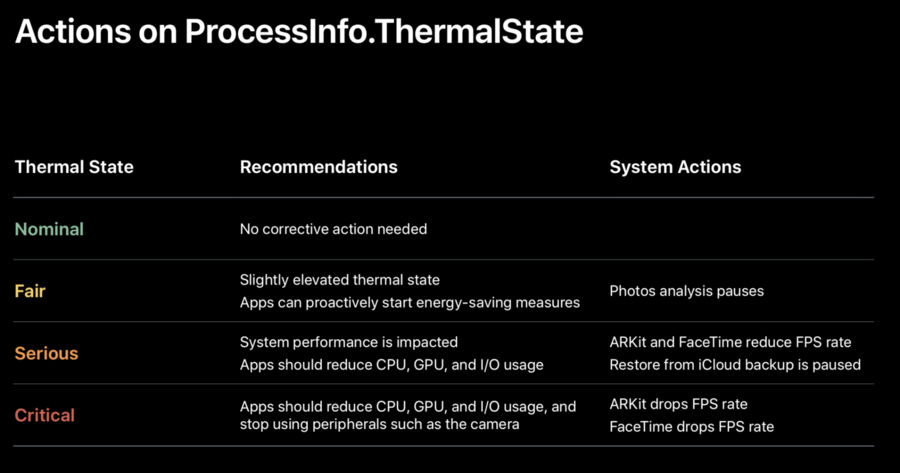
Thermal State Behavior Example from iOS
Missing anything? Corrections? Contributions are welcome!

Written By

zntfdr
zntfdr
332 notes contributed