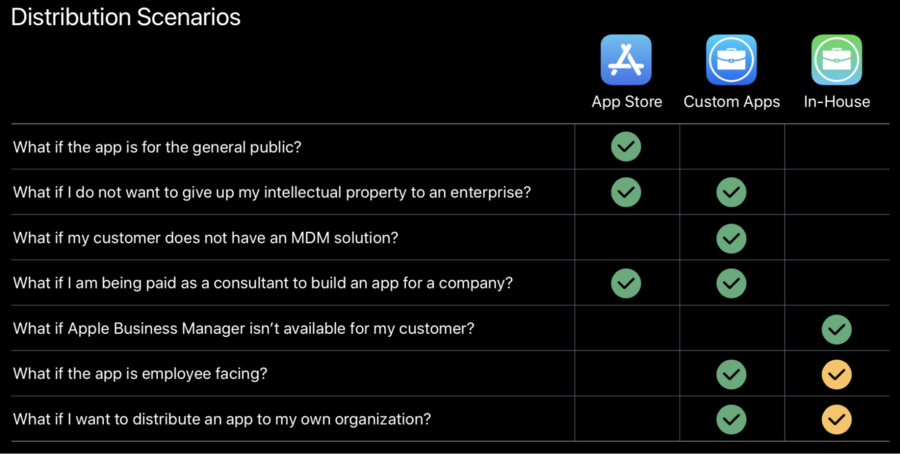
Distribution
Four main distribution methods:
Ad Hoc
App Store
In-House
Custom Apps
Which distribution should we use?
Depends on who is using the app and who is buying the app.
Individuals
Most often, an individual is both the customer and the user:
Ad Hoc: lets you distribute to a limited number of devices that you choose for testing.
App Store: lets you distribute apps to the general public.
Organizations
School/Private businesses, for apps intended to be used privately and internally by a business.
In-House NS Custom Apps: As both offer private distribution
Personal use only
When we start developing a new app, we can use our own Personal Team (associated with our own Apple ID).
Sign into Xcode with an Apple ID
Free to use
Deploy a limited number of apps to a few devices
Apps expire after a few days
To launch the app into a device, the device has to trust the developer certificate (Settings > General > Profiles and device management).
Expectations:
Intended for students, teachers and getting started
Apps will be deployed to devices you own
Intended for a few apps and a few devices
Certain capabilities are not available with free accounts (ex: CloudKit)
Apps cannot be distributed on the App Store (or TestFlight)
Ad Hoc
Lets you distribute to a limited number of devices that you choose for testing.
Requires a Membership in the Apple Developer Program.
Requires that you register their device from the developer website.
Distribute your app to testers on registered devices.
100 devices, per product family, per year can be registered.
To register a device we need its identifier (UDID): either from the finder’s sidebar or retrieving it from Xcode, which means that you as a developer would need physical possession of their device.
Installing Ad Hoc Builds
Tether and install with Xcode
Tether and install with Apple Configurator
OTA Installation
Expectations:
Meant for testing apps on registered devices
Short term distribution solution
Apps expire and will eventually stop working (the provisioning profiles used to sign these apps expire yearly, so eventually the apps will stop working or need to be re-signed.)
Device limits reset once per year
App Store
Lets us test the app via TestFlight
25 internal testers (no review required)
10,000 testers via email or a public link
Builds are active for 90 days
Builds for external testers go through beta app review
Available to members of the Apple Developer Program only
Need to make sure the app is appropriate for the general public
Working with a Third Party Developer
Assigning user permissions
3rd party (developer)
Developer Permission (to Upload builds)
Marketing Permission (to Provide metada, such as screenshots and app description)
Company that owns the app
Admin (for TestFlight Distribution, Pricing, App Submission, Go-Live on the App Store)
Expectations:
Apps are submitted under client accounts
Customer is legally responsible for the apps published under their brand
Limit access to powerful roles
In-House
While the Apple Developer Enterprise Program still exists, it’s no longer the standard mechanism for distributing private internal apps.
Proprietary apps built by internal developers for their employees
Organization owns and maintains the source code
Distribution is outside of the store
Organization distributes the app, usually via MDM (not publicly posted)
Expectations:
Users must be employees
Distribution certificates should be protected (if one is revoked, all apps will stop working immediately)
Certificate lifecycle needs to be managed
DIY Beta Testing and Hosting
Apps require periodic access to the internet
Custom Apps
The new way forward.
Two ways to use Custom Apps Distribution:
The developer sells the app directly to the company by using the developer own account (B2B model)
The developer gives the source code to the company and the company has its own App Store account where it will distribute the app (Business to self)
Benefits:
Part of the Apple Developer Program
Privately offer customized apps to customers you identify or to yourself
Apps for partners, clients, franchisees, internal employees, and affiliates
Distribute licenses via MDM or Redemption codes
Benefits vs enterprise accounts:
One program to manage all of your apps (internal and external)
Apps don’t expire
Apps are managed individually
Apps can be distributed to much larger audiences
Easier to work with third-party software vendors
Additional App Store features
TestFlight and App Store Connect tools
How-to from the developer POV
Setup app store account
Create new app
Create new app record (in App Store Connect)
The same bundle identifier cannot be available in both the public App Store and privately as a custom app. They’re totally separate apps with separate bundle
Upload build
List the app for sale as a Custom App
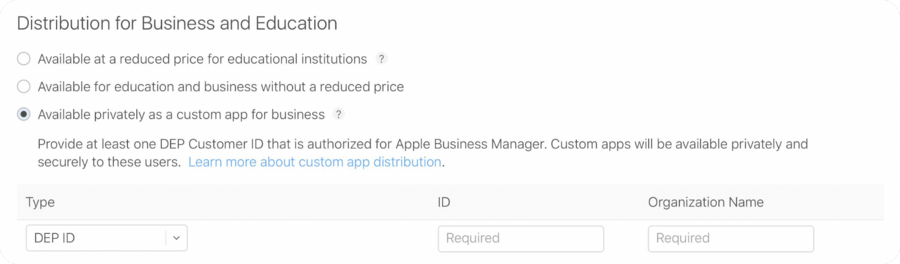
When submitting private apps for review, it is required to provide the targeted organization DEP ID and Organization Name.
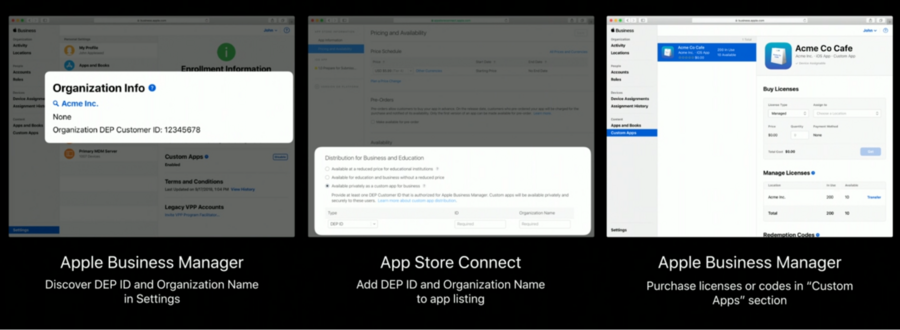
The DEP ID is a unique identifier given to the organization when they enroll in Apple Business Manager.
How-to from the Organization POV
Enroll in Apple Business Manager
Developer submits a new app/build with the org
DEP IDandOrganization NameOrganization see the app listed in their Custom Apps section in Apple Business Manager and can purchase/distribute the app.
With this Apple Business Manager program, organizations can buy App Store apps, custom apps and books in bulk, and deploy to their devices and users.
They can also do app license management.
Note that this needs to be set up in advance of you listing the app for sale as a custom app because you need that DEP ID and organization name to distribute the app to them.
Custom Apps will also be available for Apple School Manager this fall.
Troubleshooting
For the developer:
Make sure that Program and Paid Apps agreements are signed
Make sure all Banking and tax information are in place
For the organization/Customer:
Make sure Custom Apps are enabled (under Settings > - Enrollment Info in Apple Business Manager)
Wait a few minutes (the custom app availability is not instantaneous)
Consult App Store Connect Help
Expectations:
Customer is required to have Apple Business Manager
Apps have to support the countries they will be distributed in
Redemption codes will not be made publicly available
Reviewers need to access the full functionality of the app
Once submitted, apps can not be moved between public and private availability