The preview API is part of SwiftUI, but we can use it for preview UIKit views as well.
To create previews on the current file, create a new
Structconforming to thePreviewProviderprotocol:
usually this preview will returns the view of the current file and that’s it.Wrap the preview declarations with
#if DEBUG#endifcompile conditions to make sure previews will be compiled only in debug mode.We can select the device destination on the preview screen itself, or we can specify it in our preview code by using
.previewDevice(“iPhone X”).Instead of a device, we can also focus on the raw view itself (a-la
xibfiles), and that is done via the.previewLayout()API.Use
Group { .. }to display multiple previews at once.Override environment variables with the
.environment(\.sizeCategory, .extraLarge) APIUse
forEachto test all cases:
#if DEBUG

struct ContentView_Previews: PreviewProvider {
  static var previews: some View {
    Group {
      ForEach(ContentSizeCategory.allCases, id: \.hashValue) { size in
        ContentView()
          .environment(\.sizeCategory, size)
      }
    }
  }
}

#endif
If we have too many previews, we can assign each a name (displayed below each preview) with the
.previewDisplayName(“title”)API`.
Development assets
New in Xcode 11
Used (for example) when we want to preview images without having needing to relay on a network or with the need to add assets in our final binary.
UIKit previews
Works exactly like SwiftUI previews
Create a
PreviewProvider.Create a
UIViewRepresentable/UIViewControllerRepresentable.Add
UIViews/UIViewControllers in thePreviewProvider’spreviewsstatic property.
Canvas Protips:
Use the pin button in the bottom left corner of the preview to pin the current preview and jump to other files.
Show/hide the canvas by pressing
⌘+⌥+↩.
MVVM
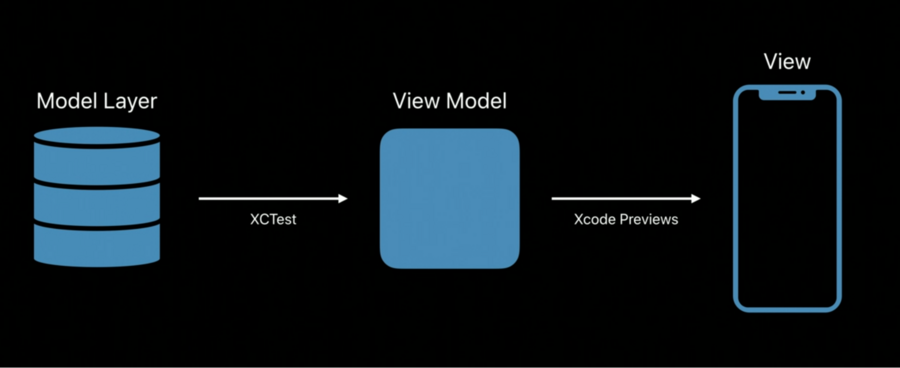
Apple is really pushing us to use the MVVM architecture with SwiftUI: Model-view-viewmodel.
Apple even suggests to add tests on how data migrates from a model to a view model: