
Offline Compilation
Offline compilation can help reduce app stutters, first launch, and new level load times. This is accomplished by moving GPU binary generation to project build time.
Previous Way to Generate GPU Binaries
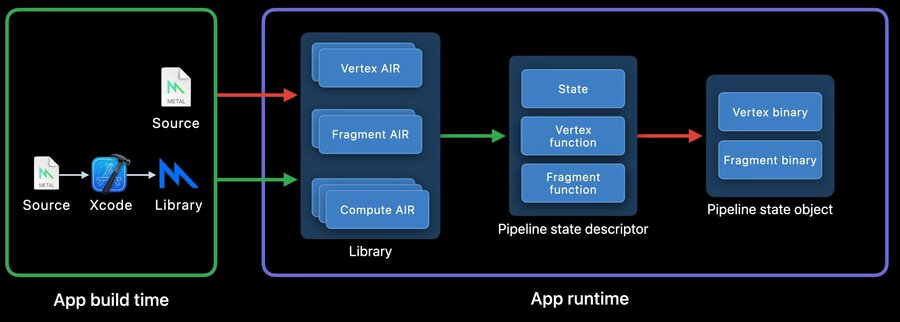
Metal library is instantiated from source during runtime using AIR (Apple’s Intermediate Representation) this operation is CPU intensive.
Library generation can be moved to build time by precompiling the source file and instantiating it.
When the Metal library is in memory, a Pipeline State Descriptor and Pipeline State Object (PSO) are created.
Creating a PSO is CPU intensive.
After the PSO is created, just-in-time GPU binary generation takes place.
When PSOs are created, Metal stores the GPU binaries in its file system cache.
Binary archives let users control when and where GPU binaries are cached.
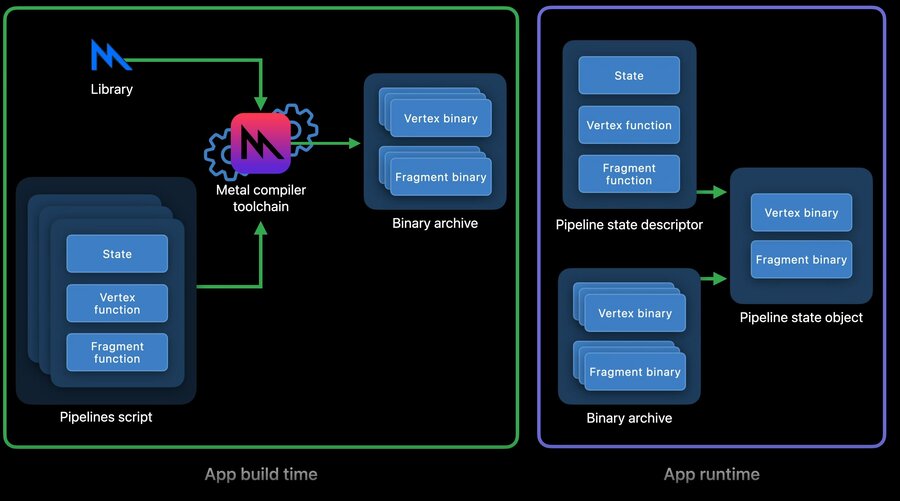
PSO creation can become a lightweight operation by using PSO descriptors to cache GPU binaries in an archive.
What’s New
Offline binary generation allows for a Metal pipeline script to be specified at project build time. This new artifact is equivalent to a collection of Pipeline State Descriptors in the API. The output provides a binary archive that can be loaded to accelerate PSO creation.
Creating Metal Pipeline Script
A Metal pipeline script is a JSON formatted description of one or more API Pipeline State Descriptors and can be created in a JSON editor or harvested from the binary archives.
Using a JSON Editor
Specify API Metal library file path.
Add API render descriptor function names as render pipeline properties.
Add pipeline state information (such as raster_sample_count or pixel formats).
Metal code for generating a render pipeline script
// An existing Obj-C render pipeline descriptor
NSError *error = nil;
id<MTLDevice> device = MTLCreateSystemDefaultDevice();

id<MTLLibrary> library = [device newLibraryWithFile:@"default.metallib" error:&error];

MTLRenderPipelineDescriptor *desc = [MTLRenderPipelineDescriptor new];
desc.vertexFunction = [library newFunctionWithName:@"vert_main"];
desc.fragmentFunction = [library newFunctionWithName:@"frag_main"];
desc.rasterSampleCount = 2;
desc.colorAttachments[0].pixelFormat = MTLPixelFormatBGRA8Unorm;
desc.depthAttachmentPixelFormat = MTLPixelFormatDepth32Float;
JSON equivalent
  "//comment": "Its equivalent new JSON script",
  "libraries": {
    "paths": [
      {
        "path": "default.metallib"
      }
    ]
  },
  "pipelines": {
    "render_pipelines": [
      {
        "vertex_function": "vert_main",
        "fragment_function": "frag_main",
        "raster_sample_count": 2,
        "color_attachments": [
          {
            "pixel_format": "BGRA8Unorm"
          },
        ],
        "depth_attachment_pixel_format": "Depth32Float"
      }
    ]
  }
}
Further schema details can be found in Metal’s developer documentation https://developer.apple.com/documentation/metal
Using Metal Runtime
This is done during runtime
Create Pipeline Descriptor with state and functions
Add descriptor to binary archive
Serialize binary archive to be imported by app
Harvesting sample
MTLRenderPipelineDescriptor *pipeline_desc = [MTLRenderPipelineDescriptor new];
pipeline_desc.vertexFunction = [library newFunctionWithName:@"vert_main"];
pipeline_desc.fragmentFunction = [library newFunctionWithName:@"frag_main"];
pipeline_desc.rasterSampleCount = 2;
pipeline_desc.colorAttachments[0].pixelFormat = MTLPixelFormatBGRA8Unorm;
pipeline_desc.depthAttachmentPixelFormat = MTLPixelFormatDepth32Float;

// Add pipeline descriptor to new archive
MTLBinaryArchiveDescriptor* archive_desc = [MTLBinaryArchiveDescriptor new];
id<MTLBinaryArchive> archive = [device newBinaryArchiveWithDescriptor:archive_desc error:&error];
bool success = [archive addRenderPipelineFunctionsWithDescriptor:pipeline_desc error:&error];

// Serialize archive to file system
NSURL *url = [NSURL fileURLWithPath:@"harvested-binaryArchive.metallib"];
success = [archive serializeToURL:url error:&error];
Extracting JSON pipelines script from binary archive can be done to move generation from runtime to build time.
This can be done by using metal-source while specifying buffers and output directory options
metal-source -flatbuffers=json harvested-binaryArchive.metallib -o /tmp/descriptors.mtlp-json
Generating Offline GPU Binaries
Generating GPU binary from source can be done by invoking metal with source, pipeline script, and output
metal shaders.metal -N descriptors.mtlp-json -o archive.metallib
Generating GPU Binary from Metal Library can be done by invoking metal-tt with source, pipeline script, and output file
metal-tt shaders.metallib descriptors.mtlp-json -o archive.metallib
Loading Offline Binaries
Provide binary archive URL when creating archive descriptor
Use URL to instantiate archive
For more information regarding API, see last year’s talk.
https://developer.apple.com/videos/play/wwdc2021/10229
Optimize for Size
The Metal Compiler optimizes aggressively for runtime performance. These optimizations may expand the GPU program size which may have unexpected costs. Xcode 14 provides a new optimization mode for metal: optimize for size. This setting prevents optimizations such as inlining and loop unrolling which should lower application size and compile time. This setting is useful for situations where the user encounters long compilation time. Optimize for size may hurt runtime performance, however it may improve runtime performance if the program was incurring runtime penalties associated with large size.
Enabling Optimize for Size
This feature can be enabled in 3 ways:
In Xcode build settings under Metal Compiler - Build Options by selecting Size [-Os] under Optimization Level
In Terminal with option
-OsIn Metal Framework setting
MTLLibraryOptimizationLevelSizein anMTLCompileOptionsobject
