
Grid
perfect for two-dimensional layouts when you have a static set of views to display
not lazy/scrollable
all views are loaded rightaway
allocates as much space to each row and column as it needs to hold its largest view (for that row/column)
lets you align all elements of a column via
gridColumnAlignment(_:)(see alsogridCellAnchor(_:))for an element/view to take multiple columns, use
gridCellColumns(_:)
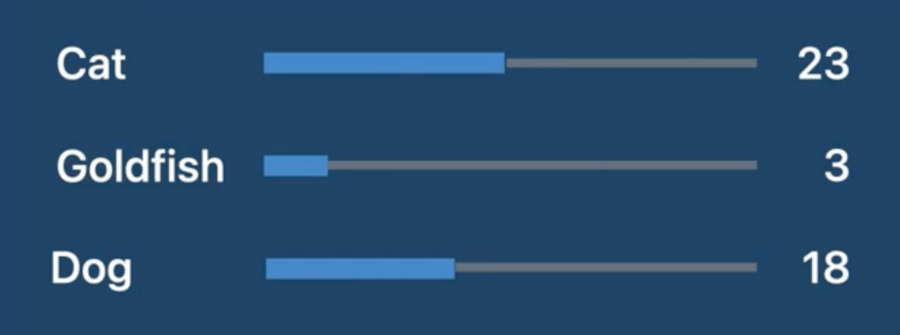
struct Leaderboard: View {
  var pets: [Pet]
  var totalVotes: Int

  var body: some View {
    //     👇🏻 this alignment will apply to all cells in the Grid (unless overridden via gridColumnAlignment(_:) and similar)
    Grid(alignment: .leading) {
      ForEach(pets) { pet in
        GridRow { // 👈🏻 within each Grid row, every view will correspond to a different column
          Text(pet.type)

          // 👇🏻 this view is flexible, and will take as much space as the Grid offers, Grid will make sure
          //    that ProgressView in each row will take the same amount of space
          ProgressView(
            value: Double(pet.votes),
            total: Double(totalVotes)
          )

          Text("\(pet.votes)")
            .gridColumnAlignment(.trailing)
            // 👆🏻makes sure that all this text is trailing aligned across all Grid rows
        }

        Divider() // Alternative: GridRow { Divider().gridCellColumns(3) }
      }
    }
    .padding()
  }
}
Layout
by conforming to the
Layoutprotocol, we can define a custom layout container that participates directly in SwiftUI’s layout processpossible thanks to
the new
ProposedViewSizestructure, which is the size offered by your container viewLayout.Subviewswhich is a collection of proxies for the subviews of a layout view, where we can ask for various layout properties for each sub view
public protocol Layout: Animatable {
  static var layoutProperties: LayoutProperties { get }
  associatedtype Cache = Void
  typealias Subviews = LayoutSubviews

  func updateCache(_ cache: inout Self.Cache, subviews: Self.Subviews)

  func spacing(subviews: Self.Subviews, cache: inout Self.Cache) -> ViewSpacing

  /// We return our view size here, use the passed parameters for computing the
  /// layout.
  func sizeThatFits(
    proposal: ProposedViewSize,
    subviews: Self.Subviews,
    cache: inout Self.Cache // 👈🏻 use this for calculated data shared among Layout methods
  ) -> CGSize

  /// Use this to tell your subviews where to appear.
  func placeSubviews(
    in bounds: CGRect, // 👈🏻 region where we need to place our subviews into, origin might not be .zero
    proposal: ProposedViewSize,
    subviews: Self.Subviews,
    cache: inout Self.Cache
  )

  // ... there are more a couple more optional methods
}
Example
A custom horizontal stack that offers all its subviews the width of its largest subview:

struct MyEqualWidthHStack: Layout {
  /// Returns a size that the layout container needs to arrange its subviews.
  /// - Tag: sizeThatFitsHorizontal
  func sizeThatFits(
    proposal: ProposedViewSize,
    subviews: Subviews,
    cache: inout Void
  ) -> CGSize {
    guard !subviews.isEmpty else { return .zero }

    let maxSize = maxSize(subviews: subviews)
    let spacing = spacing(subviews: subviews)
    let totalSpacing = spacing.reduce(0) { $0 + $1 }

    return CGSize(
      width: maxSize.width * CGFloat(subviews.count) + totalSpacing,
      height: maxSize.height)
  }

  /// Places the stack's subviews.
  /// - Tag: placeSubviewsHorizontal
  func placeSubviews(
    in bounds: CGRect,
    proposal: ProposedViewSize,
    subviews: Subviews,
    cache: inout Void
  ) {
    guard !subviews.isEmpty else { return }

    let maxSize = maxSize(subviews: subviews)
    let spacing = spacing(subviews: subviews)

    let placementProposal = ProposedViewSize(width: maxSize.width, height: maxSize.height)
    var nextX = bounds.minX + maxSize.width / 2

    for index in subviews.indices {
      subviews[index].place(
        at: CGPoint(x: nextX, y: bounds.midY),
        anchor: .center,
        proposal: placementProposal)
      nextX += maxSize.width + spacing[index]
    }
  }

  /// Finds the largest ideal size of the subviews.
  private func maxSize(subviews: Subviews) -> CGSize {
    let subviewSizes = subviews.map { $0.sizeThatFits(.unspecified) }
    let maxSize: CGSize = subviewSizes.reduce(.zero) { currentMax, subviewSize in
      CGSize(
        width: max(currentMax.width, subviewSize.width),
        height: max(currentMax.height, subviewSize.height))
    }

    return maxSize
  }

  /// Gets an array of preferred spacing sizes between subviews in the
  /// horizontal dimension.
  private func spacing(subviews: Subviews) -> [CGFloat] {
    subviews.indices.map { index in
      guard index < subviews.count - 1 else { return 0 }
      return subviews[index].spacing.distance(
        to: subviews[index + 1].spacing,
        along: .horizontal)
    }
  }
}
LayoutValueKey
a custom
Layoutcan only access the subview proxies (Layout.Subviews), not the views or your data modelwe can store custom values on each subview via
LayoutValueKey, set via the newlayoutValue(key:value:)modifier
private struct Rank: LayoutValueKey {
  static let defaultValue: Int = 1
}

extension View {
  func rank(_ value: Int) -> some View { // 👈🏻 convenience method
    layoutValue(key: Rank.self, value: value) // 👈🏻 the new modifier
  }
}
we can then read our custom
LayoutValueKeyvalues viaLayout.Subviewsproxies in ourLayoutmethods:
func placeSubviews(
  in bounds: CGRect,
  proposal: ProposedViewSize,
  subviews: Subviews,
  cache: inout Void
) {
  let ranks = subviews.map { subview in
    subview[Rank.self] // 👈🏻
  }

  // ...
}
ViewThatFits
Container type that automatically picks the first view that fits in the available space from the list of given views
struct StackedButtons: View {
  @Binding var pets: [Pet]

  var body: some View {
    ViewThatFits {
      // 👇🏻 stack the horizontally if there's enough width
      HStack {
        Buttons(pets: $pets)
      }

      // 👇🏻 ...otherwise stack them vertically
      VStack {
        Buttons(pets: $pets)
      }
    }
  }
}
AnyLayout
lets you seamlessly transitions between layout types
you can apply different layouts to a single view hierarchy, so that you maintain the identity of the views as you transition from one layout type to another
var body: some View {
  let layout = isThreeWayTie ? AnyViewLayout(HStack()) : AnyViewLayout(MyRadialLayout()) // 👈🏻

  layout {
    ForEach(pets) { pet in
      Avatar(pet: pet)
        .rank(rank(pet))
    }
  }
  .animation(.default, value: pets)
}