Translation
Use
String(localized:comment:)for localizing text
let windPerceptionLabelText = String(
  localized: "Wind is making it feel cooler",
  comment: "Explains the wind is lowering the apparent temperature"
)
new
String(localized:defaultValue:comment)for the same English word but different translationsDon’t assume that prepositions will be the same in other languages for interchangeable dynamic data, such as a city name & location description
commentis really important for translators, give them the contextWhat interface element
What context
What each variable is
When Server sends a list of supported languages, use
Bundle.preferredLocalizations(from: allServerLanguages).firston phone to get the most fitting languagefor pluralized texts, use a Stringsdict file or automated grammar agreement
String(localized: "\(amountOfRain) in last ^[\(numberOfHours) hour](inflect: true).",
       comment: "Label showing how much rain has fallen in the last number of hours")
Formatters
for unit numbers use
.formattedon the number, e.g. with the.percenttypeFormatters available for almost everything (session “Formatters make data human friendly” from past years)
Combine formatters with text
use
UnitLength(forLocale: .current, usage: .rainfall)for the preferred unituse
Measurementtype for unit-ful values
func expectedPrecipitationIn24Hours(for valueInMillimeters: Measurement<UnitLength>) -> String {
  // Use user's preferred measures
  let preferredUnit = UnitLength(forLocale: .current, usage: .rainfall)

  let valueInPreferredSystem = valueInMillimeters.converted(to: preferredUnit)

  // Format the amount of rainfall
  let formattedValue = valueInPreferredSystem
    .formatted(.measurement(width: .narrow, usage: .asProvided))

  let integerValue = Int(valueInPreferredSystem.value.rounded())

  // Load and use formatting string
  return String(localized: "EXPECTED_RAINFALL",
         defaultValue: "\(integerValue) \(formattedValue) expected in next \(24)h.",
          comment: "Label - How much precipitation (2nd formatted value, in mm or Inches) is expected in the next 24 hours (3rd, always 24).")
}Stringsdictentry starts with a keyprovide for
otherfirstprovide any others needed per language
Swift Packages
provide
defaultLocalizationin package definitionyou can now export localizations from packages, too: Go to Products > Export Localizations and choose your package
will export as
.xclocfiles for translators, can be imported againString(localized:bundle:comment:)used in packagespass
.modulefor bundle in packages
Localize your package, advertise supported languages
Developers should ensure dependencies are localized & test
Layout and SwiftUI
don’t give UI elements a fixed height, some languages like Hindi need more line height for the same text
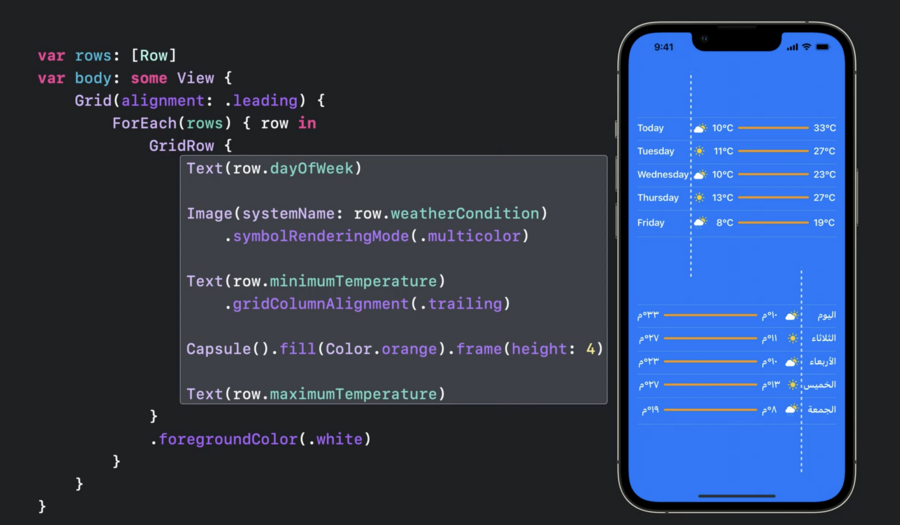
Adjust a column width in a table like list to the longest label
use
Gridview in SwiftUI to implement this
use two or more lines if needed, e.g. for German on watchOS
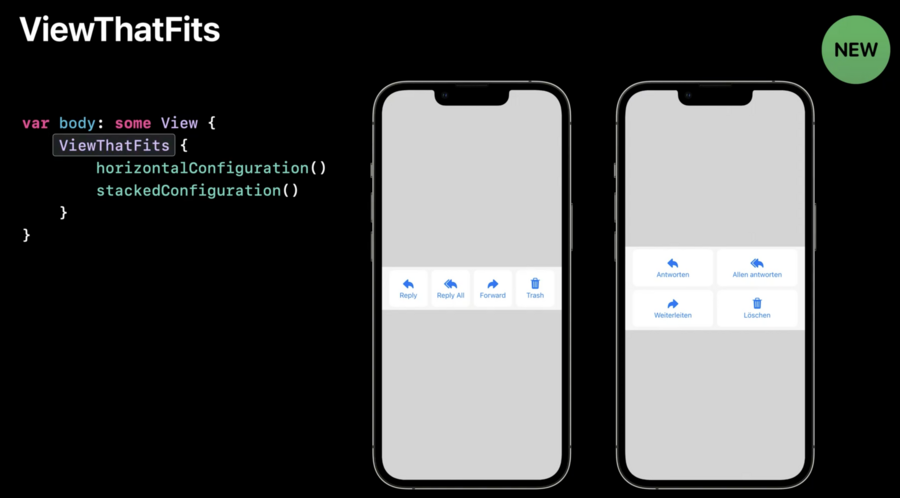
Sometimes a horizontal stack can be changed to a vertical to fit
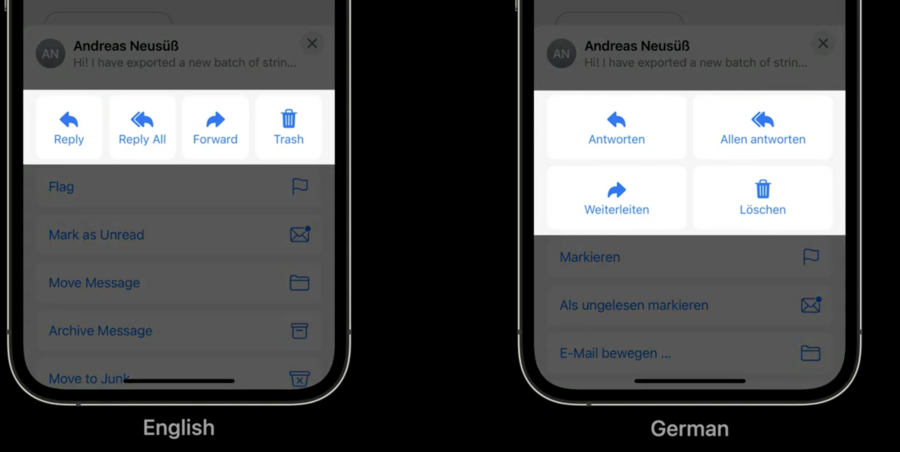
Possible with
ViewThatFitsin SwiftUI now