
Introduction
CarPlay apps
primarily intended for drivers
only target uses cases relevant while driving
omit complex and less common use cases (e.g., one time configuration, log in, terms and conditions)
CarPlay entitlement required
request the entitlement on the Apple CarPlay developer website
supported app types
navigation
audio
communication
EV charging
parking
quick food ordering
fueling 🆕
driving task 🆕
Templates
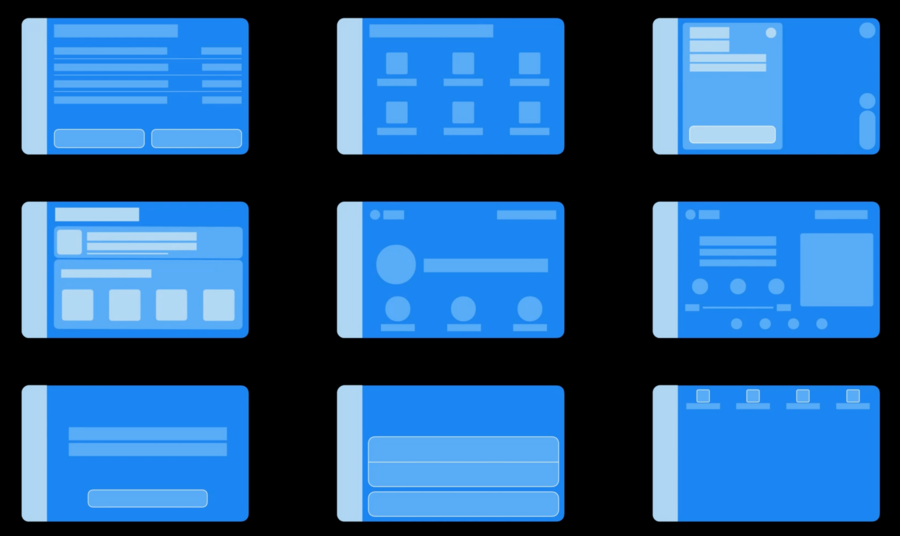
Templates are how apps in CarPlay present their UI
Your app supplies the data, and the system draws the UI onto the vehicle’s display on your behalf
no need to worry about font sizes, consistency, etc
makes your app works in all cars
Different templates are available to different app types:
| Audio | Communication | Driving task | EV charging | Fueling | Navigation | Parking | Quick food ordering | |
|---|---|---|---|---|---|---|---|---|
| Action Sheet | ✅ | ✅ | ✅ | ✅ | ✅ | ✅ | ✅ | |
| Alert | ✅ | ✅ | ✅ | ✅ | ✅ | ✅ | ✅ | ✅ |
| Grid | ✅ | ✅ | ✅ | ✅ | ✅ | ✅ | ✅ | ✅ |
| List | ✅ | ✅ | ✅ | ✅ | ✅ | ✅ | ✅ | ✅ |
| Tab bar | ✅ | ✅ | ✅ | ✅ | ✅ | ✅ | ✅ | ✅ |
| Information | ✅ | ✅ | ✅ | ✅ | ✅ | ✅ | ✅ | |
| Point of Interest | ✅ | ✅ | ✅ | ✅ | ✅ | |||
| Now Playing | ✅ | |||||||
| Contact | ✅ | ✅ | ||||||
| Map | ✅ | |||||||
| Search | ✅ | |||||||
| Voice control | ✅ |
What’s new
Fueling apps
similar to EV charging, but for fuel types
should be more than just finding locations
e.g., actions at the pump
Driving task apps
Enable a wide range of very simple tasks, targeting primarily the driver
These are tasks that actually help with the drive, not just a task to be done while you drive:
control car accessories
driving or road status and information
tasks to start or end of drives
Consider single-screen apps with minimal functionality
target tasks that can be completed in a few seconds
CarPlay Simulator
Ways to test your app:
Xcode Simulator
real iPhone in a real CarPlay car, or with aftermarket head unit
real iPhone with CarPlay Simulator 🆕
CarPlay Simulator:
standalone Mac app that replicates a CarPlay environment
Download it via Additional Tools for Xcode
Run your app, and connect your iPhone to your Mac with a cable
can debug on Xcode/Instruments
can test multiple card configurations (e.g. different display sizes)
Maps in instrument cluster
adding your map in instrument cluster is the same as adding yout map in CarPlay Dashboard (iOS 13+):
update Info.plist to declare support for Dashboard and implemented the required delegates
delegates notify your app when it is appearing and disappearing in Dashboard, and pass over a UIWindow to your app in which to draw your map content
In your Info.plist:
<key>UIApplicationSceneManifest</key>
<dict>
  <!-- Indicate support for CarPlay dashboard -->
  <key>CPSupportsDashboardNavigationScene</key>
  <true/>
  <!-- Indicate support for instrument cluster displays -->
  <key>CPSupportsInstrumentClusterNavigationScene</key>
  <true/>
  <!-- Indicate support for multiple scenes -->
  <key>UIApplicationSupportsMultipleScenes</key>
  <true/>
  <key>UISceneConfigurations</key>
  <dict>
    <!-- For device scenes -->
    <key>UIWindowSceneSessionRoleApplication</key>
    <array>
      <dict>
        <key>UISceneClassName</key>
        <string>UIWindowScene</string>
        <key>UISceneConfigurationName</key>
        <string>Phone</string>
        <key>UISceneDelegateClassName</key>
        <string>MyAppWindowSceneDelegate</string>
      </dict>
    </array>
    <!-- For the main CarPlay scene -->
    <key>CPTemplateApplicationSceneSessionRoleApplication</key>
    <array>
      <dict>
        <key>UISceneClassName</key>
        <string>CPTemplateApplicationScene</string>
        <key>UISceneConfigurationName</key>
        <string>CarPlay</string>
        <key>UISceneDelegateClassName</key>
        <string>MyAppCarPlaySceneDelegate</string>
      </dict>
    </array>
    <!-- For the CarPlay Dashboard scene -->
    <key>CPTemplateApplicationDashboardSceneSessionRoleApplication</key>
    <array>
      <dict>
        <key>UISceneClassName</key>
        <string>CPTemplateApplicationDashboardScene</string>
        <key>UISceneConfigurationName</key>
        <string>CarPlay-Dashboard</string>
        <key>UISceneDelegateClassName</key>
        <string>MyAppCarPlayDashboardSceneDelegate</string>
      </dict>
    </array>
    <!-- For the CarPlay instrument cluster scene -->
    <key>CPTemplateApplicationInstrumentClusterSceneSessionRoleApplication</key>
    <array>
      <dict>
        <key>UISceneClassName</key>
        <string>CPTemplateApplicationInstrumentClusterScene</string>
        <key>UISceneConfigurationName</key>
        <string>CarPlay-Instrument-Cluster</string>
        <key>UISceneDelegateClassName</key>
        <string>MyAppCarPlayInstrumentClusterSceneDelegate</string>
      </dict>
    </array>
  </dict>
</dict>
Delegate:
extension TemplateApplicationSceneDelegate: CPTemplateApplicationInstrumentClusterSceneDelegate {

  func templateApplicationInstrumentClusterScene(
    _ templateApplicationInstrumentClusterScene: CPTemplateApplicationInstrumentClusterScene,
    didConnect instrumentClusterController: CPInstrumentClusterController
  ) {
    // Connected to Instrument Cluster
    TemplateManager.shared.clusterController(instrumentClusterController, didConnectWith: templateApplicationInstrumentClusterScene.contentStyle)
  }

  // ...

  func instrumentClusterControllerDidConnect(_ instrumentClusterWindow: UIWindow) {
    // Window in which to draw instrument cluster contents
    self.instrumentClusterWindow = instrumentClusterWindow
  }
Considerations specific to the instrument cluster:
handle navigation-specific events via
CPInstrumentClusterControllerDelegatezoom in/out
show compass
show speed limit
your view may not be entirely visible
override
viewSafeAreaInsetsDidChangeuse
safeAreaLayoutGuide
