
Core concepts
When we start a build in Xcode, the build system gets invoked with a representation of your project (source files, assets, build settings, run destination)
the build system knows which tools to invoke using which settings and which intermediate files to produce to eventually create an app
the build system invokes the tools to process the project’s input files whose outputs can then processed by other tools recursively until we reach the final target of our build
e.g., the source files .swift, .h .c are fed to the Clang and the Swift compilers, which then produce relocatable objects .o as output, which can then be processed by Apple’s static linker
ld64, which in turn create a mach-o file or a .dylib, etcany step in our build process might fail, thus failing the entire build
build tasks/steps have a dependency based on what they consume and produce (their input and output), putting together all these dependencies creates a build system dependency graph
a build task can’t start until its input are ready, which means that it might need to wait for another task to produces said input first
tasks that get unblocked when another task finishes are called downstream
tasks that block other tasks are called upstream
in incremental builds, the build system is able to skip tasks for which inputs haven’t changed while the output is still up to date
the dependencies and duration of the task execution defines the first possible time a downstream task can start
it’s possible to calculate the critical path which is the shortest time the build needs to run with theoretical unlimited resources
your goal is to shorten this path to create a highly parallelizable and scalable build graph
Xcode Build Timeline
new feature in Xcode 14
shown when opening the assistant window in the build log
enhance the build log by visually showing you the tasks execution of your builds
in this chart:
the number of rows at given time represents the level of parallelism during that time
the horizontal length of individual tasks represent the duration they needed to finish their work
empty space in the graph shows where unfinished tasks blocked downstream tasks from starting to execute.
different colors applied to the timeline elements help distinguish the different targets that were part of the build
For incremental builds, the chart will only show executed tasks
Build phases
build phases describe the work that needs to be done to produce that target’s product
can contain a set of source code files and assets to compile, files that need to be copied like headers or resources, as well as libraries that should be linked or scripts that should be executed
build phases might describe tasks with inputs or outputs from other build phases, creating dependencies between them
the build system will consider the inputs and outputs of build phases to determine if they can run in parallel
Script phases
the build system runs consecutive script phases one at a time to avoid introducing a data race in the build process
If the scripts in a target are configured to run based on dependency analysis and specify their complete list of inputs and outputs, then the build setting
FUSE_BUILD_SCRIPT_PHASEScan be set toYESto indicate the build system should attempt to run them in parallelenable the build setting
ENABLE_USER_SCRIPT_SANDBOXINGto block shell scripts phases from accidentally accessing source files (PROJECT_DIR) and intermediate build objects, unless those are explicitly declared as an input or output for the phase
Cross-Target builds
Two new cross-target optimizations:
eager emission of modules
eager linking
Swift driver
building a Swift target’s source code into binary product’s is a complex operation that typically consists of many sub-tasks for build planning, compilation, and linking
coordination of these tasks is delegated to the Swift Driver
the Driver has specialized knowledge on when and how to construct the required compiler and linker invocations for the target’s source code
Eager emission of modules
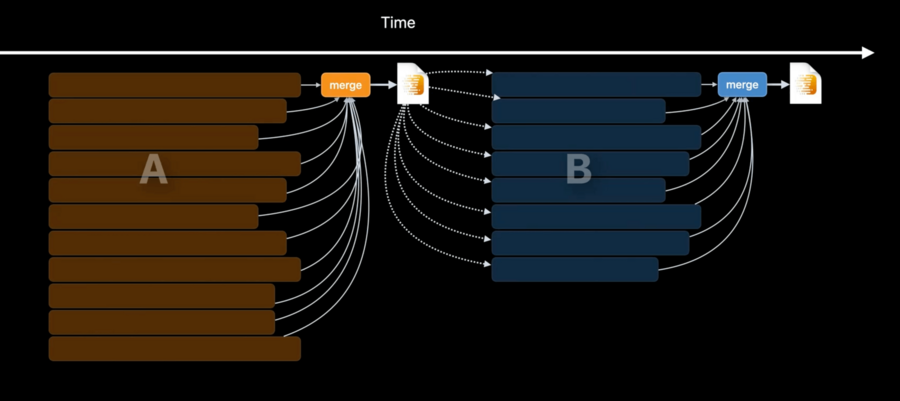
Swift modules/libraries that depend on other Swift modules/libraries need to wait for their dependency libraries tasks to emit a binary module file that captures the dependent’s public interface
Before Xcode 14, this meant:
waiting for all module source code to be compiled
assemble all the objects .o into a binary module file
Because the assembling of this binary module file was done in a single task, it meant that most machine cores were in idle during that phase (only one core is needed for the assembling)
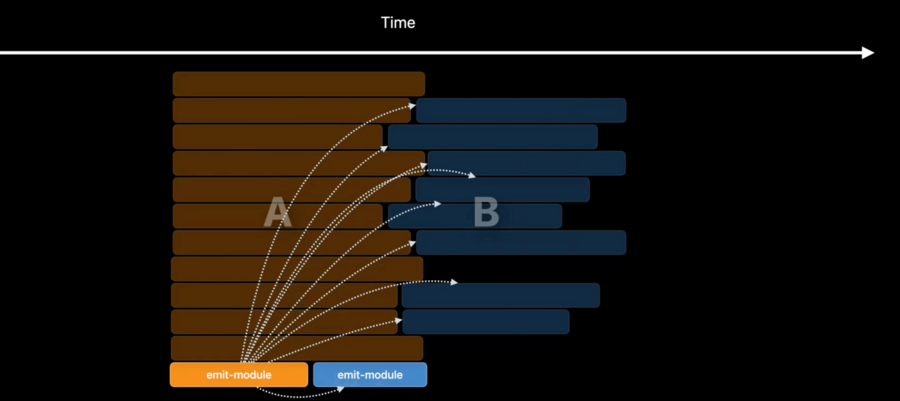
New in Xcode 14 and Swift 5.7 we have eager emission of modules:
the construction of a target’s module binary file is done in a separate emit-module task, directly from all program source files (no need to wait .o files)
This means target’s dependencies can begin compilation as soon as the emit-module task is complete without waiting for all of the other compiler tasks of the dependency target
| Before Xcode 14 and Swift 5.7 | after Xcode 14 and Swift 5.7 |
|---|---|
 |  |
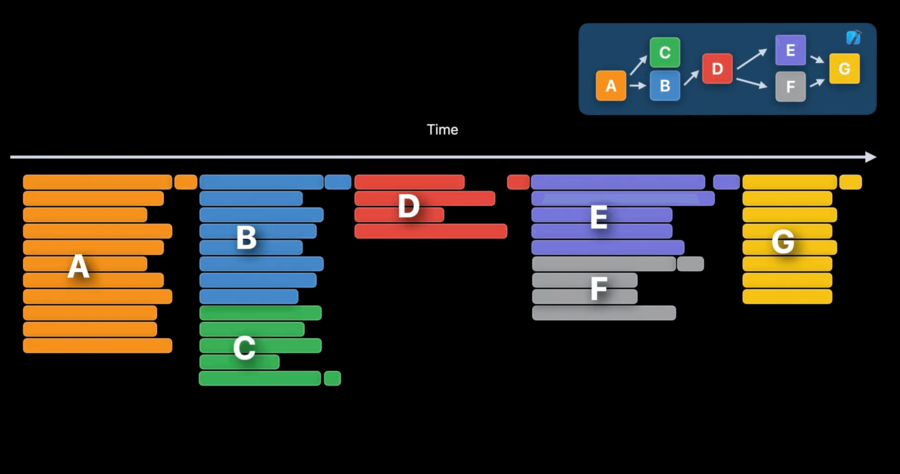
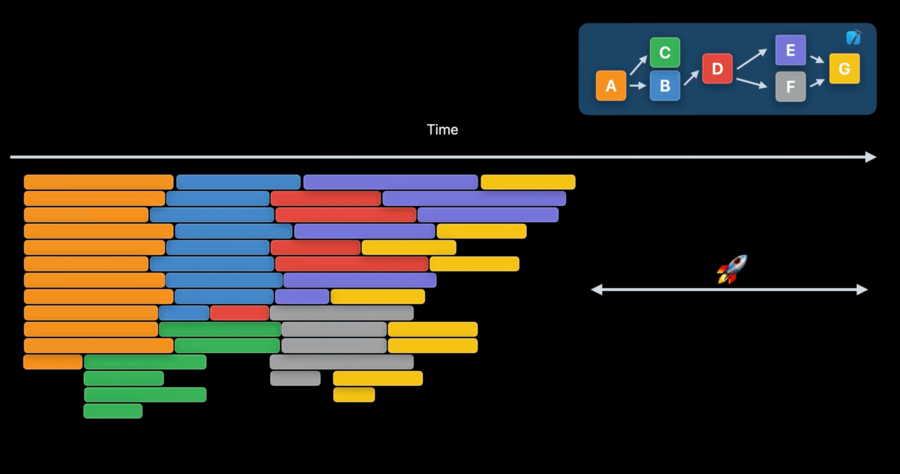
The gain becomes even more obvious if we look at a bigger project with more modules
| Before Xcode 14 and Swift 5.7 | after Xcode 14 and Swift 5.7 |
|---|---|
 |  |
Eager linking
Linking a dependent target requires the linked product of its dependencies in addition to the target’s own compilation outputs
from this year, linking the dependent target only needs to wait for the emit-task of its dependencies and its own source code compilation before starting
| Before Xcode 14 and Swift 5.7 | after Xcode 14 and Swift 5.7 |
|---|---|
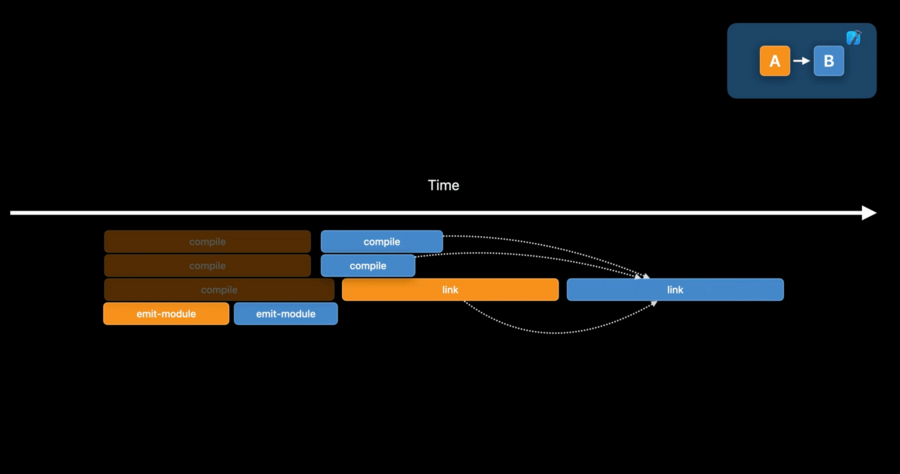 | 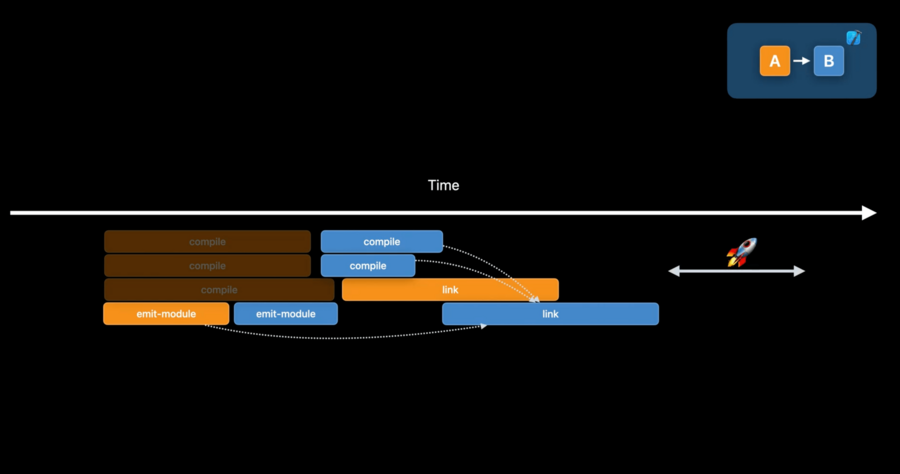 |
This is possible because, instead of depending on a linked product of the dependency, linking now depends on a text-based dynamic library stub produced earlier in the build process by the emit-module task
This stub contains a list of symbols which will appear in the linked product for use by dependents
To enable this:
enable Eager Linking build settings
target must be Swift-only and dynamically linked by their dependents to participate in the optimization
