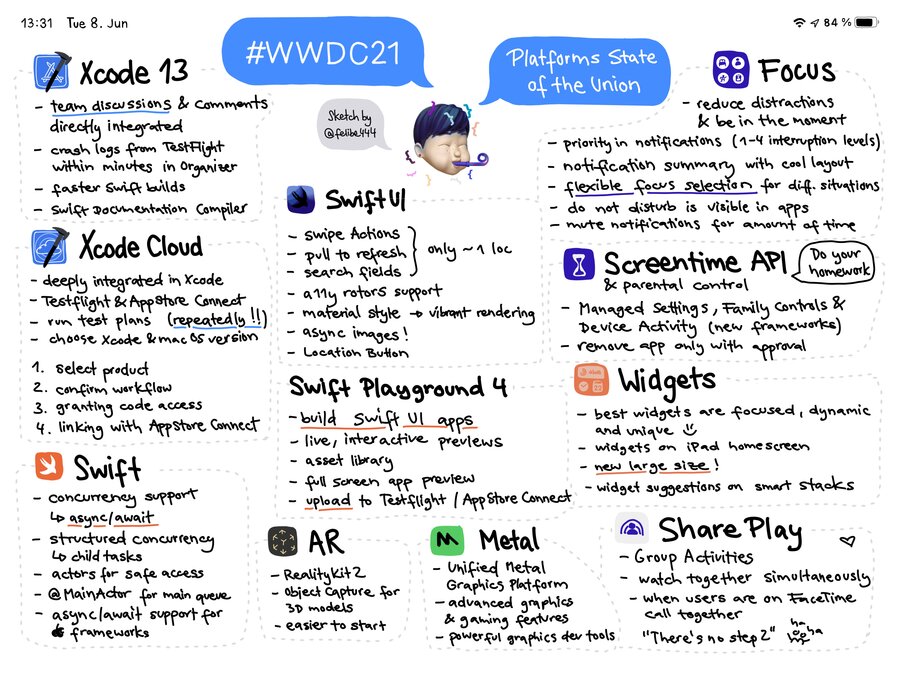
Xcode Cloud
CI/CD service built into Xcode and designed for Apple developers, runs on the cloud
Everything can be done within Xcode UI, no context switching.
Integrates with any git host provider (GitHub, GitLab, …)
Setup CI/CD in 1 minute
Configuration centralized in the cloud
Flexible and extensible
Each Xcode Cloud workflow configuration can be accessed through:
Xcode UI
App Store Connect web UI
App Store Connect public REST API (in JSON)
Automatically handles code signing, app distribution and other workflows
Review workflow results directly in Xcode
Can automatically trigger workflows via PR creation, tags, and more
We can choose environment’s Xcode version, simulators (or just use Xcode Cloud’s “recommended” ones), including targeting iOS beta releases (even when you’re using an earlier version of Xcode)
Helps testing more thoroughly on all platforms and in parallel
Can notify back once the flow has finished (E.g. on slack)
Can run scripts
Pricing:
Free limited beta (sign up here)
More on pricing/availability this fall
Code signing in the Cloud
No more keeping and update certification and provisioning profile in your machine
More insight of test flight beta testers
Crash logs from test flight testers is automatically delivered in Xcode Organizer within minutes, can contact the tester directly from Organizer crash logs.
Embedded Xcode GitFlow
Xcode has a new Source Control Changes tab, for better git integration:
Shows all branches
Shows all PRs
PR comments Integration directly in Xcode
Full overview of activities and conversations going on on each
Live status on all workflows
Shows comments in line in the code editor
In-line comparison and side-by side
Xcode Testing enhancements
When running UI tests, we can now see all screenshots in a gallery-like mode instead of having to click through each test step ourselves.
To enable it, go Editor results menu > Gallery View (instead of the default list view)
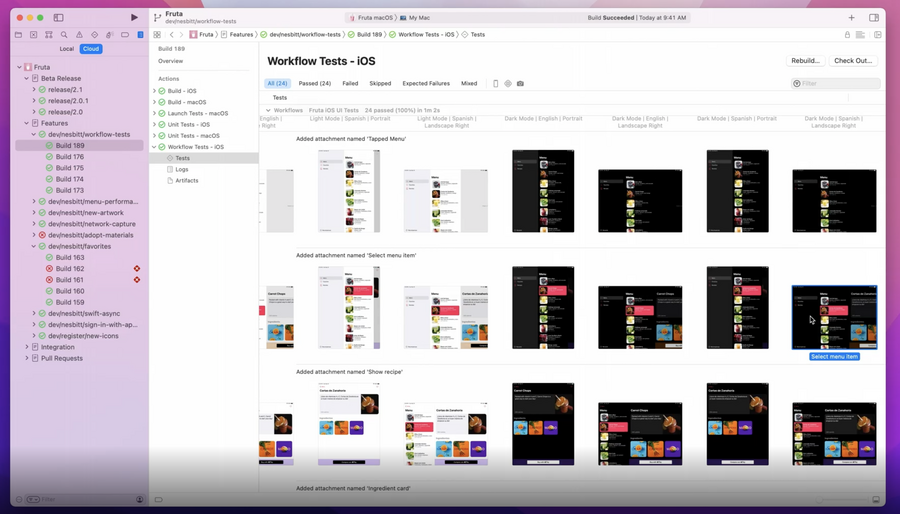
Run test repeatedly:
We can run a single test multiple times automatically, this is great to check when a test is unreliable
New
XCTExpectFailureAPI. This command declares a test is unreliable: the test suite will pass even when this specific test fails, in the results there will be a reminder about this test failing.
New Xcode 13 features highlights
Memory Tracking in XCTest
watchOS Digital Crown Interaction Tests
Smarter Swift Code Completion
iPadOS Cursor Interaction Tests
VIM Key Bindings
Streamlined Project Navigator
Faster Swift Builds
Swift Documentation Compiler
Improved Swift Syntax Coloring
Project Content for Swift Playgrounds
Simplified Project Templates
Mac Scroll Performance Testing
Swift Package Manager Index
Columnar Breakpoints
SwiftUl Preview Rotations
Layered Symbols
Swift concurrency
Swift first class support for concurrency
The async-await pattern replaces previous completion handlers pattern, we go from:
func prepareForShow(completion: @escaping (Result<Scene, Error>) -> Void) {
  danceCompany.warmUp(duration: .minutes (45)) { result in
    switch result {
      case .success (let dancers):
        self.crew.fetchStageScenery { scenery in
          self.setStage(with: scenery) { openingScene in
            dancers.moveToPosition(in: openingScene) { result in
              completion(result)
            }
          }
        }
      case .failure(let error):
        completion(.failure (error))
    }
  }
}
to:
func prepareForShow() async throws -> Scene {
  let dancers = try await danceCompany.warmUp (duration: .minutes (45))
  let scenery = await crew.fetchStageScenery()
  let openingScene = setStage(with: scenery)
  return try await dancers.moveToPosition (in: openingScene)
}
All iOS SDKs automatically adopt async-await.
Structured Concurrency
Concurrent child tasks
Async let to create child tasks that run in parallel with the parent
In the previous example scenery had to wait for let dancers = ... to finish first, however it doesn’t have to:
func prepareForShow() async throws -> Scene {
  async let dancers = danceCompany.warmUp(duration: .minutes (45))
  async let scenery = crew.fetchStageScenery()
  let openingScene = setStage(with: await scenery)
  return try await dancers. moveToPosition(in: openingScene)
}
Actors
Objects that protect their own state by providing mutual exclusive access to it
Compiler will assures that async stuff is safely accessed
Automatically avoid race conditions
No need manually sync operations within actors
We go from:
class StageManager {
  var stage: Stage
  let queue = DispatchQueue(label: "stage")

  func setStage(with scenery: Scenery, completion: @escaping (Scene) -> Void) {
    queue.async {
      self.stage.backdrop = scenery.backdrop
      for prop in scenery.props {
        self.stage.addProp(prop)
      }
      completion(self.stage. currentScene)
    }
  }
}
to:
actor StageManager {
  var stage: Stage

  func setStage(with scenery: Scenery) -> Scene {
    stage.backdrop = scenery.backdrop
    for prop in scenery.props {
      stage.addProp(prop)
    }
    return stage.currentScene
  }
}
Actors are defined via the
actorkeyword (see above)they’re first-class constructs
no need manual sync
internally actors can access their states no problem, externally we use
await:
let scene = await stateManager.setStage(with scenery)use the
@MainActorattribute to assures a certain function is always run in the main thread (no need for dispatch)
@MainActor
func display(scene: Scene)
SwiftUI
A lot more stock apps are now implemented in SwiftUI (e.g. Weather.app)
More system components use SwiftUI as well (e.g. Apple pay sheet).
New api for
Lists:.swipeActions.refreshablefor pull to refresh.searchablefor adding search field, supports search suggestions
#if elseconditional statement in Swiftui
More new SwiftUI features:
Menu Primary Actions
Control Groups
Async Images
Symbol Variants
Bordered Buttons
Export
Sensitive Content Redaction
Sectioned Fetch Request
Custom Drag Previews
Disable Interactive Dismissal
Canvas
Confirmation Dialog
Inset View Layout
Async Task Management
Timeline
Detail Scenes
Accessibility Focus
Automatic Inflection
Location Button
Control Tinting
Return Key Styles
AttributedString in Text
Button Roles
Toggle Buttons
watchOS Indexed Paging
Borderless Controls
Badges Text
Field Labels
Markdown
Keyboard Accessories
Service Import
Swift Playground 4
Available later this year
Build and submit apps to App Store from Swift Playgrounds
New app project format based on Swift package
Print statements displayed on Swift Playgrounds (message bubble and console)
ARKit
RealityKit 2
Object Capture: creating 3D models in minutes via iPhone capture
PhotogrammetrySessionAPIOutputs USDZ files
Many new effects for like smoke and fire
Metal
Unified Metal graphics platform across all Apple hardware/platforms
More realistic with Dynamic Libraries and Retracing API
Stochastic motion blur
Adaptive sync display
Variable refresh rate displays
Adapt app frame rate
Adapt sync display on mac
Game Control support
Xboc series and PS5 suport
new on screen virtual game controller
Selective Shader Debugger
Texture Converter Tool
Metal Debugger Timeline View
Focus
A more customizable do not disturb
A user can have multiple different types of focus modes, each with its own configuration
3rd party apps can integrate with user focus in their app
synchronizes across all platforms
Notifications
New interruption levels API:
Passive - people will see them when they pick up their phone
Active - standard (sound + haptic)
Time sensitive - will be promptly highlighted, stay on top of screen longer, announced by Siri with AirPods
Communication with people: notifications from people are personalized with the sender Avatar
Notification Summary - personalized summary of all notifications
Screen Time API
Three new frameworks:
Managed Settings
Parent Control
Device activity
Managed Settings
your app can set a number of restrictions in the following areas:
Account (e.g. is user authorized to change password?)
Cellular
Game Center
Media
App Store (e.g. can user download new apps?)
Web Content (e.g. filter web traffic)
Application (e.g. is user authorized to use this app?)
Passcode (e.g. is the user authorized change the passcode?)
Shows a restriction page (similar to screen time) with your custom actions and UI
Widget
Widgets can be put on iPad home screen
New Extra Large (nee, wide!) Widget for iPad
Smart stacks can now also suggest new widgets
Share Play API
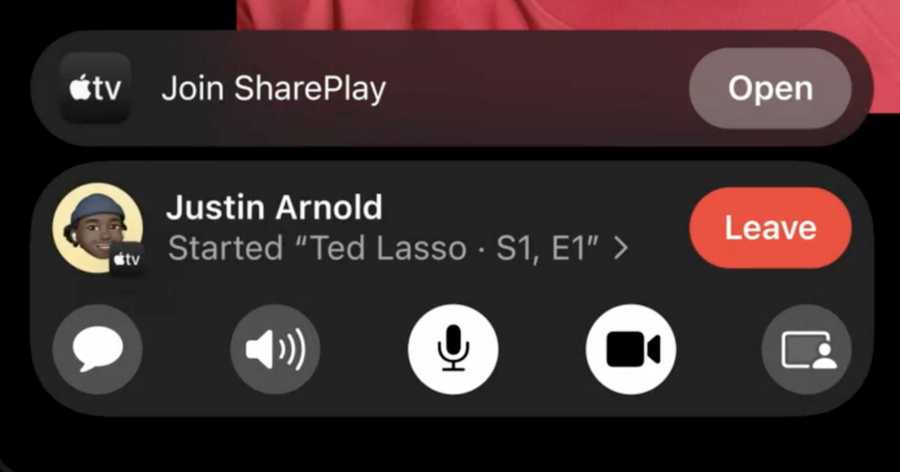
Used to do some app activity together on a phone during a video call
New GroupActivities framework
It syncs the activity of an app among all people apps in the call: if one person stops a video, it will stop for everybody at the same timestamp. Everyone can do something and the same action will be applied on others devices