
new in iOS 15: Businesses app clips will show up in Spotlight
App Clip card in Safari
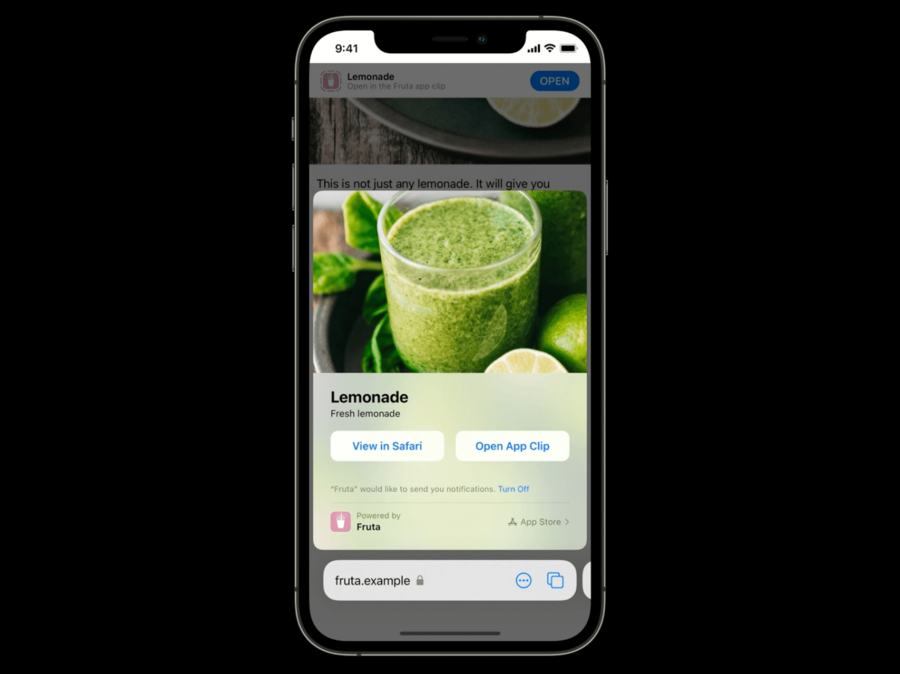
in iOS 14, we could use the
apple-itunes-appmeta tag to display the smart app banner in Safari or Safari View Controllernew in iOS 15 we can configure the meta tag to show a full-sized App Clip Card
if the user chooses
View in Safari, Safari will remember the choice and not show the card next time the page is loaded againadd
app-clip-display=cardin your meta tag:
<head>
<meta name="apple-itunes-app"
      content="app-clip-bundle-id-com.example.fruta.Clip, app-id-123456789, app-clip-display=card">
</head>
works from another app’s Safari View Controller too
Test with local experiences
you can test the whole app clip experience
you can launch it with most of regular App Clip invocation methods.
to create one local experience, go to
Developer Settings > Local ExperiencesLocal experiences support QR, NFC, App Clip Code, Safari, and Messages
They don’t show up in Maps, location suggestions, and Spotlight search
you can only specify local experiences for Xcode-installed App Clips or App Clips in Beta testing
App Clip Code
Apple-designed visual code
available from iOS 14.3
an App Clip code always leads to an App Clip
each code encodes an unique URL
two types: NFC-integrated or Scan-only
can be used as an AR anchor
you can create a code via App Store Connect or via the App Clip Code Generator cli tool
See all available templates at
/Library/Developer/AppClipCodeGenerator/SampleTemplatesgenerator command example:
$ AppClipCodeGenerator generate --type nfc --url https://fruta.example --index 4 --output fruta.svg`Best practices
keep the code on a flat surface
the code should be placed at upright position (no sideways etc)
make the code at least one-inch wide
ensure good visibility: the code shouldn’t be blocked, damaged, or placed too close to other codes
