Key Terms
Photogrammetry: computer vision technique (Wikipedia definition)
Object Capture: Photogrammetry API provided by Apple to build apps which take a collection of images and create an AR model object.
Object Capture Overview
Prior to API, we would need to hire a professional photographer to spend hours modeling it.
With Object Capture:
Take photos of object from every angle.
Copy to Mac that supports Object Capture API.
Create a 3D geometric mesh as well as various material maps (Photogrammetry)
Capturing Photos
Pick an object that has sufficient texture detail (avoid transparency or highly reflective regions)
Ensure the object is in focus, capture from all angles, get close to the object, 20-200 images
Optionally, use CaptureSample App – demonstrates how to capture photos.
iPhone or iPad (stereo depth data to allow for recovery of actual object size), but you can also use DSLR or even a drone.
API Details
Swift API in RealityKit (macOS)
Silicon Macs or Intel Macs with 4GB AMD and 16GB RAM
HellloPhotogrammetry: command-line sample app provided by Apple to accept collection of images and turn them into an AR model
USDZ, USDA, or OBJ exports
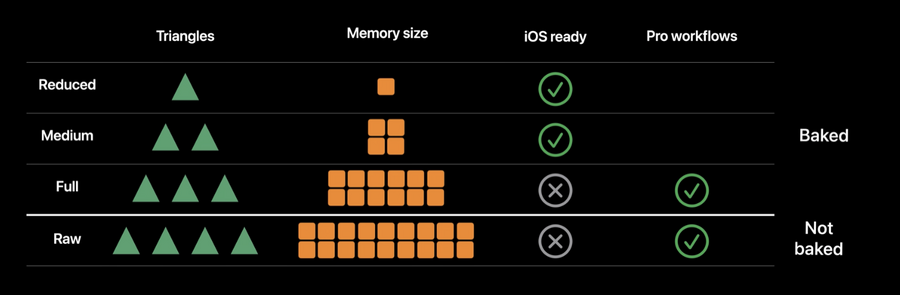
Detail: preview, reduced, medium, full, raw
Getting Started
Basic Workflow
Create session – a fixed container (folder) of image samples (HEIC, JPG, PNG)
Connect output stream
Generate models
Creating a Session
import RealityKit

let inputFolderUrl = URL(fileURLWithPath: "/tmp/Sneakers/", isDirectory: true)
let session = try! PhotogrammetrySession(input: inputFolderUrl,
configuration: PhotogrammetrySession.Configuration())
Connect Output Stream
async {
    do {
        for try await output in session.outputs {
            switch output {
            case .requestProgress(let request, let fraction):
                print("Request progress: (fraction)")
            case .requestComplete(let request, let result):
                if case .modelFile(let url) = result {
                    print("Request result output at (url).")
                }
            case .requestError(let request, let error):
                print("Error: (request) error=(error)")
            case .processingComplete:
                print("Completed!")
                handleComplete()
            default:  // Or handle other messages...
                break
            }
        }
    } catch {
        print("Fatal session error! (error)")
    }
}
Output messages • requestProgress progress of request • requestComplete with model or bounds • requestError for errors • processingComplete when all requests have finished processing.
Generating a Request
try! session.process(requests: [
    .modelFile("/tmp/Outputs/model-reduced.usdz", detail: .reduced),
    .modelFile("/tmp/Outputs/model-medium.usdz", detail: .medium)
])
Interactive Workflow
More advanced (for interactive editing)
Designed to allow several adjustments to preview model
Watch ~17:00 for demo of sample app built by Apple
Best Practices: Selecting the Right Output