
New databaseScope:
.sharedNew APIs for sharing objects and accepting invitations
Record Zone Sharing
Allows cloud encryption
What is “sharing?”
The presenter shows the process of creating a shared album. Then uses a demo project to demonstrate how to share a newly created post to others through email.
How do we share?
“Sharing” is by far the most complicated feature built in NSPersistentCloudKitContainer.
Data is stored in different stores. Using a single managedObjectContext, an application can manage objects in both stores.
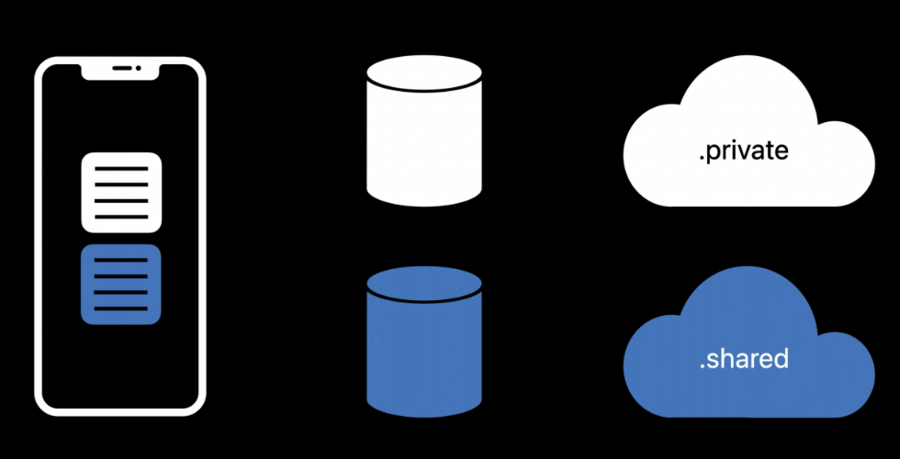
To do this, we have to tell NSPersistentCloudKitContainer to mirror the shared CloudKit database to a new persistence store:
add a new description by copying the private store description with a different URL
set the databaseScope to
.shared(This is new in iOS 15)
let containerIdentifier = //...
let sharedStoreDescription = privateStoreDescription.copy()
let sharedStoreURL = storesURL.appendingPathComponent("shared.sqlite")
sharedStoreDescription.url = sharedStoreURL

let sharedStoreOptions = NSPersistentCloudKitContainerOptions(containerIdentifier: containerIdentifier)

sharedStoreOptions.databaseScope = .shared // new in iOS 15
sharedStoreDescription.cloudKitContainerOptions = sharedStoreOptions
container.persistentStoreDescriptions.append(sharedStoreDescription)
And then we can adopt a new method on NSPersistentCloudKitContainer to create the share:
open func share(_ managedObjects: [NSManagedObject],
                to share: CKShare?,
                completion completion: @escaping (Set<NSManagedObjectID>?,
                                                  CKShare?,
                                                  CKContainer?,
                                                  Error?) -> Void)
This is how the demo uses it:
// DetailViewController+Sharing.swift
@IBAction func shareNoteAction(_ sender: Any) {
  let container = AppDelegate.sharedAppDelegate.coreDataStack.persistentContainer
  let cloudSharingController = UICloudSharingController {
    (controller, completion: @escaping (CKShare?, CKContainer?, Error?) -> Void) in
    // HERE!
    container.share([self.post!],
                    to: nil) { objectIDs, share, container, error in
            completion(share, container, error)
        }
  }
  cloudSharingController.delegate = self

  if let popover = cloudSharingController.popoverPresentationController {
    popover.barButtonItem = barButtonItem
  }
  present(cloudSharingController, animated: true) {}
}
The new method is invoked in the create-share phase of a UICloudSharingController’s workflow.
Last thing is to be able to accept invitation by using another new method:
open func  acceptShareInvitations(fromMetadata metadata: [CKShare.Metadata],
                                  into persistentStore: NSPersistentStore,
                                  completion: (([CKShare.Metadata]?, Error?) -> Void)? = nil)
It is used in the AppDelegate:
func application(_ application: UIApplication,
                 userDidAcceptCloudKitShare cloudKitShareMetadata: CKShare.Metadata) {
    let sharedStore = AppDelegate.sharedAppDelegate.coreDataStack.sharedPersistentStore
    let container = AppDelegate.sharedAppDelegate.coreDataStack.persistentContainer
    container.acceptShareInvitations(from: [cloudKitShareMetadata],
                                     into: sharedStore,
                                     completion: nil)
}
After we accept the share invitations, the NSPersistentCloudKitContainer will automatically save all of the shared objects to the local store.
For further clarification, there are some crucial concepts to be identified.
Owners and participants
Owners create and share objects
Participants operate on shared objects
Shared objects
NSManagedObject is turned into CKRecord
NSPersistentCloudKitContainer uses Record Zone Sharing to share objects
Record Zone Sharing
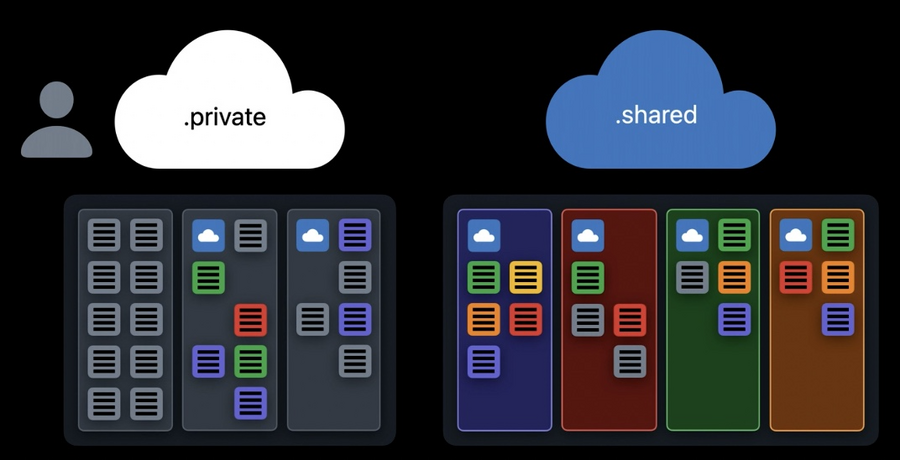
NSPersistentCloudKitContainer will create zones we owned, whether or not they are shared, in the private database. For shared zones, NSPersistentCloudKitContainer will also create a CKShare record to control who can access these zones. Other paticipants, if allowed, can add and modify records in these shared zones.
In the shared database, we would see shared zone that other users have shared with us. And if we are allowed to, we can add and modify records in these zones just as they can in the zones we owned.
Most of the time, NSPersistentCloudKitContainer can infer where records belong. But we can also tell it to store objects in a specific zone:
// DetailViewController+Sharing.swift
@IBAction func shareNoteAction(_ sender: Any) {
  let container = AppDelegate.sharedAppDelegate.coreDataStack.persistentContainer
  let cloudSharingController = UICloudSharingController {
    (controller, completion: @escaping (CKShare?, CKContainer?, Error?) -> Void) in
    // HERE! Using an existing share
    container.share([self.post!],
                    to: self.share) { objectIDs, share, container, error in
            completion(share, container, error)
        }
  }
  cloudSharingController.delegate = self

  if let popover = cloudSharingController.popoverPresentationController {
    popover.barButtonItem = barButtonItem
  }
  present(cloudSharingController, animated: true) {}
}
Applications change with sharing
Decorate shared objects
Conditionalize editing
Display participants
We can get the CKShare for a specific shared object with the new API:
// Fetch Shares to access metadata
open func fetchShares(matching objectIDs: [NSManagedObjectID]
                      throws -> [NSManagedObjectID: CKShare])

// Conditionalize Editing
open func canUpdateRecord(forManagedObjectWith objectID: NSManagedObjectID) -> Bool
open func canDeleteRecord(forManagedObjectWith objectID: NSManagedObjectID) -> Bool
open func canModifyManagedObjects(in store: NSPersistentStore) -> Bool
While in the demo, there is a protocol SharingProvider built to accomplish these customizations:
protocol SharingProvider {
  func isShared(object: NSManagedObject) -> Bool
  func isShared(objectID: NSManagedObjectID) -> Bool
  func participants(for object: NSManagedObject) -> [RenderableShareParticipant]
  func shares(matching objectIDs: [NSManagedObjectID]) throws -> [NSManagedObjectID: RenderableShare]
  func canEdit(object: NSManagedObject) -> Bool
  func canDelete(object: NSManagedObject) -> Bool
}
Check out
BlockBasedShareProviderif you are interesting in testing.
Sensitive data
New
CKRecord.encryptedValuespayloadEncryption using the user’s keychain
One click adoption in Core Data
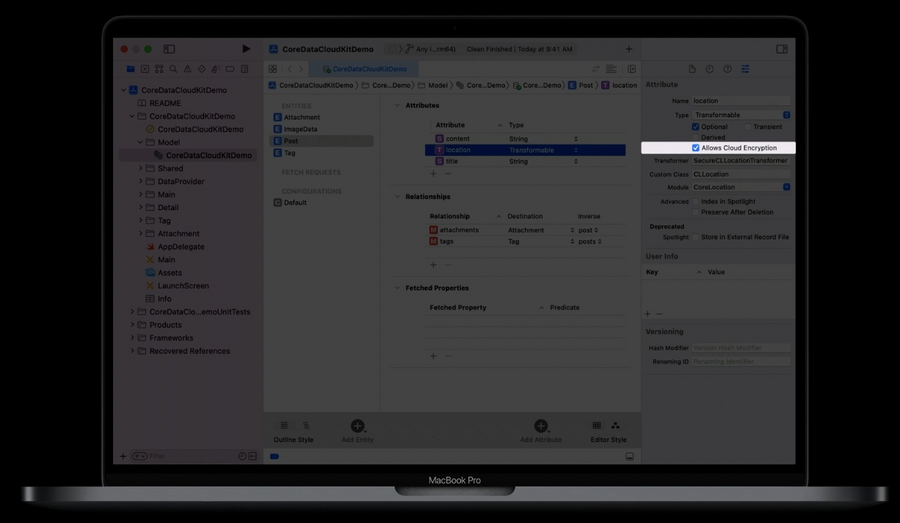
Or if you prefer to do it in code:
open class NSAttributeDescription: NSPropertyDescription {
    @available(iOS 15.0, *)
    open var allowsCloudEncryption: Bool
}
A note about encrypted values
CKRecord field types can only be set once
Once the schema is pushed to production it is forever
Remember to use initializeSchema
